24
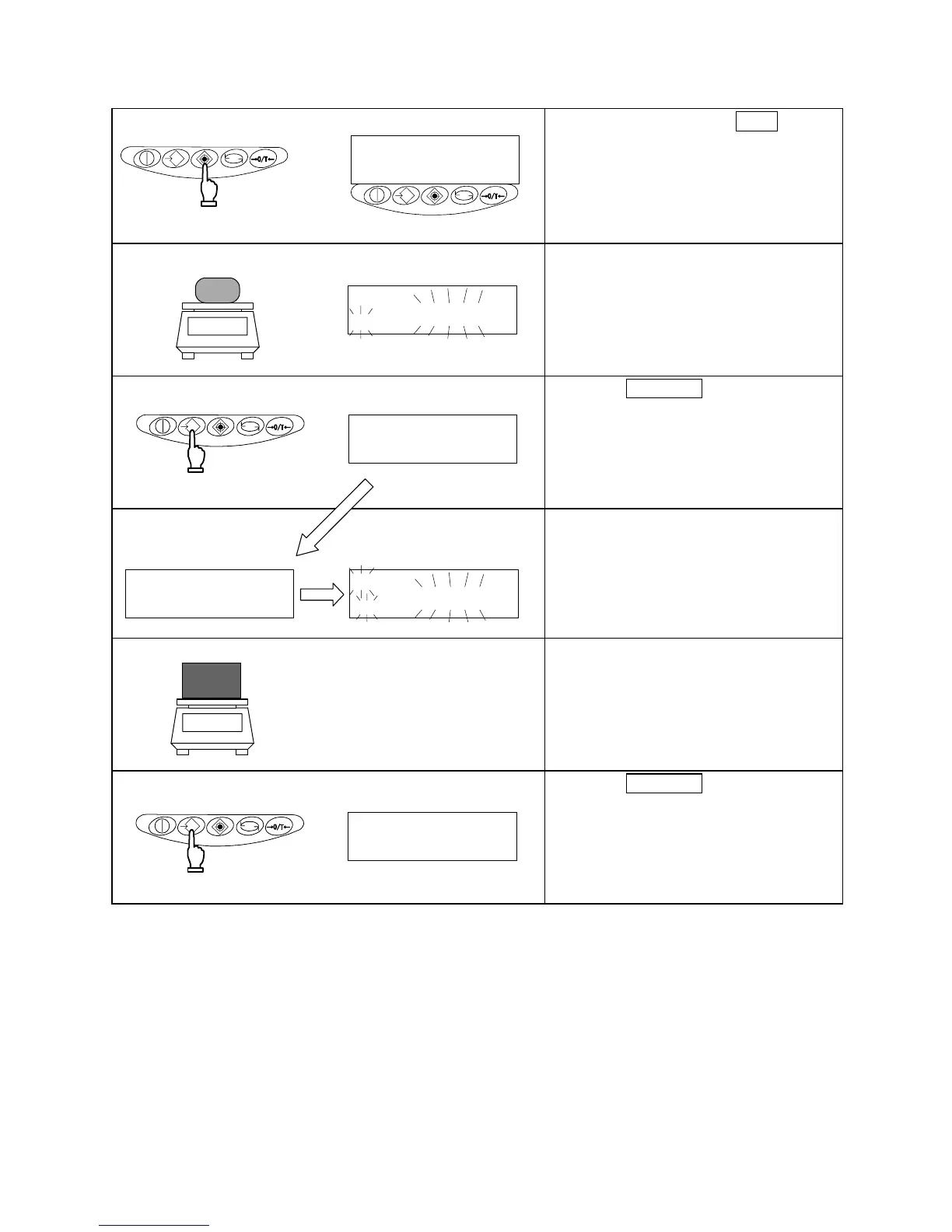
8.2 Setup of Limit Values by Actual Quantity Loads
1 Starting the limit function
長押
し
指を
離す
Continuous pressing
Key released
Press and hold down the Set key.
Release the key when [
] is
displayed.
The currently set lower-limit value
flashes.
2 Loading the sample for the lower-limit value
Load the sample of the lower-limit value
on the measurement pan.
3 Saving the lower-limit value
Press the Memory key.
After the lower-limit value has been
saved, the balance displays it briefly
and proceeds to the following setup.
※If One-point setup was chosen, the
setup is complete.
4 The upper-limit value
setup
The display now changes to
[
], indicating that the
upper-limit value can be set.
The currently set upper-limit value
flashes.
5 Loading the sample of the upper-limit value
Load the sample of the upper-limit value
on the measurement pan.
6 Saving the upper-limit value
Press the Memory key.
After saving the upper-limit value, the
balance displays it briefly and
terminates the setup.
M
g
M
g
M
g
M
g



 To Next Page