19617-001 Rev. H DiagnosticPRO Edge User’s Guide 9
About films
The DiagnosticPRO Edge handles standard radiograph films up to 14" x 17" (35.5cm x
43cm). Longer films can be digitized, however this is dependent on the software, and
films longer than 17" must be fed manually and supported during digitization.
With multi-film DiagnosticPRO Edges, you can feed multiple films (up to 25), and you
can mix film sizes ranging from 7" x 8" (17.8cm x 20.32cm) to 14" x 17" (35.5cm x
43cm) in one stack—as long as you follow the rules below.
IMPORTANT: Remove stickers, tape, staples, paper clips, etc.
from films before scanning. These may cause serious film
feeding problems. Failure to remove extraneous items from
films will void your warranty.
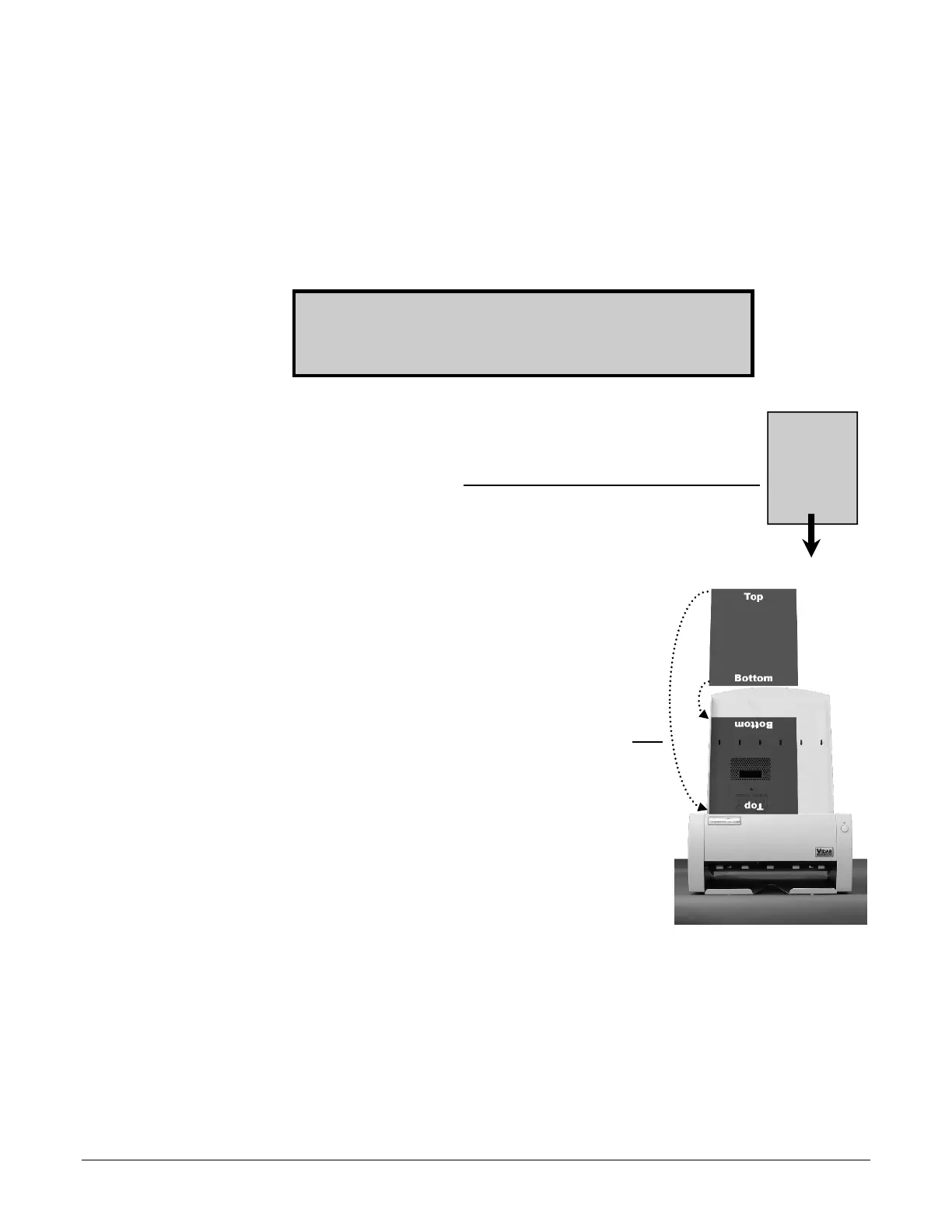
Load films just as you would view them on a light box, with
these qualifications:
Films 8" x 10" (20.5cm x 24.5cm) or larger should be fed in portrait
orientation, as shown here.
Films smaller than 7" x 8" (17.8cm x 20.32cm) must be fed
one at a time.
Proper orientation of the film during loading depends
on the scanning application program you are using.
Some scanning programs rotate images 180° for
display. If images appear upside down, you may be
able to set the default orientation in the scanning
application. If this option isn’t available, then insert
films into the digitizer upside down, as shown here.


 To Next Page