Boiler Connections
23
Connections (continued)
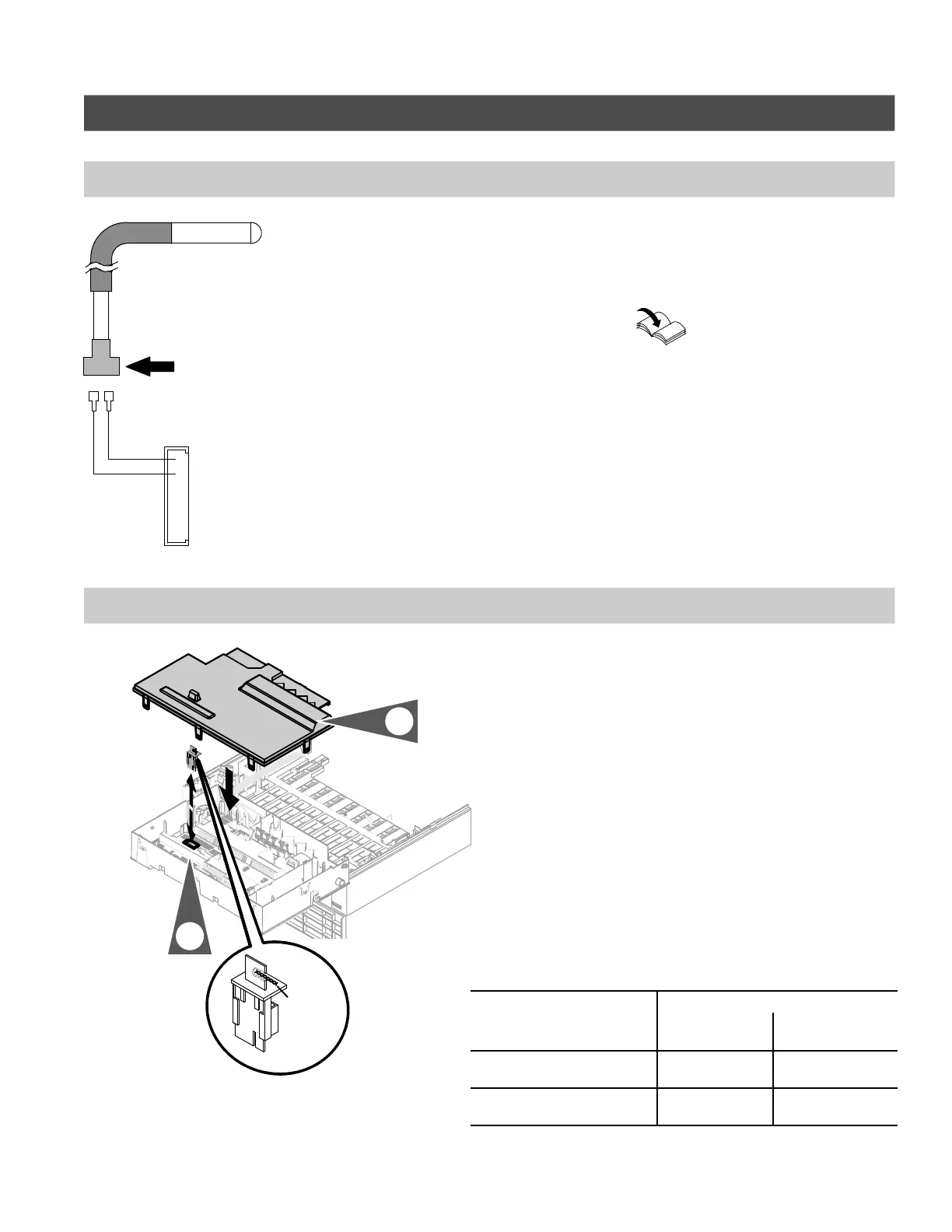
Connecting DHW sensor
1.Attach the DHW sensor to the quick
connect plugs provided from the
boiler control board (see page 22).
Install DHW tank temperature
sensor as described in the
Vitocell Installation
Instructions supplied with the
DHW storage tank.
High altitudes setting
In the factory default setting, the boiler
is equipped to operate in altitudes of up
to 5,000 ft. / 1,500 m. For operation
in higher altitudes, the existing coding
card must be replaced with a higher
altitude coding card. See table 2 or the
Viessmann Price List for order
information.
1.Pull out the existing coding card,
cut and remove it from the cable tie.
Insert the high altitude coding card
into the boiler control board.
2.Install cover.
Table 2. Altitude coding cards
Coding card Order Number
0-5,000 ft. /
0-1,500 m
5,000-10,000 ft. /
1,500 - 3,000 m
WB2B 45 (7374866....) 7832 267 *1 or
7833 227 *1
7425 956 or
7424 905
WB2B 60 (7374867....) 7832 268 *1 or
7833 229 *1
7425 957 or
7424 906
*1 Factory Installed
5418 909 v1.6
Field Connection
X9 Connector
(boiler control board)
Fig. 18
Coding
card
number
Fig. 19
1.
2.





 To Next Page