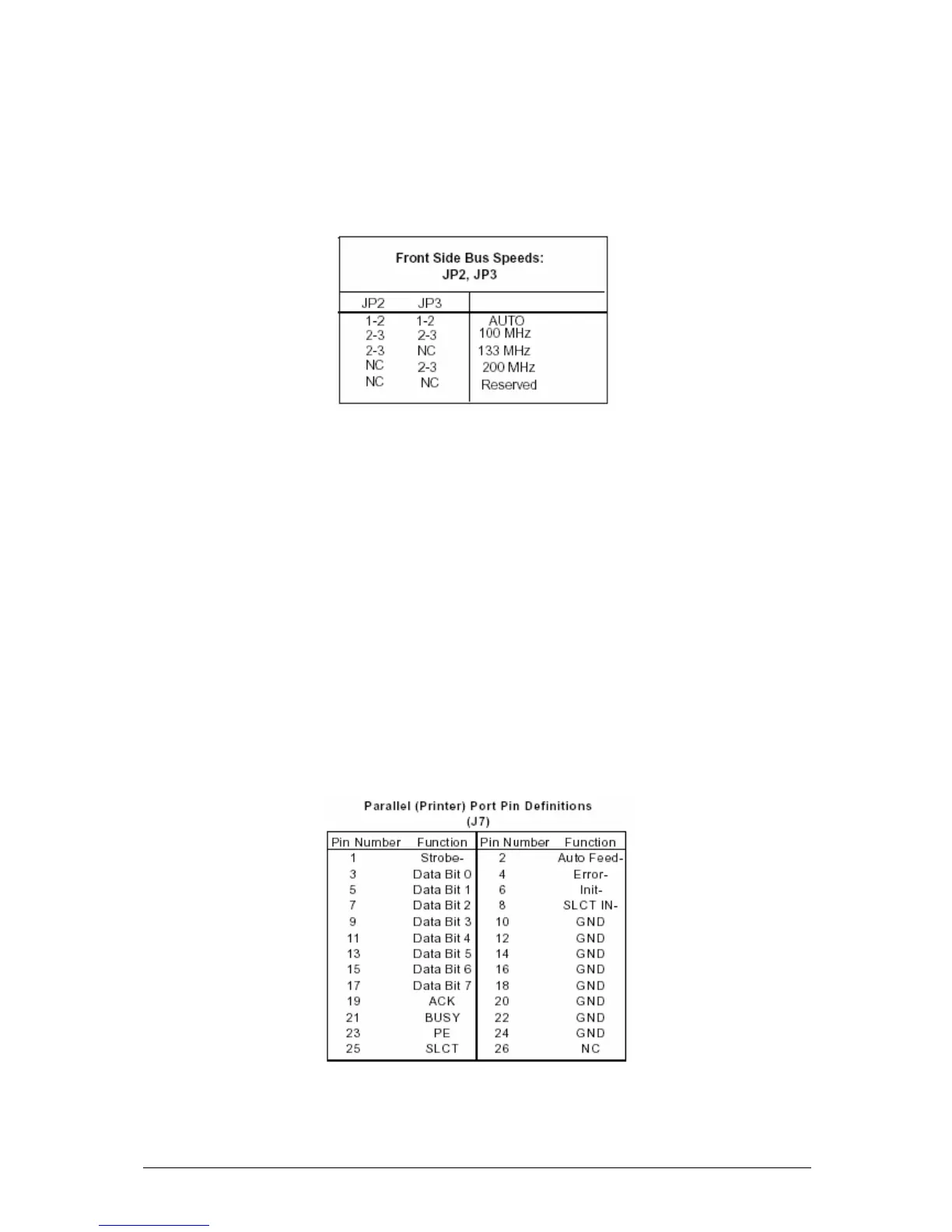
System Bus Speed
JP2 & JP3 allows you to select Auto, or Manual speed for your system (front side)
bus speed. The recommended Auto setting will automatically determine the system
bus speed of your processor(s). See the table below for jumper settings.
“Auto” is the recommended setting.
Parallel Port, Floppy and Hard Disk Drive
Note the following when connecting the floppy and hard disk drive cables:
? The floppy disk drive cable has seven twisted wires.
? A red mark on a wire typically designates the location of pin 1.
? Single floppy disk drive ribbon cable has 34 wires and two connectors to provide
for two floppy disk drives. The connector with twisted wires always connects to
drive A, and the connector that does not have twisted wires always connects to
drive B.
Parallel (Printer) Port Connector
The parallel (printer) port is located on ss. See the table below for pin definitions.



 To Next Page