The CPL (Circular Polarizing Lens) can be used to reduce reflections
and glare from the window glass and road surfaces that can
otherwise damage image quality, this works in the same way as
polarized sunglasses, getting more saturated and beautiful video.
When installing the CPL, you need to align the
white mark on the CPL with the corresponding
mark on the camera.
Install CPL
17 18
Install Optional Accessories
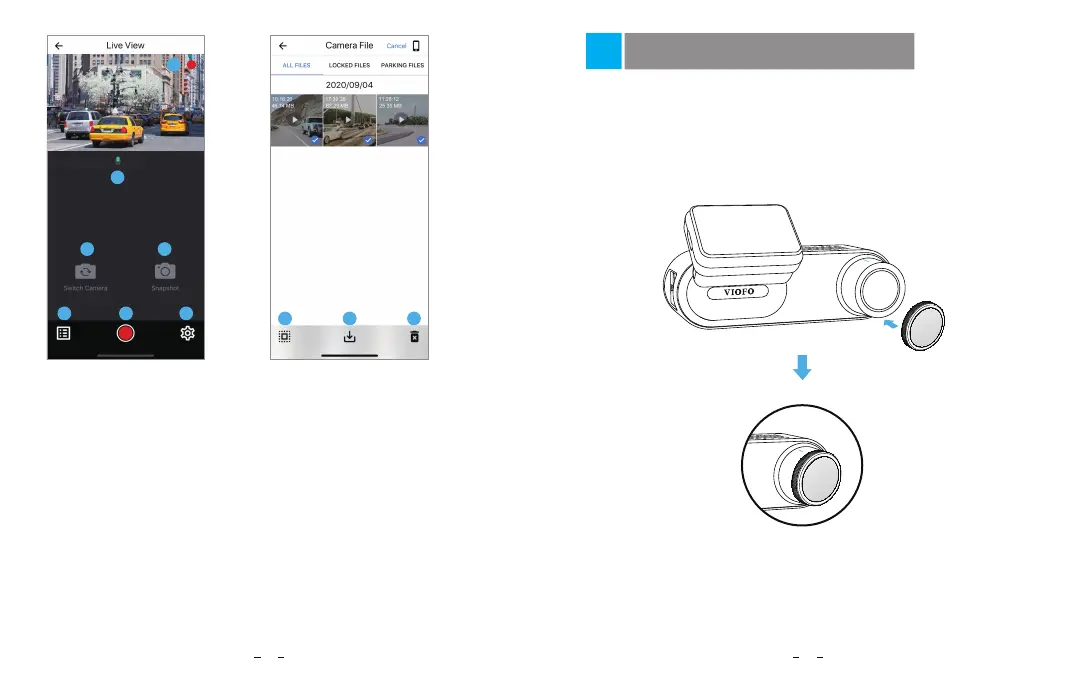
1 - Live Video
2 - Audio Recording Status
3 - Switch Camera Video Source
(Not Applicable)
4 - Take a Video Snapshot
5 - Go to Video File Lists
6 - Start / Stop Recording
7 - Go to System Settings
8 - Video File Lists
9 - Download Video Files
10 - Delete Video Files
Preview Video
1
2
3
5 6
7
4
8
9
10
1
2560x1440P 30fps



 To Next Page