2. Install the Dashcam
Format the memory card
Format the memory card in the camera
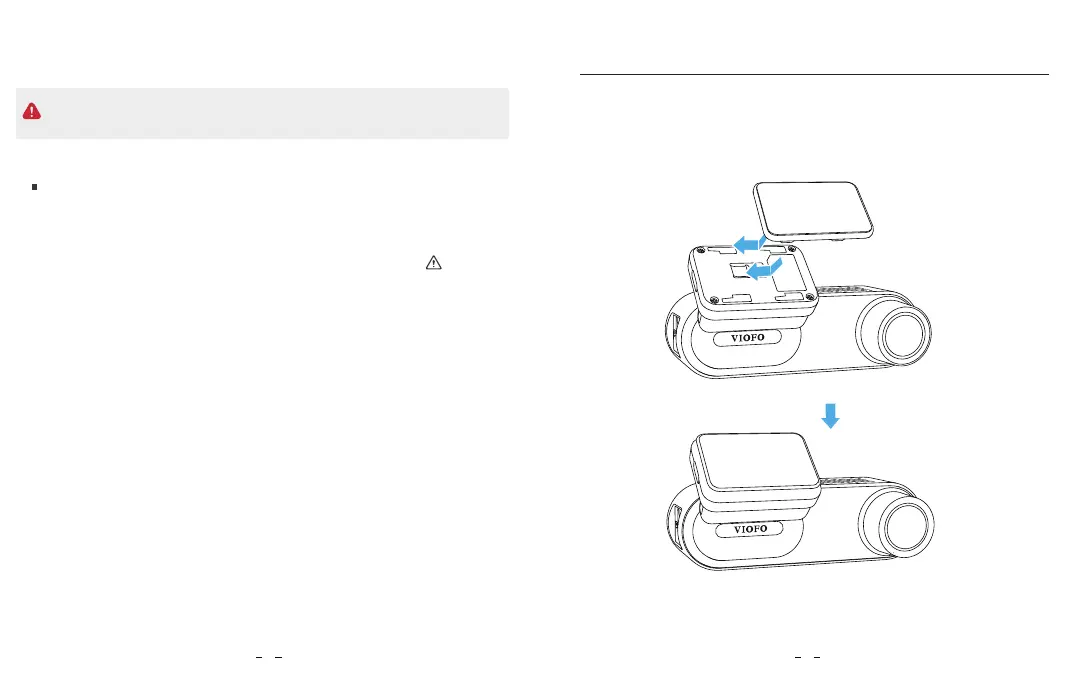
1. Install the Mount
Format the memory card using a computer
To format the card in the camera, either use the VIOFO App and the
format option in the Settings, or alternatively long press the [ ] button.
Insert the clips, then slide the mount horizontally into the slot on the back
of camera.
• Please turn off the WM1 before inserting or removing the microSD card.
• Inserting or removing the microSD card while recording may destroy the files.
To format the memory card on your computer, follow your computer’s
user manual.
For deep formatting of the memory card, you can also download the
GUIFormat tool from our official website:
https://viofo.com/download/guiformat.exe
87



 To Next Page