1. Insert / Remove the Memory Card
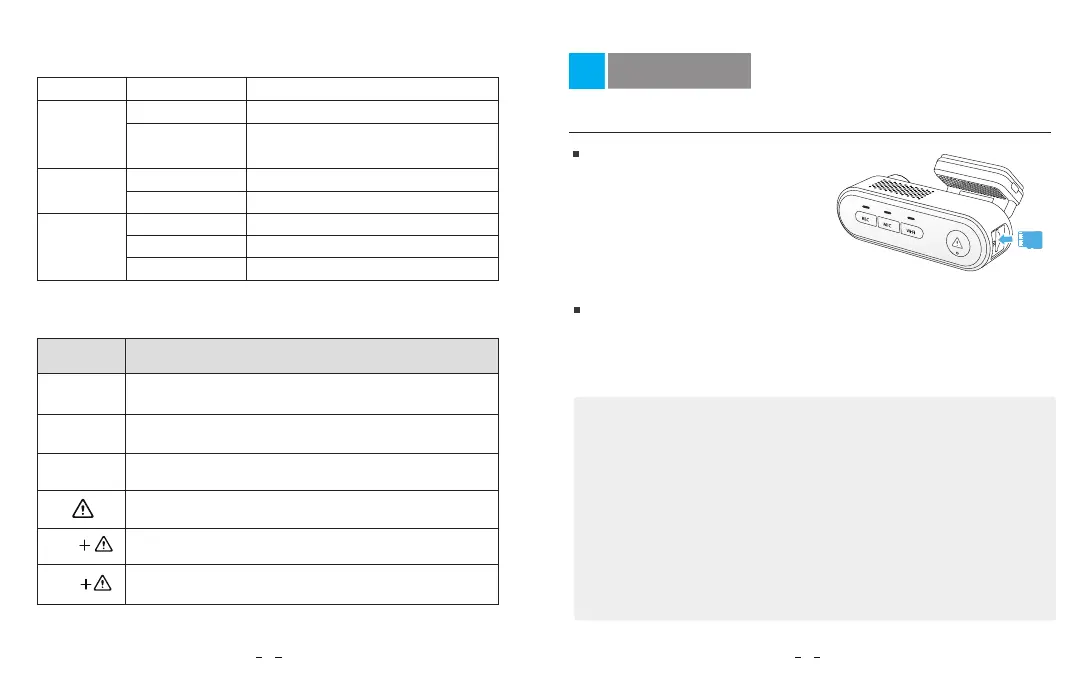
Insert the memory card
LED light
REC
REC
MIC
MIC
MIC
Wi-Fi
LED Status
Buttons
Behavior
Behavior
LED Indicators
Buttons and Icons
Solid Red
Solid Red
Red Off
Solid Blue
Flashing Blue
Blue Off
Long press to Power ON / OFF
Click once to start / stop recording
Long press to turn on / off Wi-Fi
Recording pause, long press to format the card
Recording pause, hold both buttons to turn on
Bluetooth pairing mode
Recording pause, hold both buttons to reset the
camera to default settings
Click once to disable /enable audio recording
Make sure the metal contacts on the
memory card are facing away from
the VIOFO logo side of the dash cam.
Ensure the camera is turned off and
push the memory card into the card
slot until you hear a click.
Remove the memory card
Note:
Ensure that the camera is turned off, and then push the edge of the
memory card with your fingernail. The card will spring out far enough
to be removed.
• The microSD card is sold separately. The microSD card must have a UHS-U1/U3
or above rating and the capacity up to 256GB.
• We recommend you to buy the VIOFO brand memory cards which are
manufactured with top-tier MLC NAND flash, making them durable and reliable.
• Please format the card on a computer to the exFAT or FAT32 file system.
• Formatting will permanently erase any data on the microSD card. For best
performance, format periodically (after backing up any important files).
• Make sure the metal contacts on the memory card are facing away from the
VIOFO logo side of the dash cam. Ensure the camera is turned off and push the
memory card into the card slot until you hear a click.
65
Installation
Recording
Audio Recording On
Audio Recording Off
Wi-Fi Connected
Wi-Fi on and Waiting Connecting
Wi-Fi Disabled
Flashing Red
Not Recording
Updating Firmware
Wi-Fi
Wi-Fi



 To Next Page