80
8.1 Search By Time
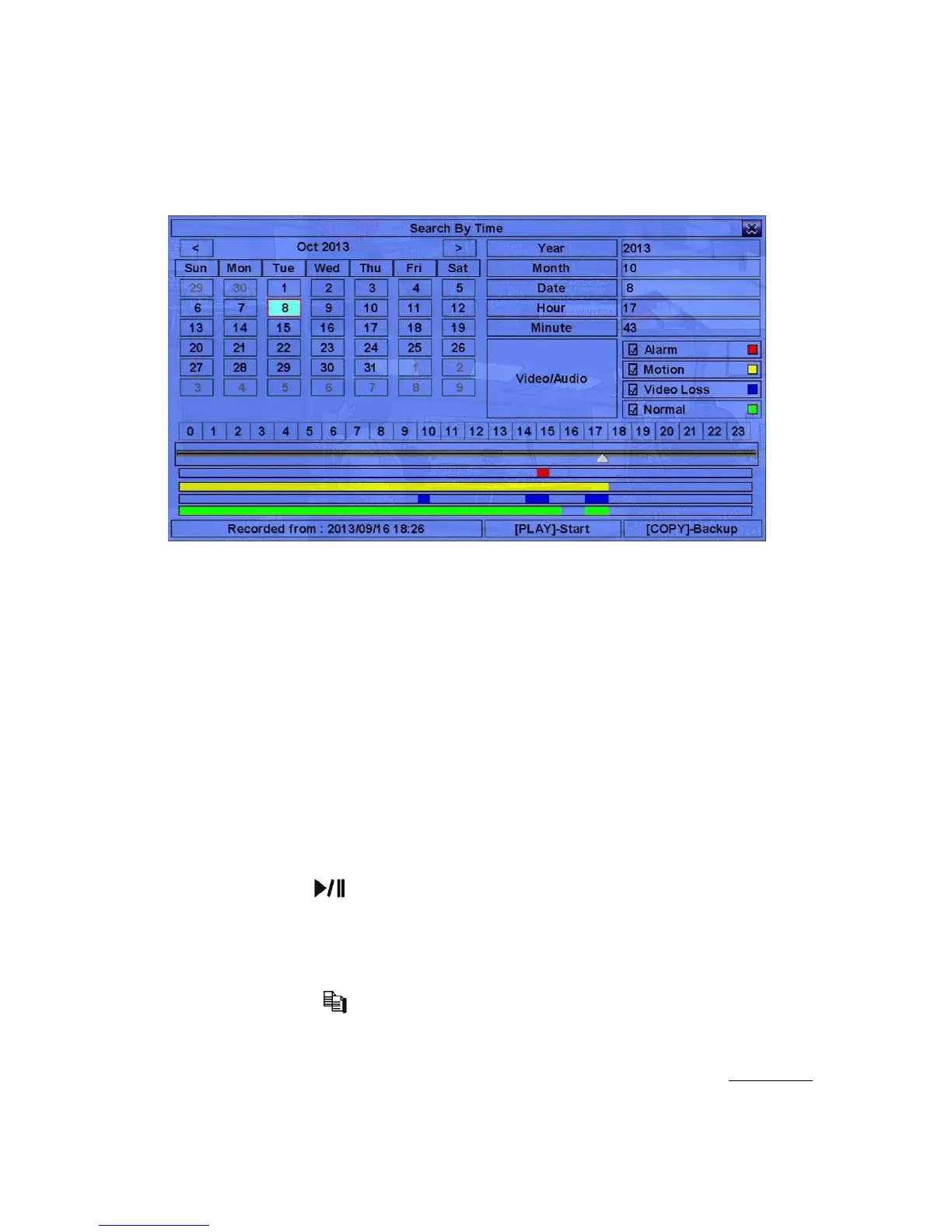
The screen for Search By Time is shown as below:
The Status field will show the ‘Recorded from’ time based on the selected
Video/Audio before searching - alarm partition if any of Alarm, Motion, or Video
Loss, is checked, and normal partition if Normal is checked. Above the status field
is the 24H time slider and alarm/motion/video loss/normal recording status (from top
to bottom).
The general operations are as below:
! !""# (Mouse: Left click)
Press these buttons to select the items.
! ESC (Mouse: Right Click)
Press this button to escape from this screen, and return to split-window display.
! Play Button ( ) (Mouse: Left click)
Press this button to start playing the recorded video/audio with the selected search
time and video/audio type. If there’s no camera in playback mode, all the
cameras in the current split window will be set to playback mode.
! Copy Button ( ) (Mouse: Left click)
Press this button to backup (copy) the selected type of recorded video/audio
starting from the Search Time (described below) in the HDD to the connected
backup device without playback. The Backup display (described in Section 8.6)
will be shown. Please note that this kind of backup is performed in the



 To Next Page