2
© 2011 Directed Electronics. All rights reserved.
Responder LE 2- way remote
8
1
2
3
4
5
9
6
7
AUX
Feature
Description
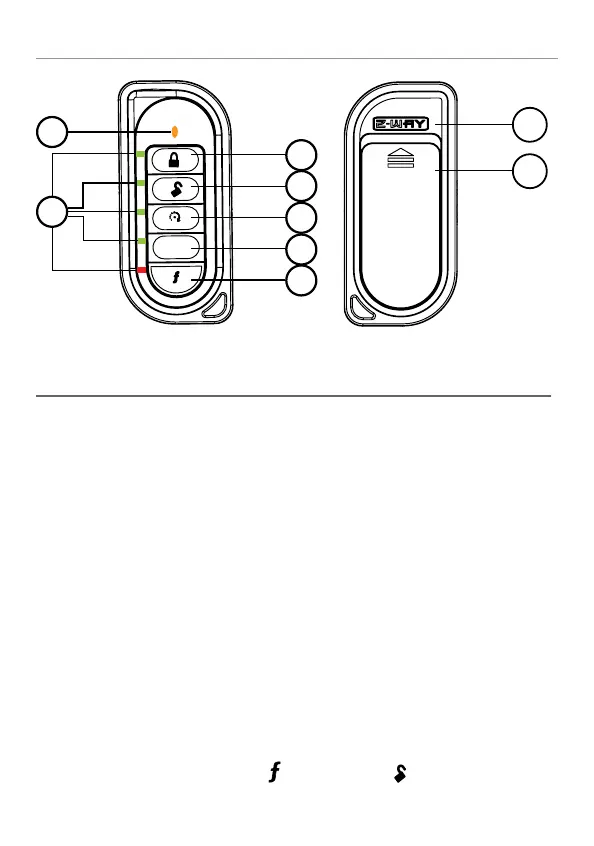
1 Lock button Press for one second to lock.
2 Unlock button Press for one second to unlock.
3 Remote start
button
Press for one second to activate remote
start.
4 Auxiliary
button
Press and hold for 1.5 second to activate
optional trunk release.
5 Function
button
Allows access to programming and
modifies operation of the other buttons.
6 Label Back of remote has label to identify the
remote as 2- way or 1- way.
7 Battery Door Remove to access batteries when
necessary. For more detail, see Page13.
8 Transmit indicator
9 LED indicators Flashes to indicate function confirmation
Note: If Keypad Lock is On, press
and then press
1
3
4
5
6
2
A U
X
8
7
1
2
3
4
5
6
1-800-274-0200
RPN 7152X
IC: 1513A-7152
FCC ID:EZSDEI7152
BATTERY: CR2032
7
8
7
8
1
2
3
4
5
6
to unlock.



 To Next Page