16
© 2011 Directed Electronics. All rights reserved.
➢ Programming
To enter:
Hold
the
button for 8 seconds, the remote emits one long beep
and the transmit LED turns on, the programming main menu has been ac-
cessed. If Car 2 mode is on, ignore the car select at 3 seconds.
Remote Features menu
Press
and
release
the button, 2 LED flashes and beeps indicate the remote
features menu is accessed and can be set.
Press
buttons indicated below -
1beep and flash turns the feature on, 2 beeps and 2 flashes turns the feature
off.
The paging feature for the 2- way remote has four options: LED On, LED Off,
LED flashing or LED flashing in groups of two.
• Keypad Lock: Press to turn On/Off.
• Remote Beeps: Press to turn Off.
• Car 2: Press
to turn On/Off.
• Paging (2- way remote only): Press AUX to change.
To save and exit,
press
and
release
the
button and then press and hold for
1.5 seconds. 1 short and 1 long beep is emitted and the transmit LED turns off
when programming is exited.
Remote Pairing
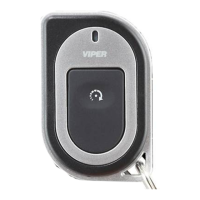
Remote pairing is a process where the Responder LE remote, and the in-vehicle
system learn the other's encrypted identification, securing communication
between the two from intruders.
Note: Remotes are pre-programmed from the factory.
How to Remote Pair
Make sure the remote control is set for the desired Car 1 or Car 2 operation
for the system it is to be paired with.



 To Next Page