20
2
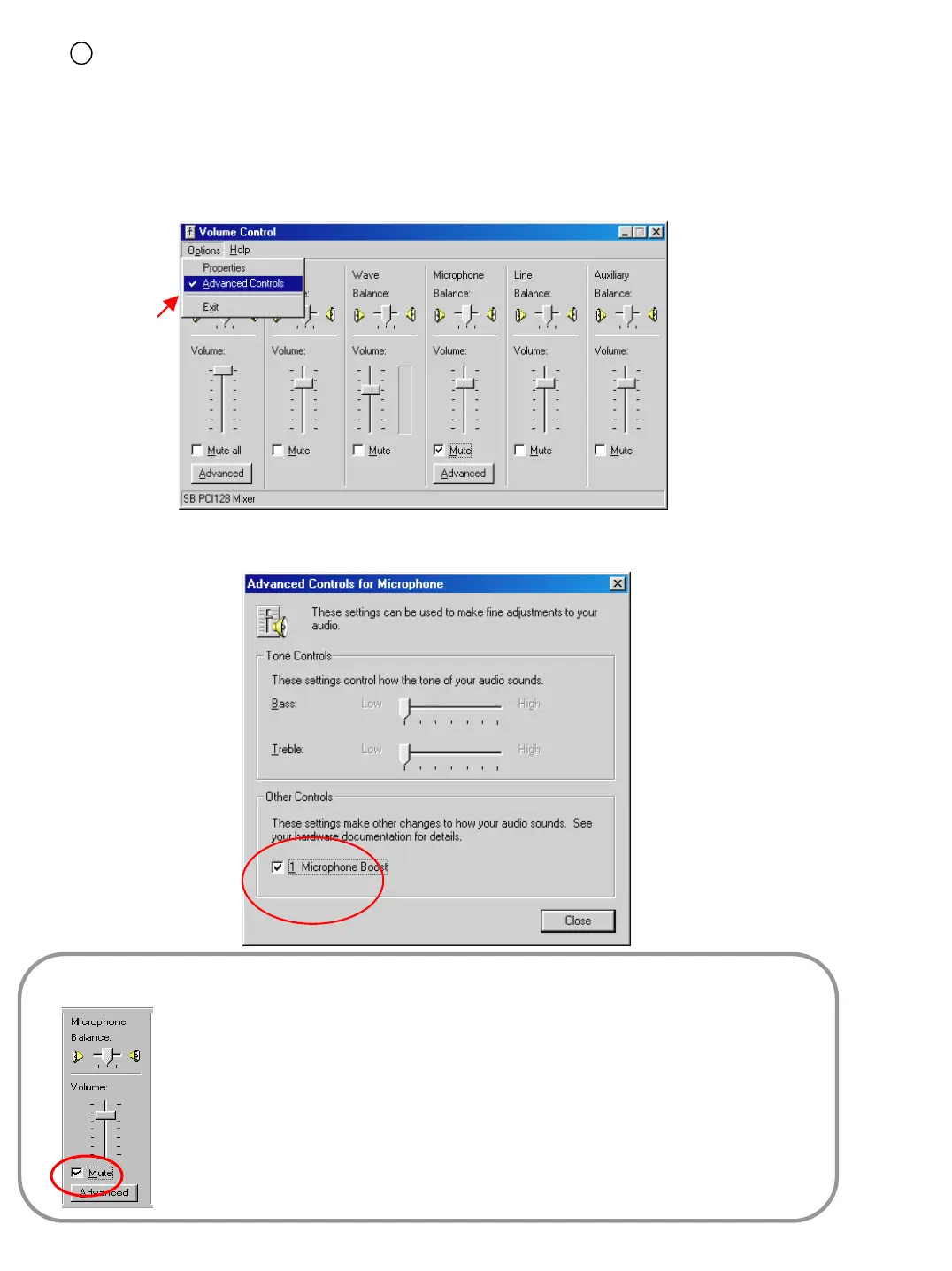
[PC setup for use of Microphone from advanced mode]
• When the audio input through microphone is weak even when the volume is maximized you can amplify
the audio input by adjusting as follows.
• ‘Advanced’ button will appear under applicable columns when you select ‘Option -> Advanced Controls
• You can go to ‘Advanced Controls for Microphone’ by clicking ‘Advanced’ on ‘Mic’ taps in ‘Volume Controls’.
• Adjust the options to make your system sound correctly.
[Tips]
• Click on ‘Mute’ which is circled on the left picture, if you do not want the
microphone input to be output through the speakers. This will prevent current audio
and recorded audio from being played together.
• If the system doesn’t support ‘Microphone Boost’ function, ‘Advanced’ button may
not appear. In that case you may need to use a more sensitive amplified
microphone.



 To Next Page