RCD9 Receiver Operators Manual
Control Menus and Receiver Operation
Issue No: 1 Page: 18
Ref: RCD9-ASUM-7001 Copyright © 2017 IMT Ltd, trading as Vislink
6.6.1. Overview Screen
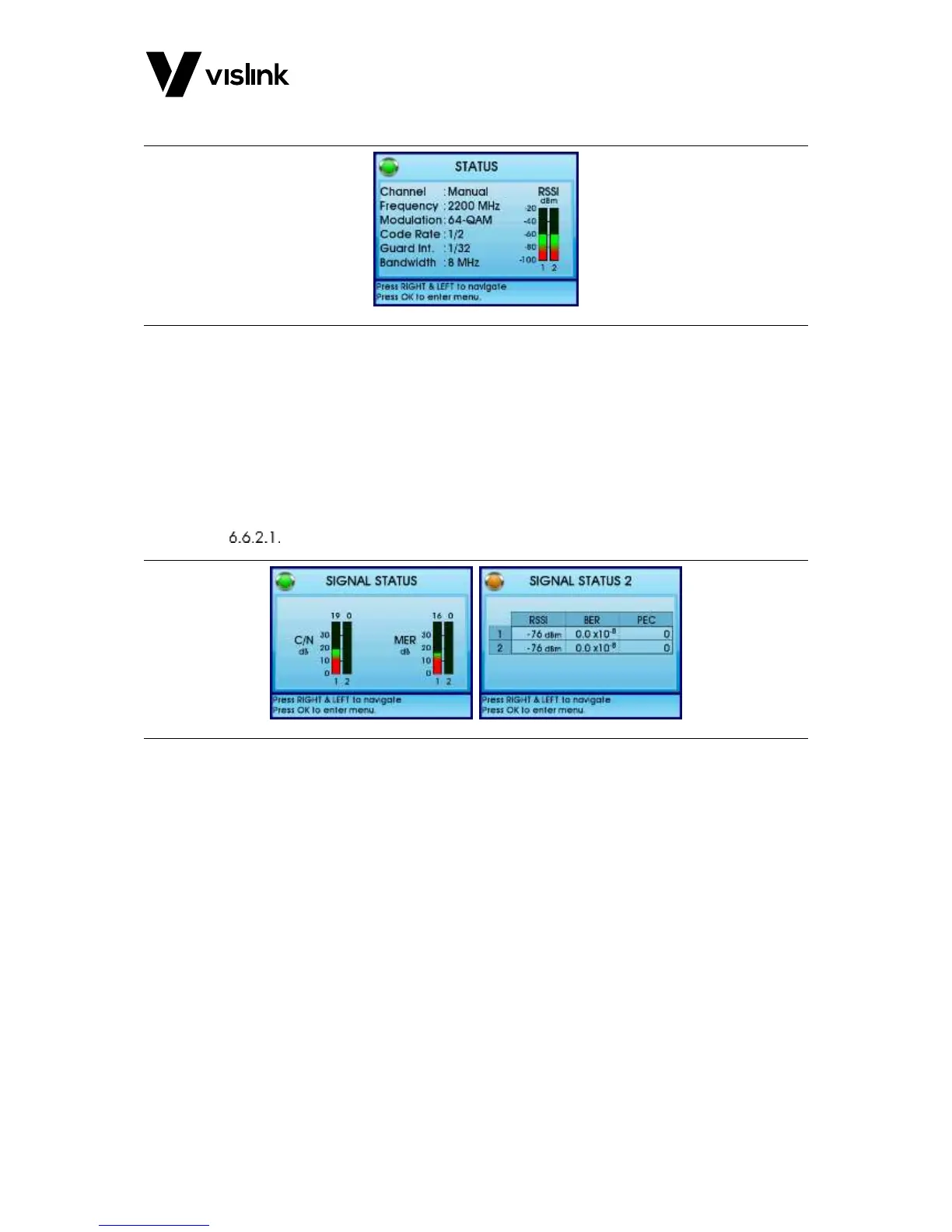
Figure 6-1 Overview Screen
This is the display screen during normal operation of the MVL-HD Diversity Receiver and
indicates the Channel number, and Rx frequency. Provided the receiver is receiving a
signal from the transmitter, the display will show the modulation, the spectrum bandwidth
and the receiver input levels for the two or four antenna inputs.
6.6.2. Additional Status and Alarm Screens
Access these screens from the Overview screen by repeatedly pressing the ► button.
Signal Status
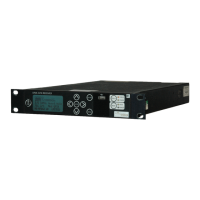
Figure 6-2 Signal Status Overview
The following functions display:
Carrier to noise (C/N) for the two or four RF inputs
MER (modulation error ratio)
Received signal level (RSSI)
Bit error rate (BER)
Packet error count (PEC) - Use ESC to clear errors



 To Next Page