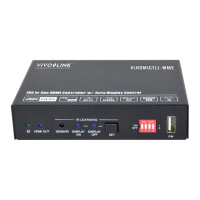
6.2 Front Panel IR Learning
Besides configuring IR control by RS232 commands. The IR commands can be
learned from IR remote by the SET button on the front panel.
Please according the below steps to learn IR commands from IR remote:
Step 1: Press SET to choose DISPLAY ON or DISPLAY OFF command to be set.
DISPLAY ON LED: Flashing indicates that DISPLAY ON mode is selected.
DISPLAY OFF LED: Flashing indicates that DISPLAY OFF mode is selected.
Step 2: Point the IR remote at the SENSOR and press the respective button on the IR
remote.
Step 3: The DISPLAY ON or DISPLAY OFF LED will stop flashing and remain lit to
indicate that IR command has been learnt.
Step 4: Press and hold the SET button for 5 seconds can learn user-defined IR
command, and both DISPLAY ON and DISPLAY OFF LEDs are flashing. Then repeat
the step 2 and both LEDs will stop flashing and remain lit to indicate that IR command
has been learnt.
Step 5: The IR learning mode will self-terminate after 10 seconds of inactivity. Both the
DISPLAY ON and DISPLAY OFF LEDs go out to exit the IR learning mode.


 To Next Page
 Loading...