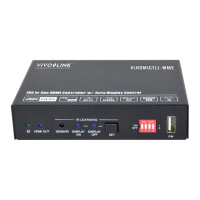
18G In-line HDMI Controller with Auto Display Control
3
3. Panel Description
3.1 Front Panel
① POWER LED: The LED illuminates green when power is applied.
② HDMI OUT LED: The LED illuminates blue when there is HDMI signal output.
③ SENSOR: Built-in IR sensor to receive IR signal.
④ DISPLAY ON LED: The LED blinks blue when the controller is in IR learning
mode, and it will illuminate blue after successfully learning the IR command.
⑤ DISPLAY OFF LED: The LED blinks blue when the controller is in IR learning
mode, and it will illuminate blue after successfully learning the IR command.
⑥ SET: Press the button to enable IR learning mode. Please refer to chapter 6.2 for
more details.
⑦ 4-pin DIP switch for EDID setting and HDCP mode selection.
⑧ FW: Type-A USB port for firmware upgrade.


 To Next Page
 Loading...