VIVOTEK - A Leading Provider of Multimedia Communication Solutions
User's Manual - 51
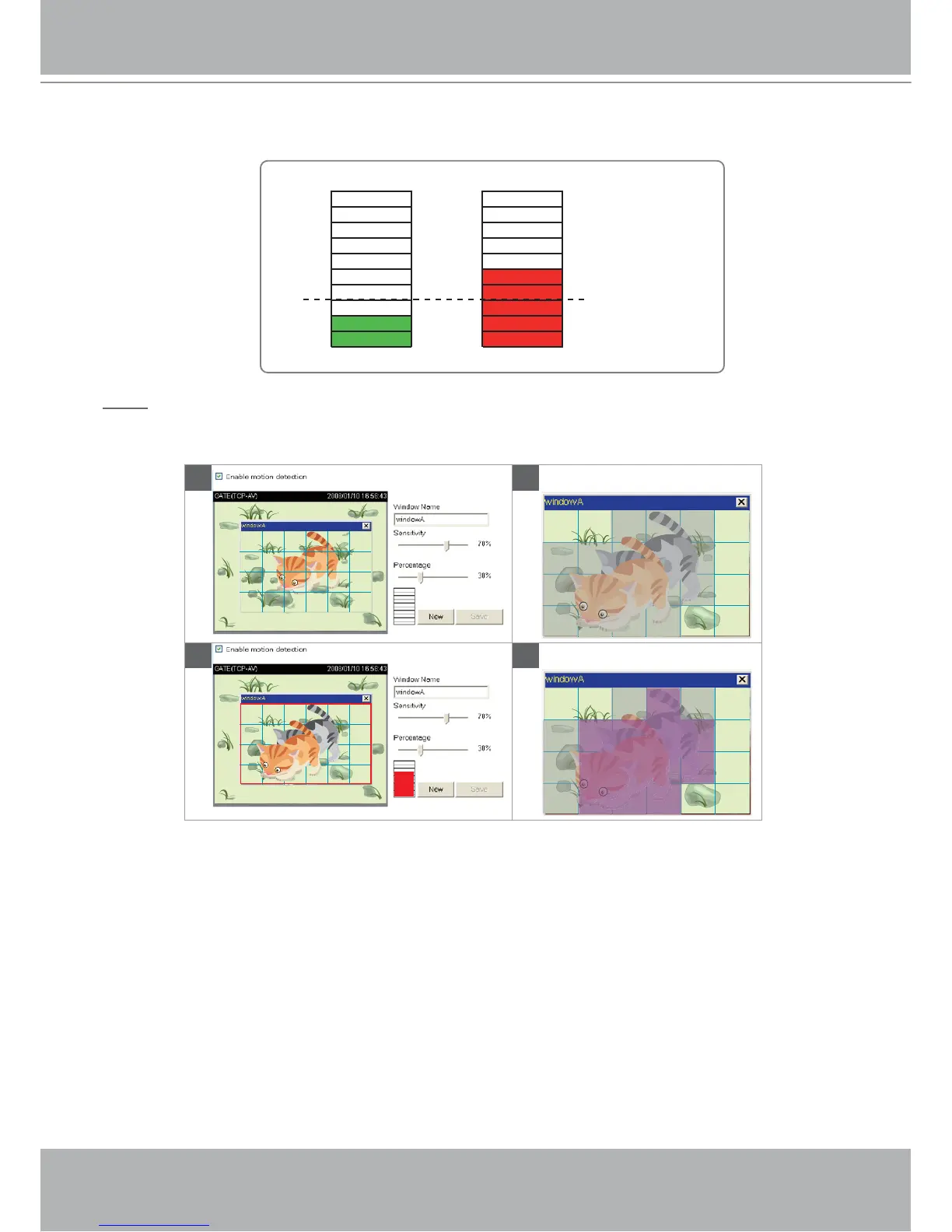
A green bar indicates that even though motions are detected, the event will not be triggered because the
image variations are still falling under the defined threshold.
NOTE
► How does motion detection work?
There are two parameters for setting the motion detection: Sensitivity and Percentage. In the
illustration above, frame A and frame B are two sequential images. Pixel differences between the
two frames are detected and highlighted in gray (frame C), and will be compared with the sensitivity
setting. Sensitivity is a value that expresses the sensitivity to moving objects. Higher sensitivity
settings are expected to sense a slight movement while smaller sensitivity settings tend to neglect
it. When the sensitivity is set to 70%, the Network Camera defines the pixels in the purple areas as
“alerted pixels” (frame D).
Percentage is a value that expresses the proportion of “alerted pixels” to all pixels in the motion
detection window. In this case, 50% of pixels are identified as “alerted pixels”. When the percentage is
set to 30%, the motions are judged to exceed the defined threshold; therefore, the motion window will
be outlined in red.
For applications that require higher security management, it is suggested to set higher sensitivity
settings and smaller percentage values.
A
BD
C
Percentage = 30%



 To Next Page