VIVOTEK
12 - User's Manual
Software Installation
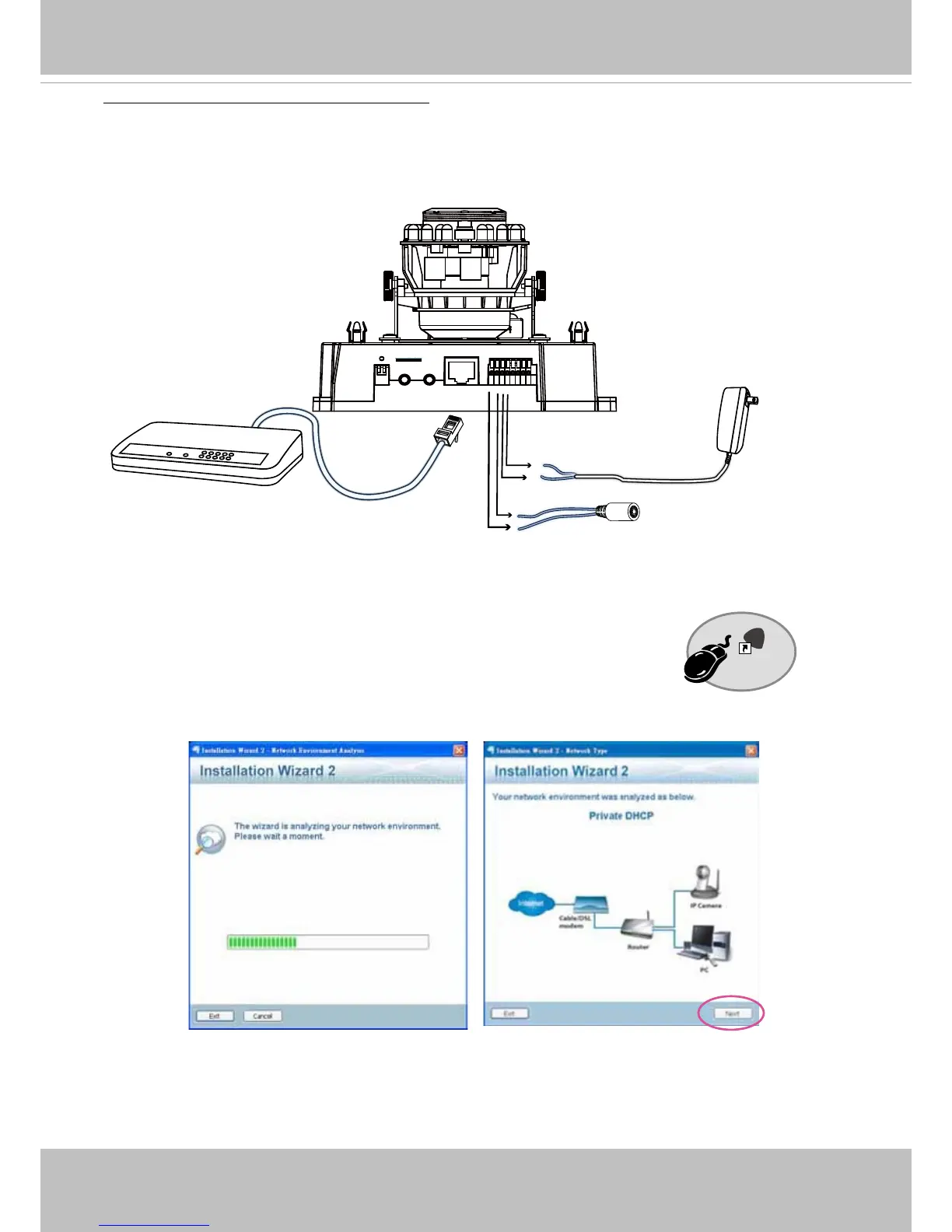
Installation Wizard 2 (IW2), free-bundled software included on the product CD, helps you set up
your Network Camera on the LAN�
1� Install IW2 under the Software Utility directory from the software CD�
Double click the IW2 shortcut on your desktop to launch the program�
2� The program will conduct an analysis of your network environment�
After your network environment is analyzed, please click Next to continue the program�
3� The program will search for all VIVOTEK network devices on the same LAN�
4� After a brief search, the main installer window will pop up� Double-click on the MAC address
that matches the one printed on the camera label or the S/N number on the package box label
Installation
Wizard 2
IW
2
General Connection (without PoE)
POW
ER
C
O
LL
I
S
ION
L
I
N
K
RE
CEIVE
PARTITIO
N
1
2
3
4
5
1� If you have external DI devices, make the connection from general I/O terminal block�
2� Ethernet, power, and other cables are user-supplied� Use a Category 5 Cross Cable when
Network Camera is directly connected to PC�
3� Connect either the DC or AC pins from the terminal block to a power outlet�
Ethernet
Switch
Pin1 & 2 DC 12V
Black
Red
Pin3 & 4 AC 24V



 To Next Page