VIVOTEK - Built with Reliability
User's Manual - 11
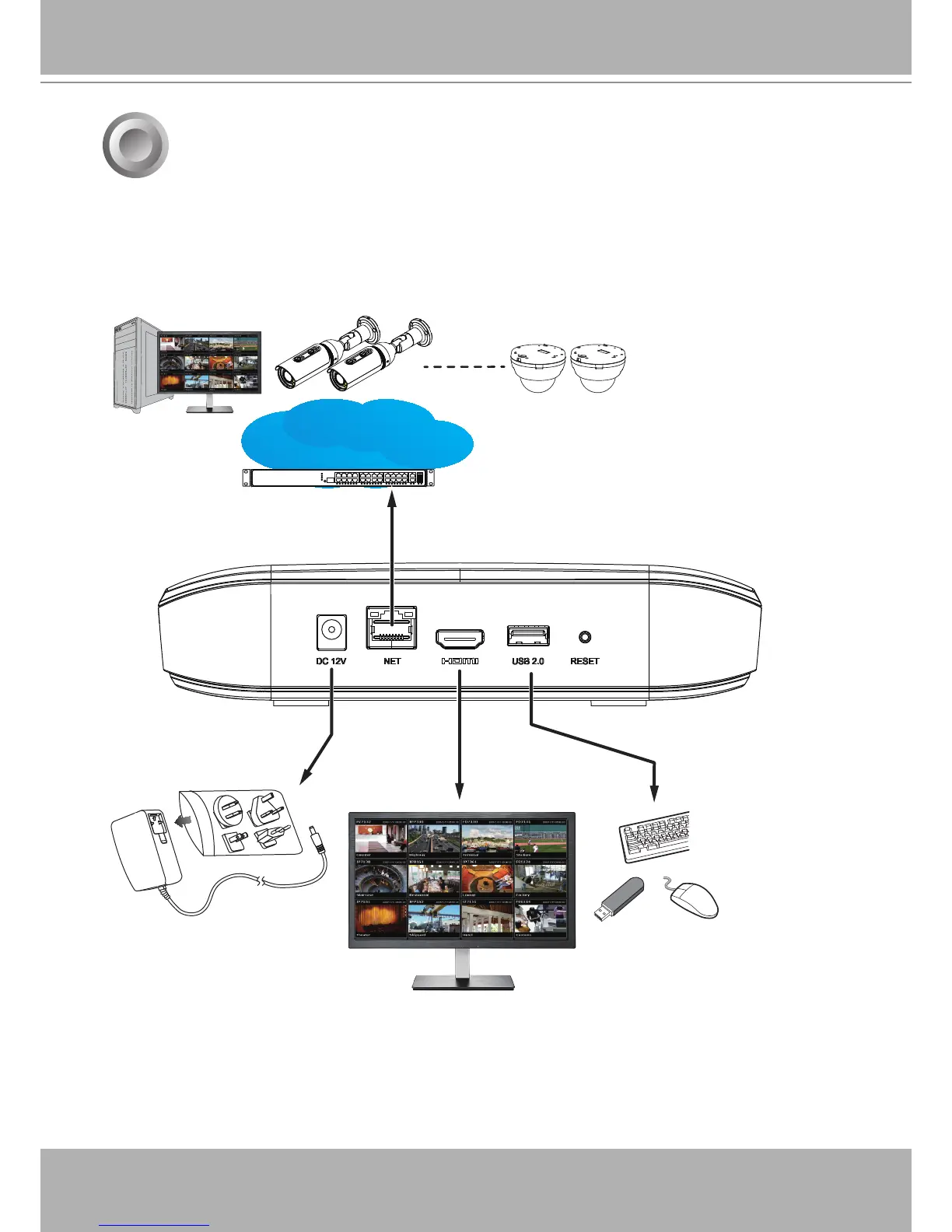
1. Connect to a monitor using an HDMI cable.
2. Connect CAT5e or better-quality Ethernet cable to the network.
3. Connect USB devices such as mouse, keyboard, or USB thumb drive (formatted in FAT for-
mat), or UPS.
4. Connect the power adaptor to the power mains and the system.
4
Interface Connections
Pressing the Reset button for longer than 10 seconds will restore the factory detaults.
AC100~240V
50/60Hz, 1.5A
LAN/WAN
USB 2.0
Camera 01
Camera 02
Camera 04
Camera 06
Camera 05
Camera 07
Camera 08
Camera 09
Camera 01
Camera 02
Camera 04
Camera 05
Camera 07
Camera 08


 To Next Page