VIVOTEK - Built with Reliability
User's Manual - 31
2-2-4. Right-click Commands
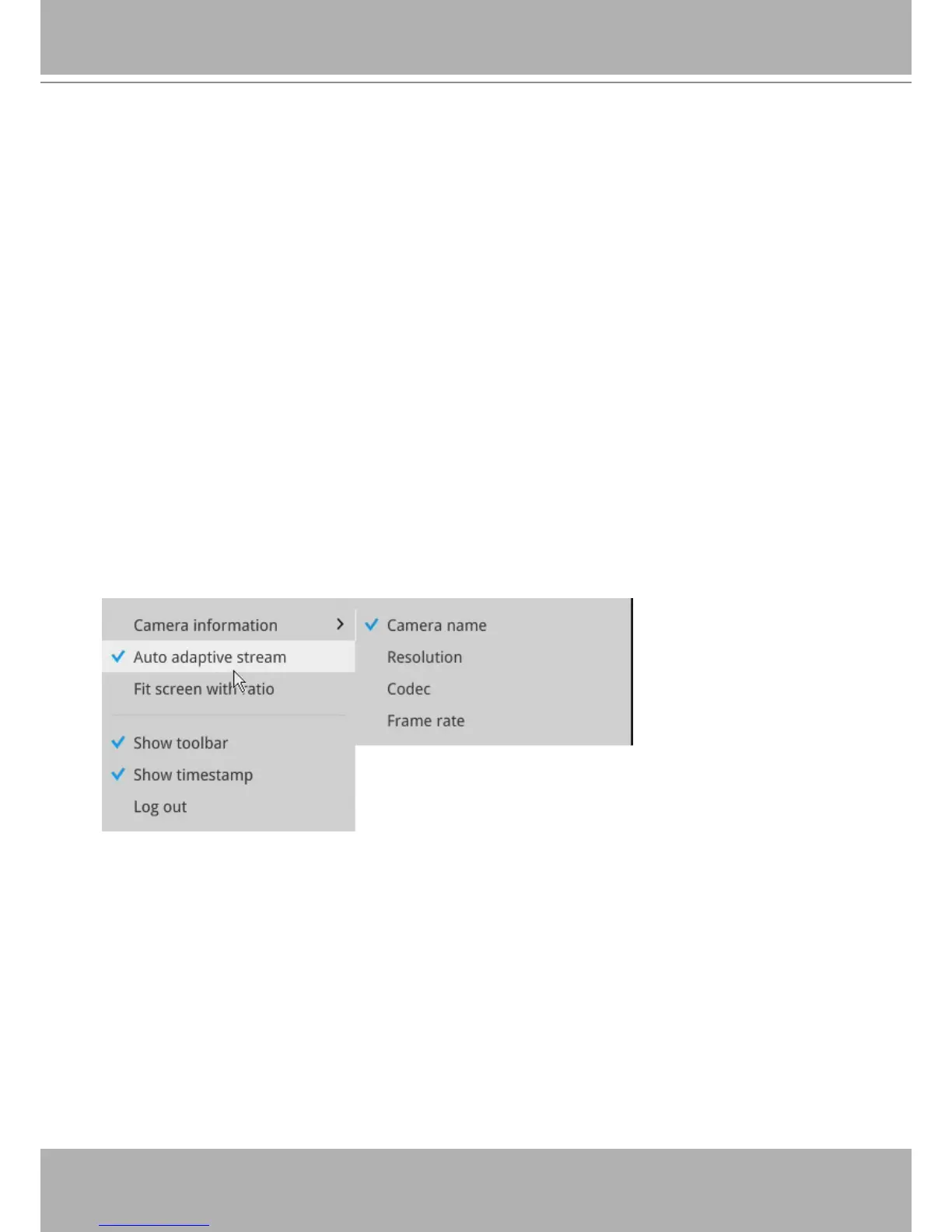
Left-click to select a camera. Right-click to display the selection menu.
1.
Camera information
: Click to display camera name, resolution, codec, or frame rate on the
view cell. The information will display on the upper left corner of a view cell.
2.
Auto adaptive stream
: Default is enabled. The Auto adaptive stream automatically polls a
video stream of a smaller resolution in order to reduce the streaming efforts. For example,
when a view cell is placed in a 3x3 monitor layout, it may not be necessary to stream the
video in its full resolution. In a full view, the system displays a video in its full resolution. Due
to the size of view cells on your monitor, when in a multi-cell layout, the system automatically
polls the camera for a smaller resolution stream.
The Auto adaptive stream feature can be disabled if you prefer consistent display resolution.
3.
Fit screen with ratio
: The Receiver server automatically optimizes the display camera view
cells. However, you can still select this option to display the camera's original aspect ratio: for
example, the original video feed can be 4:3. Without the t screen, every camera's image will
be expanded to ll the view cell.
4.
Show tool bar
: You can hide the tool bars by deselecting this option.
5.
Show timestamp
: You can hide the time stamp bars by deselecting this option.
6.
Log in
: Log in to enable system conguration.


 To Next Page