VIVOTEK - Built with Reliability
12 - User's Manual
5
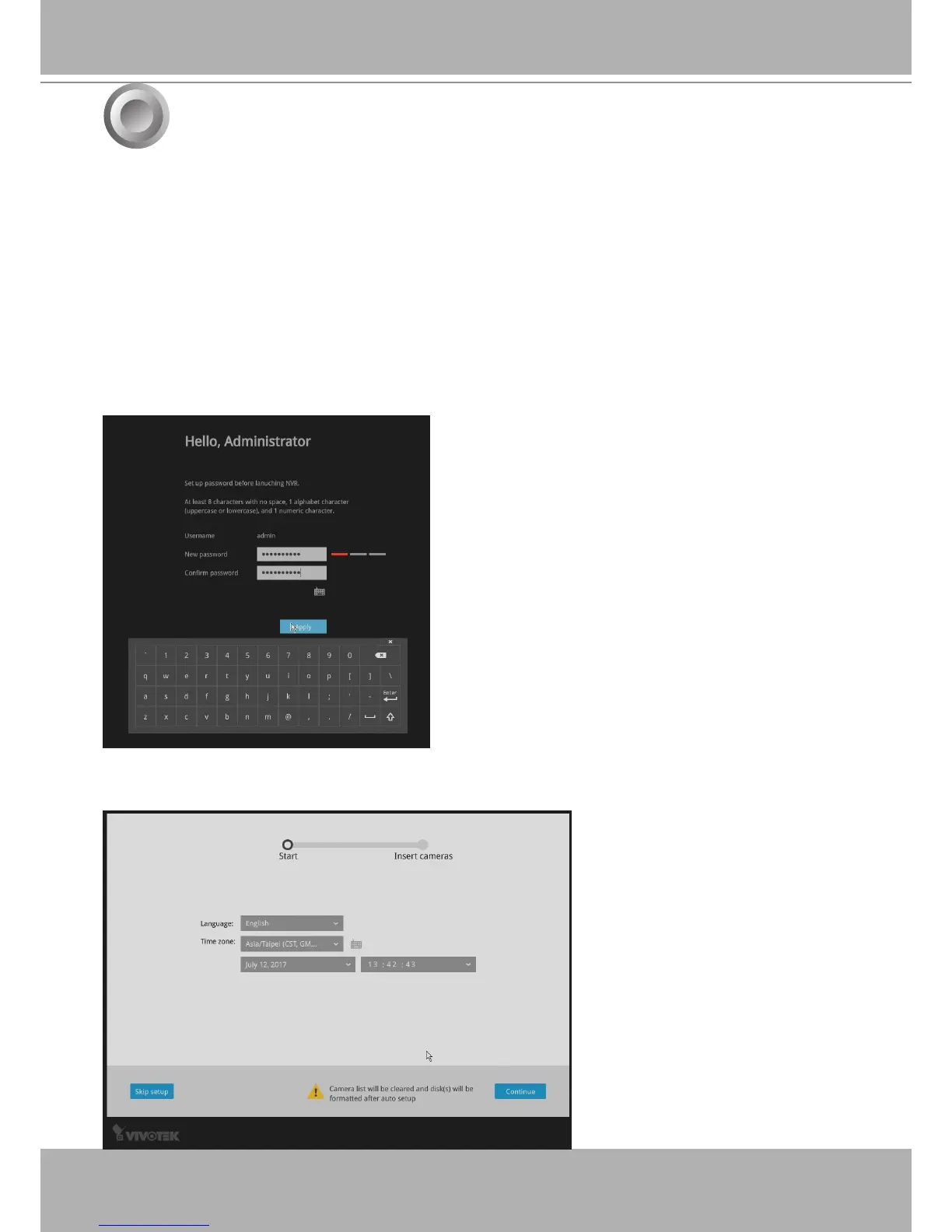
2. Select the UI language, Time zone, and current date and time. Click on the
Continue
button
to proceed.
A local console requires the following:
1. A monitor or TV is connected via an HDMI cable.
2. A mouse and/or a keyboard are connected to the system.
3. It is presumed that the system has not been congured yet. The Installation wizard only
appears for an uncongured machine or one that was restored to its default.
Follow the onscreen messages to complete the initial conguration:
1. When started for the rst time, the system will prompt for the forceful conguration of a
password. This ensures security from malicious network attack.
The applicable alpha-numeric characters are [0-9][a-z][A-Z][!][$][%][-][.][@][^][_][~], with a
max. length of 64 characters.
Click the
Apply
button when the new password is
accepted.
Initial Conguration - via a Local Console


 To Next Page