15
Descriptions and Functions
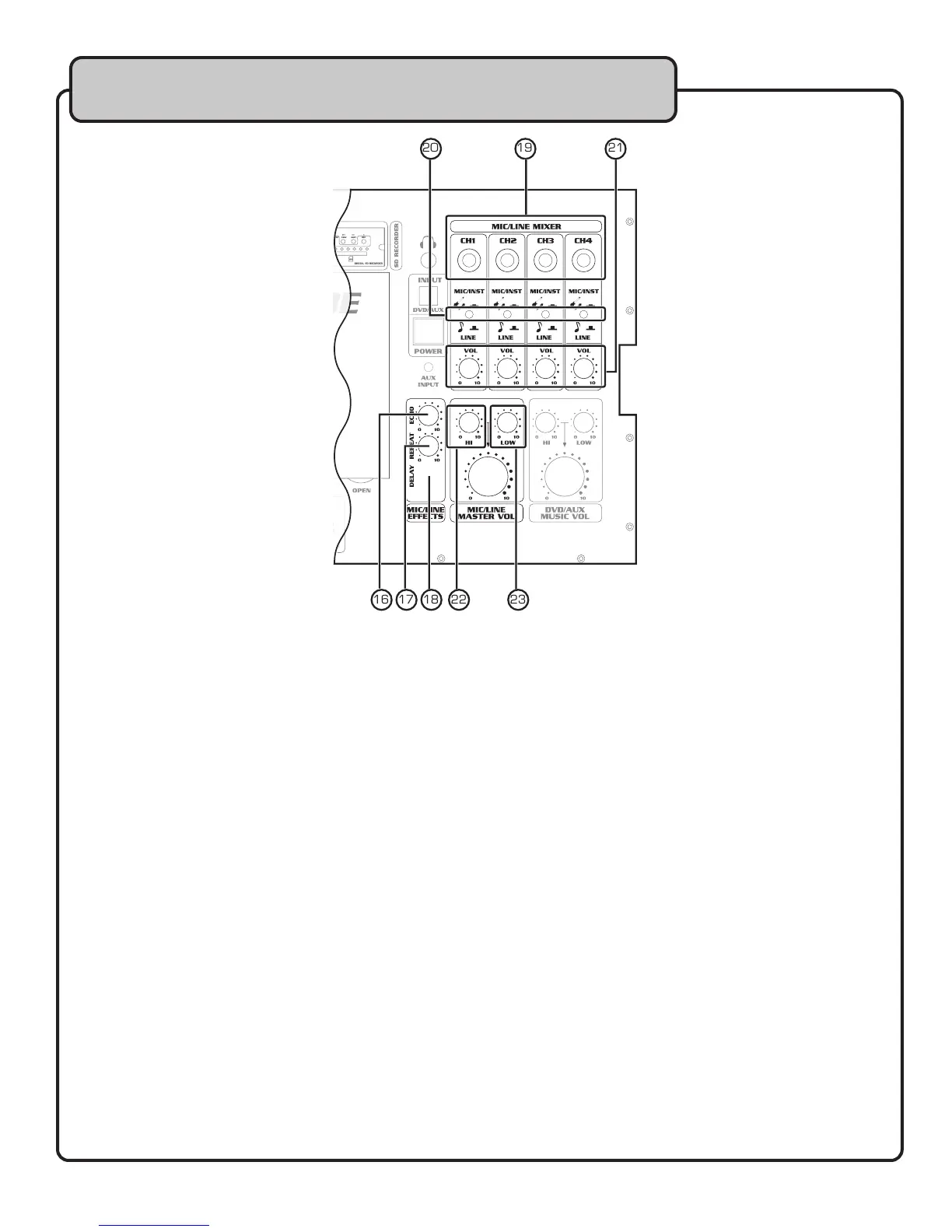
16. ECHO CONTROL – This controls the level of echo effect applied on all four mic inputs. Rotate clockwise
to increase the amount of echo effect applied to the signal, and counter-clockwise to decrease.
17. REPEAT CONTROL – This controls the number of echo repetitions heard before the echo effect fades
out. Rotate clockwise to increase the amount of repeat applied to the signal, and counter-clockwise to
decrease.
18. DELAY CONTROL – This controls the length of the gap between each echo repetition heard before
the echo effect fades out. Rotate clockwise to increase the amount of delay applied to the signal, and
counter-clockwise to decrease.
19. ¼” MIC/LINE INPUTS (CH 1-4) – Use these inputs to connect wired microphones or music
instruments with a ¼” plug.
20. MIC-INST/LINE BUTTON (CH 1-4) – Use this button to set the input for a MIC/INSTRUMENT
signal, or for a LINE LEVEL signal from a wireless receiver.
MIC/INSTRUMENT – Set button to the IN position
LINE – Set button to the OUT position
21. VOLUME CONTROL (CH 1-4) – Use this control to raise and lower the volume of microphone
output. Rotate clockwise to increase the volume, and counter-clockwise to decrease.
22. MIC/LINE HI CONTROL – Use this control to raise and lower the high frequency portion of the
MIC/LINE output. This control can be used to brighten up the sound of vocals or instruments. Rotate
clockwise to increase high frequencies, and counter-clockwise to decrease.
NOTE: This control adjusts the high frequencies for CH 1-4.
23. MIC/LINE LO CONTROL – Use this control to raise and lower the low frequency portion of the
MIC/LINE output. This control can be used to thicken up the sound of vocals or instruments.
Rotate clockwise to increase low frequencies, and counter-clockwise to decrease.
NOTE: This control adjusts the low frequencies for CH 1-4.
Top Panel


 To Next Page