16
Descriptions and Functions
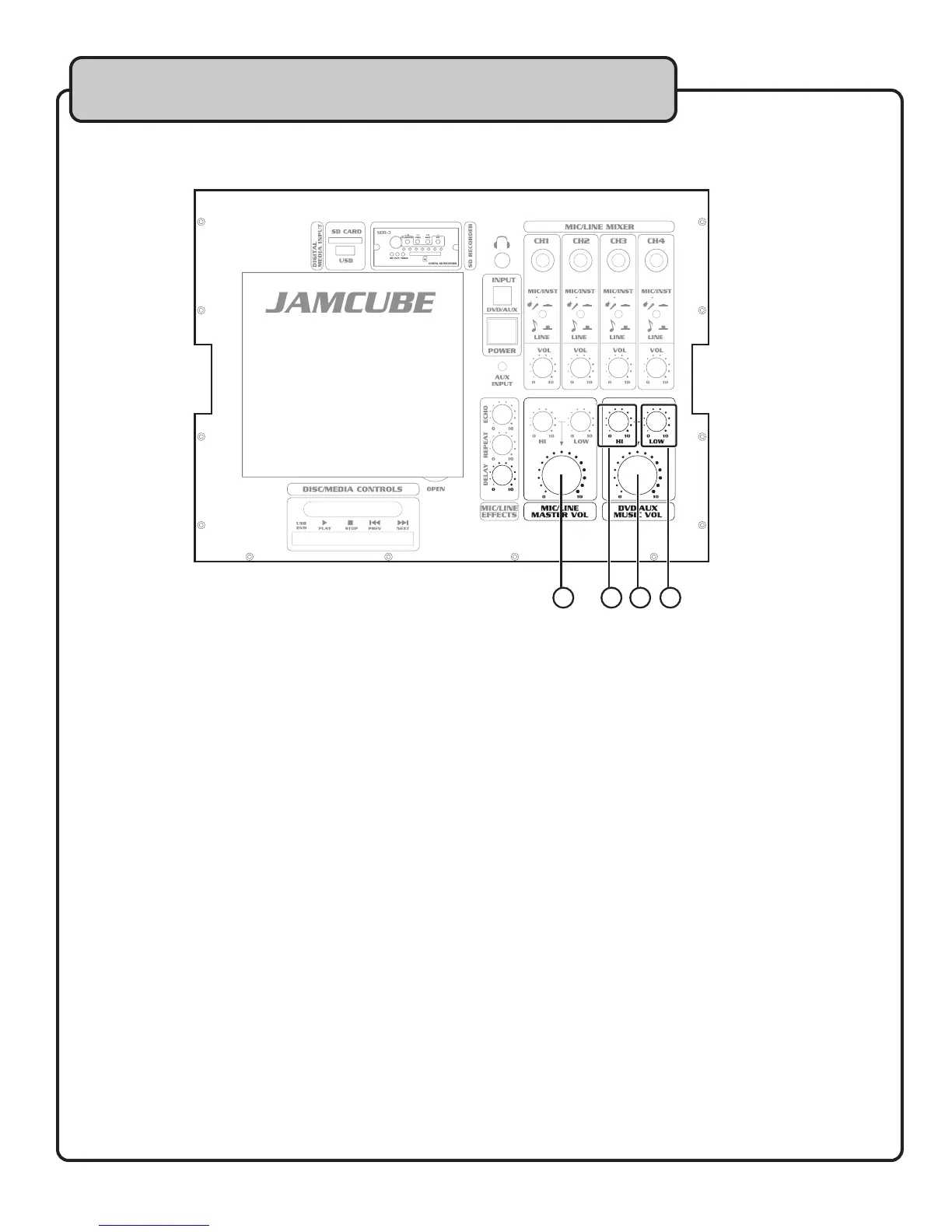
24. MIC/LINE MASTER VOL CONTROL – Use this control to adjust the volume for all MIC/LINE CH.1-4.
This is a master-level control, allowing for a one-touch volume adjustment for all the MIC/LINE channels
at once. Rotate clockwise to increase the MIC/LINE master volume, and counter-clockwise to
decrease.
25. DVD/AUX HI CONTROL – Use this control to raise and lower the high frequency portion of the music
signal from the DVD player and devices connected to the DVD/AUX inputs. This control can be used
to brighten up the sound of the music. Rotate clockwise to increase high frequencies, and counter-
clockwise to decrease.
26. DVD/AUX LO CONTROL – Use this control to raise and lower the low frequency portion of the music
signal from the DVD player and devices connected to the DVD/AUX inputs. This control can be used to
thicken up the sound of the music. Rotate clockwise to increase low frequencies, and counter-clockwise
to decrease.
27. DVD/AUX MASTER VOL CONTROL – Use this control to adjust the music volume level from the DVD
player and devices connected to the DVD/AUX inputs. Rotate clockwise to increase the MIC/LINE
master volume, and counter-clockwise to decrease.
2524 27 26
Top Panel


 To Next Page