19
Descriptions and Functions
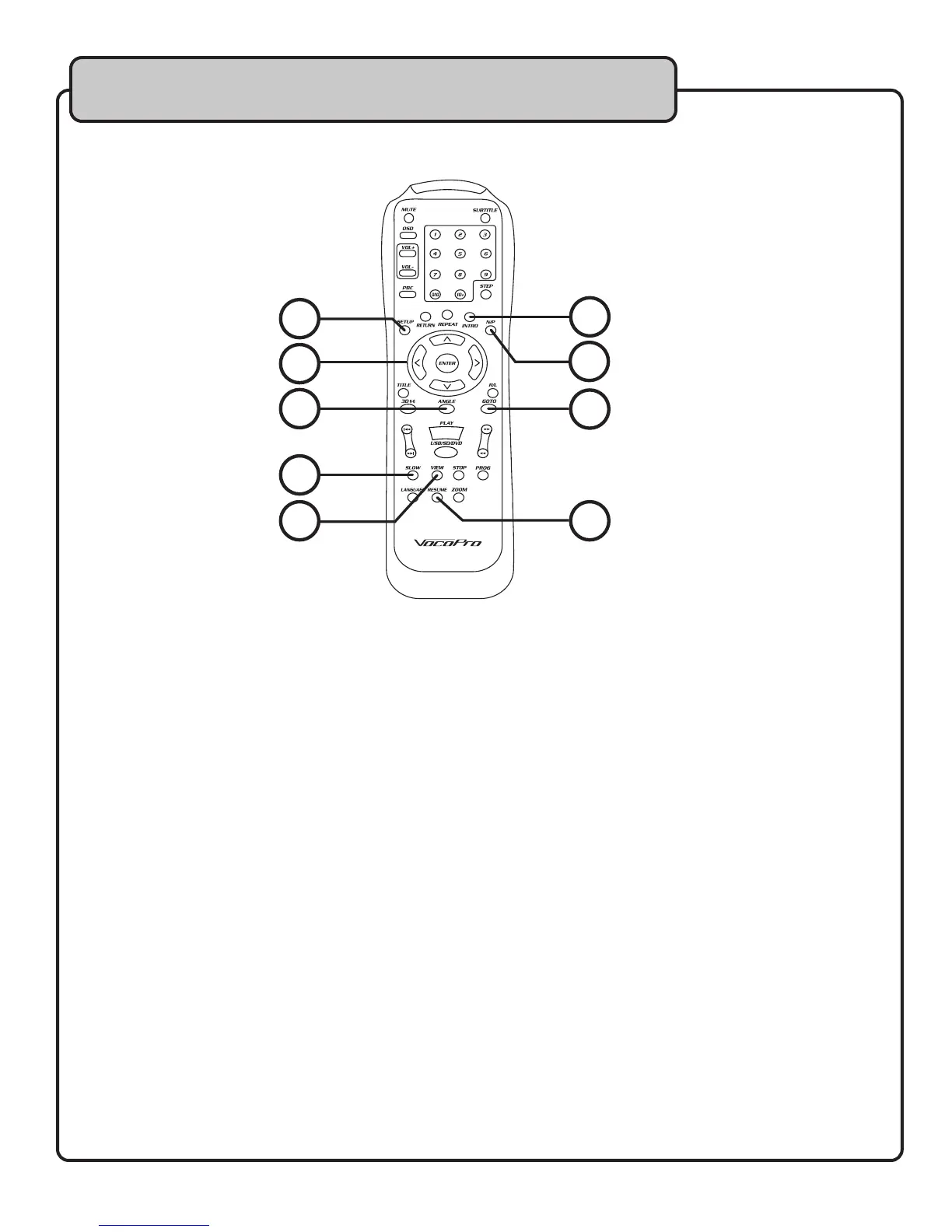
13. INTRO – Press this button to hear the first 15 seconds of each track. To exit INTRO play mode,
press a second time.
NOTE: This feature does not work with DVD discs.
14. GOTO - Use this button to jump to a specific track or time. Use this button in combination with
the left and right arrow keys and the number pad to enter tracks and times, then confirm with
the enter button.
15. ANGLE - Use this button to change the viewing angle of the DVD.
NOTE: Not all DVDs have multiple angles available.
16. SLOW – Use this button to enter SLOW playback mode. Continue to press the SLOW button to
further slow down the playback. To exit SLOW mode, press PLAY.
17. VIEW – Use this button for viewing specific sections on a VCD disc, such as the selection screen.
NOTE: The disc must be stopped in order to access the VCD View Menu.
18. SETUP – Use this button to enter the main SETUP menu for the JAMCUBE.
19. N/P – Use this button to select between PAL/NTSC video modes.
For U.S., Mexico, and Canada, select NTSC. For European countries, select PAL.
20. DIRECTION PAD – Use the UP, DOWN, LEFT, RIGHT buttons to navigate through menu screens.
Press the ENTER button to make selections.
UP – The UP button also adjusts the KEY CONTROL UP (sharp) control when not in a menu
screen.
DOWN – The DOWN button also adjusts the KEY CONTROL DOWN (flat) when not in a menu
screen.
21. RESUME - Use this button to return to the track listing menu from any SETUP subdirectory.
13
19
14
21
15
18
20
16
17
Remote Control


 To Next Page