20
Descriptions and Functions
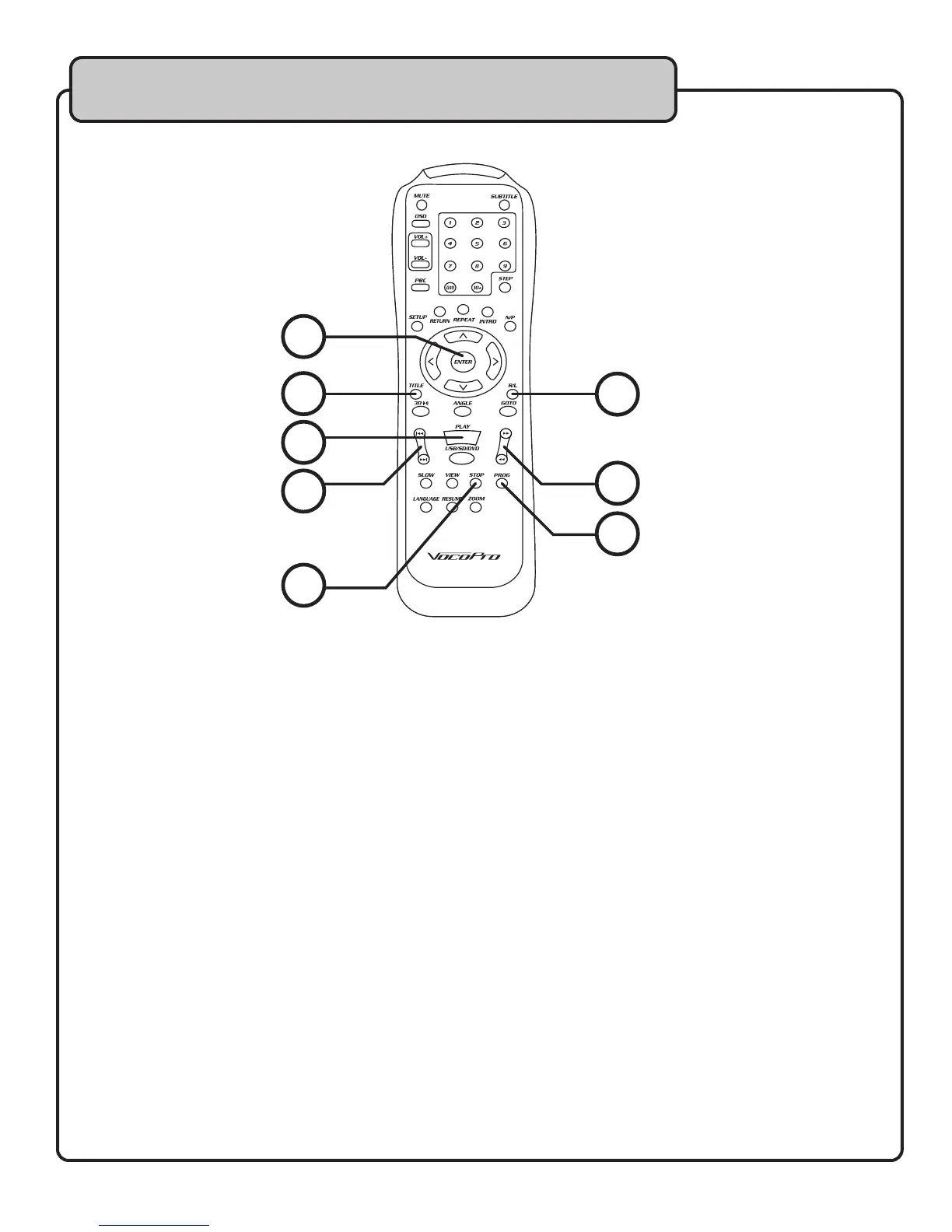
22. TITLE – Use this button to go to the title screen of a DVD disc.
23. R/L – Use this button to CANCEL VOCAL on a MULTIPLEX disc. This button toggles between left
channel, right channel and stereo outputs.
Selecting MONO L will remove the R channel audio and play the L channel audio on both sides
Selecting MONO R will remove the L channel audio and play the R channel audio on both sides.
Selecting STEREO will play the audio in normal LR stereo mode.
24. PLAY/PAUSE – Press this button to start/pause playback of a disc or media file.
25. << >> - Press the << button to scan backward through a track, and press >> to scan forward
through a track.
26. |<< >>| - Press |<< to jump to the previous track, and >>| to jump to the next track.
27. STOP – Press this button to STOP a track that is playing.
28. PROGRAM – Use this button to set up a custom sequence of tracks for playback. Refer to the
Advanced Operations section for instructions on how to setup a program.
29. ENTER - Use this button to confirm onscreen selections.
23
22
24
26
29
25
28
27
Remote Control


 To Next Page