25
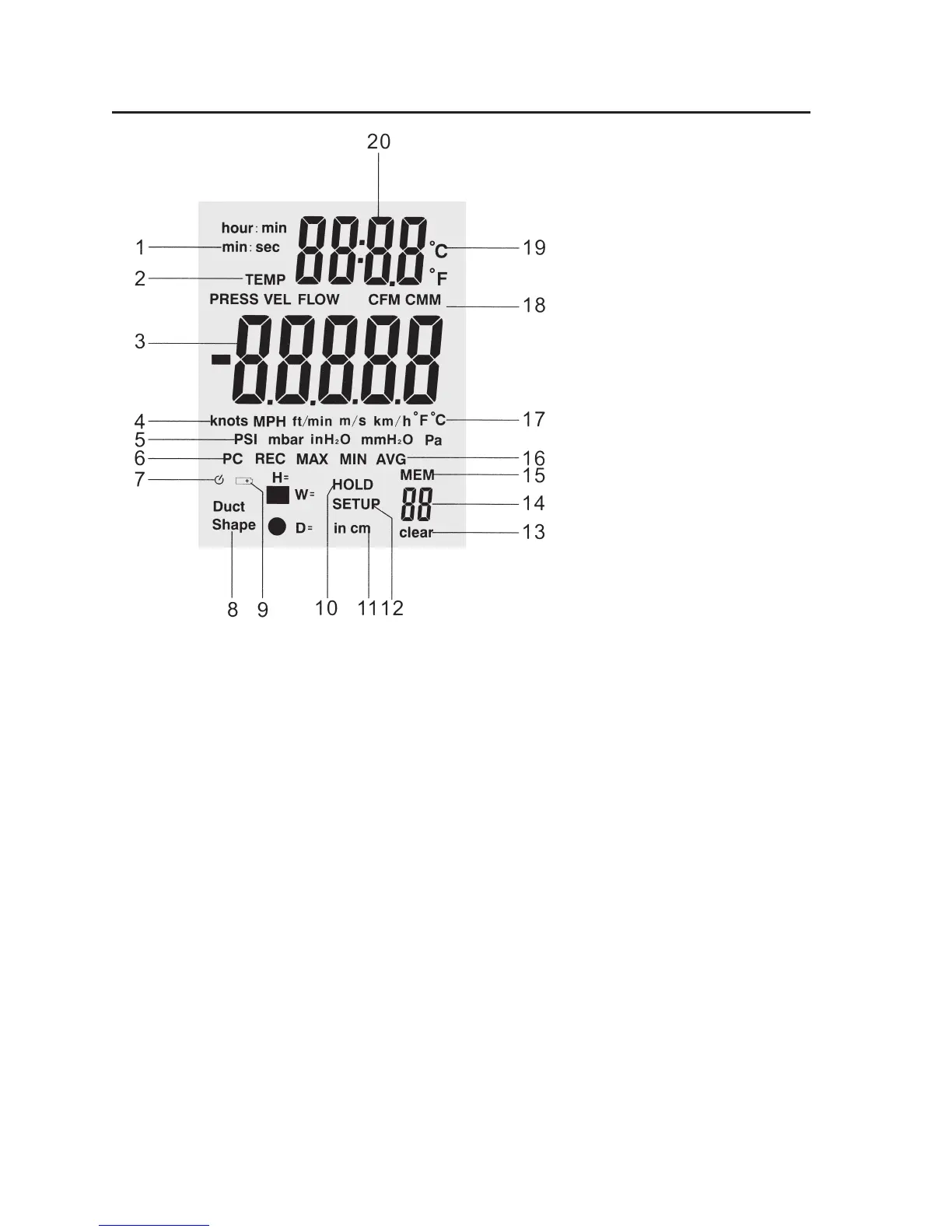
1. Display of the Time Unit: (“Hours: Minutes” or “Minutes: Seconds”)
2. Active parameters (“Temp” = temperature, “Press” = pressure, “Vel” = ow velocity, “Flow” = volume ow)
3. Main display
4. Measuring units of the ow velocity
5. Measuring unites of pressure
6. Data interface (PC) – displayed when the measuring device is connected to the computer by USB cable
7. Auto power off icon (automatic deactivation)
8. Flow channel shape (rectangular or round)
9. Battery: battery level display
10. “HOLD” notes that the data display is currently “frozen”
11. Dimensions of the ow channel: “H” = Height, “W” = Width, “D” = Diameter
12. “SETUP” notes that the setup mode with the setting options is currently active
13. “DELETE” shows that one or several data records are deleted from memory
14. Memory slot number
15. “MEM” indicates that memory access is taking place
16. Indicators for REC, MIN, MAX and AVG
17. Measuring units for large temperature display (main display)
18. Measuring units for the volume ow
19. Measuring units for small temperature display (second display)
20. Second display for temperature and time






 To Next Page