27
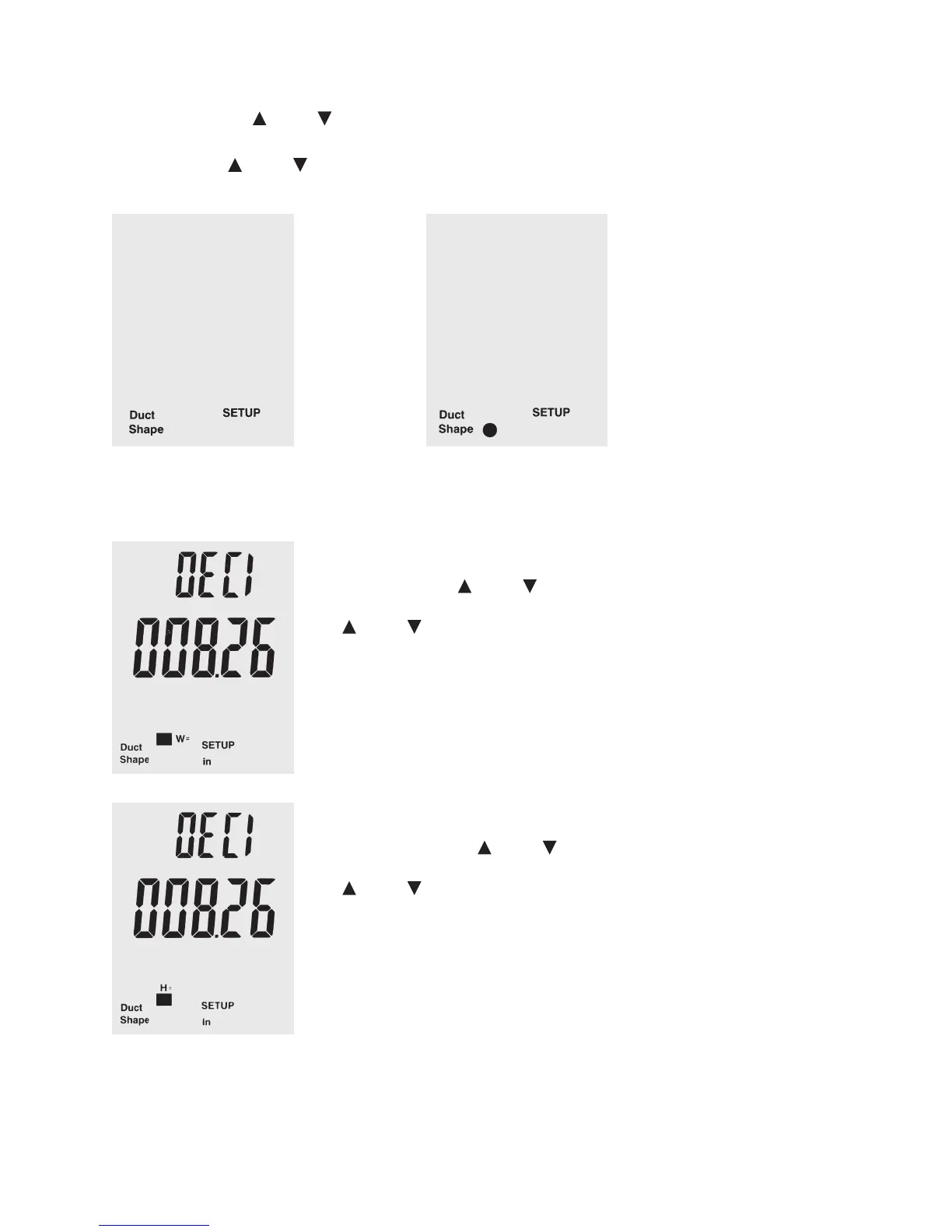
In setup mode, push “Unit ” or “Unit ”, until “duct shape” appears in the lower area of the display.
Push “Avg/Rec” to conform your selection.
Use the buttons “Unit
” or “Unit ” to select the round or square icon for a rectangular or round ow channel.
Push “Avg/Rec” to conform your selection.
If the ow channel is rectangular, the display rst shows “W=” and a number that indicates the
width of the channel in the selected measuring units.
Display “DECI”: Push “Unit
” or “Unit ”, to determine the position of the decimal point.
Push “Save/Clear” to switch between decimal points – the currently selected number ashes.
“Unit
” or “Unit ” can now be used to set the individual numbers according to your wishes
(0 … 9).
Push “Avg/Rec” to conform your selection.
The display now switches to “H=” and shows the height of the channel in the desired measur-
ing unit.
Display “DECI”: Push the “Unit
” or “Unit ”, to determine the position of the decimal point.
Push “Save/Clear” to switch between decimal points – the currently selected number ashes.
“Unit
” or “Unit ” now can be used to set the individual numbers according to your wishes
(0 … 9).
Push “Avg/Rec” to conrm your selection and save the settings.






 To Next Page