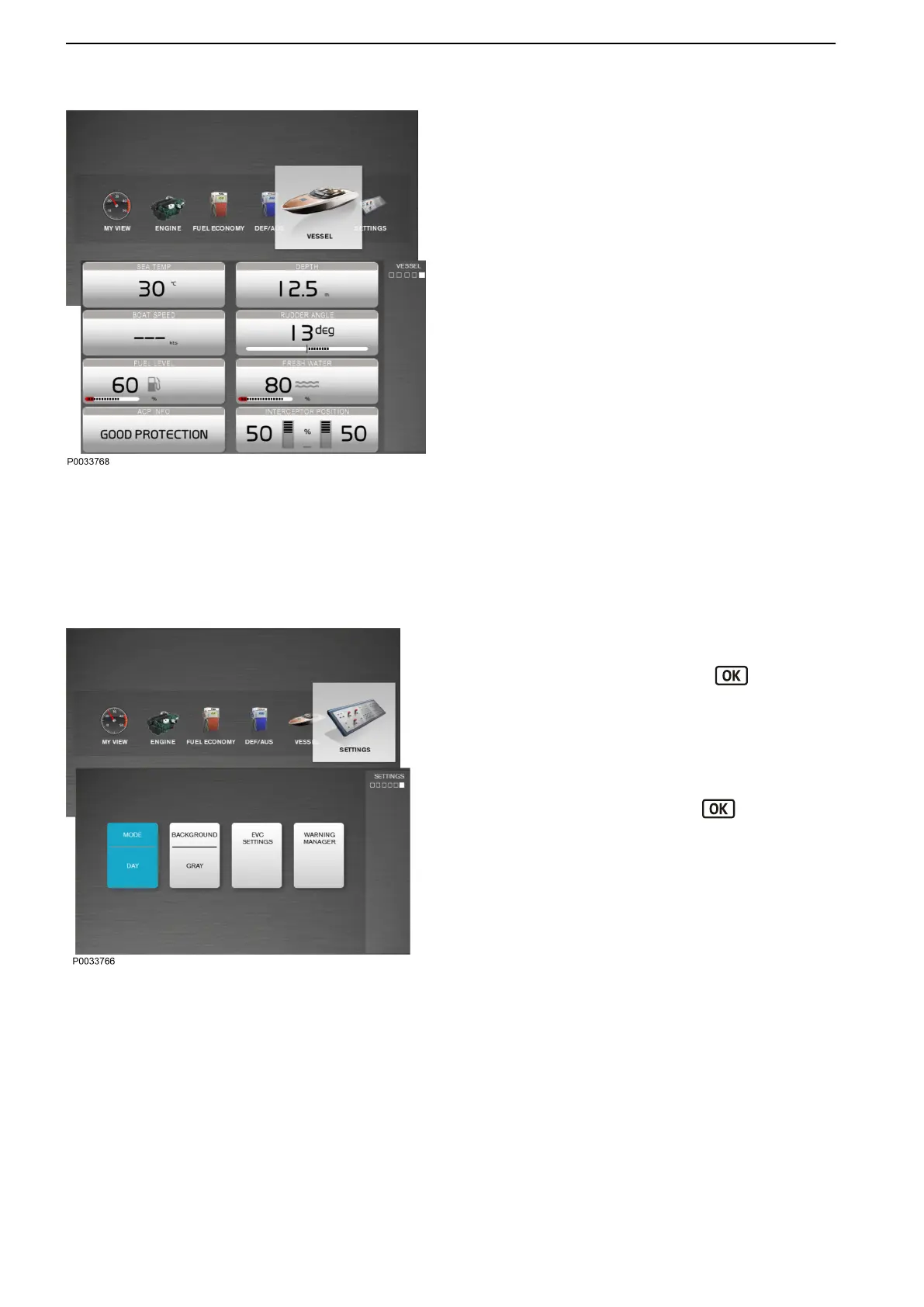
Vessel
The Vessel view shows information about the
installation of the boat. The information displayed
depends on the functions installed. The information
setup in this view cannot be changed. With full setup of
functions, the following parameters are displayed:
- Sea Water Temperature
- Depth shows the depth under the boat. To set the
echo sounder, see the information under Depth
Alarm in the chapter entitled Calibration and
Settings.
- Boat Speed
- Rudder Angle
- Fuel Level
- Freshwater Level
- ACP Info ACP Info shows information about Active
Corrosion Protection (ACP). For more information
about ACP, see the chapter entitled Active
Corrosion Protection.
- Interceptor Position shows the interceptor
position. For more information about the interceptor
system, see the chapter entitled Optional, page 70.
Settings
Functional settings and screen settings can be
modified in the Settings view. Navigate to desired
menu using the knob and press the
button to
access submenus.
Mode
Day mode shows dark-colored text against a light-
colored background and Night mode shows light-
colored text against a dark-colored background. To
switch between modes, press the button
Background
Choose between the background colors Gray, Aqua,
White, Carbon and Red.
Instruments and Controls
48 47713726 12-2021 © AB VOLVO PENTA










 To Next Page