14
WWW.VORONDESIGN.COM
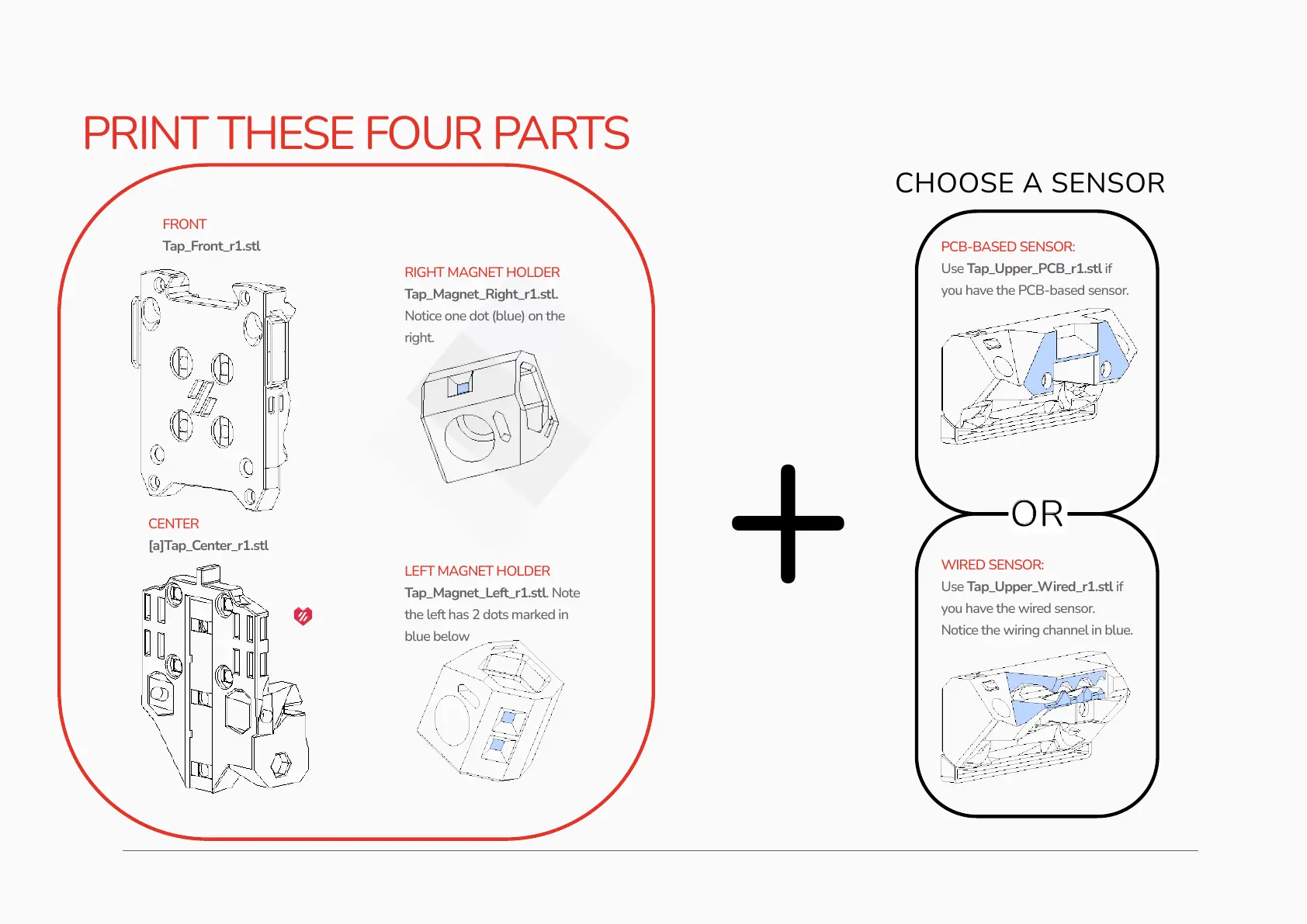
PRINT THESE FOUR PARTS
PCB-BASED SENSOR:
Use Tap_Upper_PCB_r1.stl if
you have the PCB-based sensor.
WIRED SENSOR:
Use Tap_Upper_Wired_r1.stl if
you have the wired sensor.
Notice the wiring channel in blue.
+
CHOOSE A SENSOR
OR
RIGHT MAGNET HOLDER
Tap_Magnet_Right_r1.stl.
Notice one dot (blue) on the
right.
FRONT
Tap_Front_r1.stl
CENTER
[a]Tap_Center_r1.stl
LEFT MAGNET HOLDER
Tap_Magnet_Left_r1.stl. Note
the left has 2 dots marked in
blue below


 To Next Page