Trouble Shooting Information
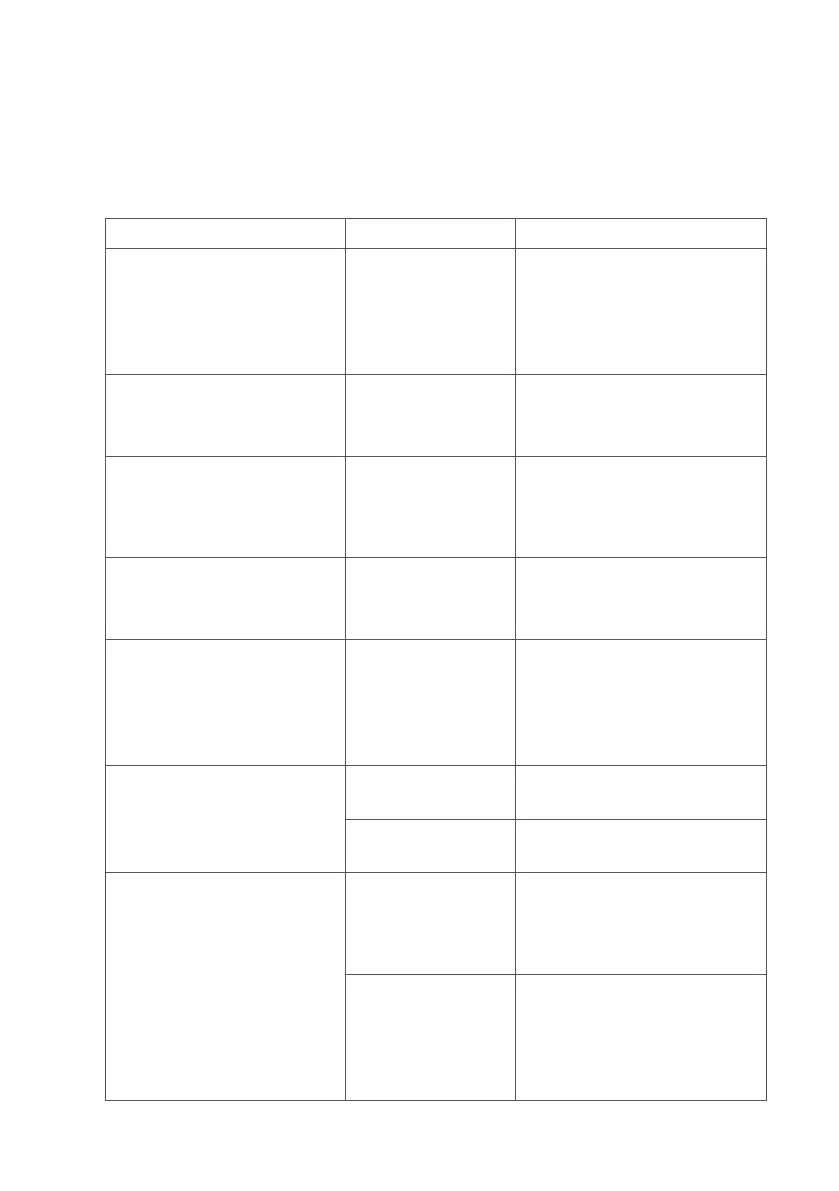
Should you encounter problems operating your MicroLab meter,
please consult the table below:
Problem Possible Cause Solution
display ‘freezes’ and the
unit does not respond to
any key presses
Multiple icons
have been
selected or
accidently
pressed
hold the on/off button
down for 10 seconds until
the unit switches off and
then turn on again
Does not register a blow Head assembly
or cable broken
Replacement of head
assembly or return the
unit for servicing
No display present Charger not
connected
or battery is
exhausted
Connect charger to the
mains and leave unit to
fully charge, or return the
unit for servicing
Blows are inverted on
the display
Head assembly
or cable broken
Replacement of head
assembly or return the
unit for servicing
Blows tracing ends
abruptly although
patient still exhaling
Turbine sticking Clean turbine in warm
soapy water or sterilising
solution, if problem
persists a replacement
turbine may be required
Battery does not hold
charge
Exhausted
battery
Return the unit for
servicing
Mains charger
faulty
Replace the mains
charger
Paper not printing Check paper is
housed in printer
compartment
correctly
Refer to section “paper
loading” of this manual,
and follow the
instructions
Incorrect
thermal paper
being used
Ensure you are using
Vyaire recommended
thermal paper (See
Consumables /
Accessories section)
38



 To Next Page