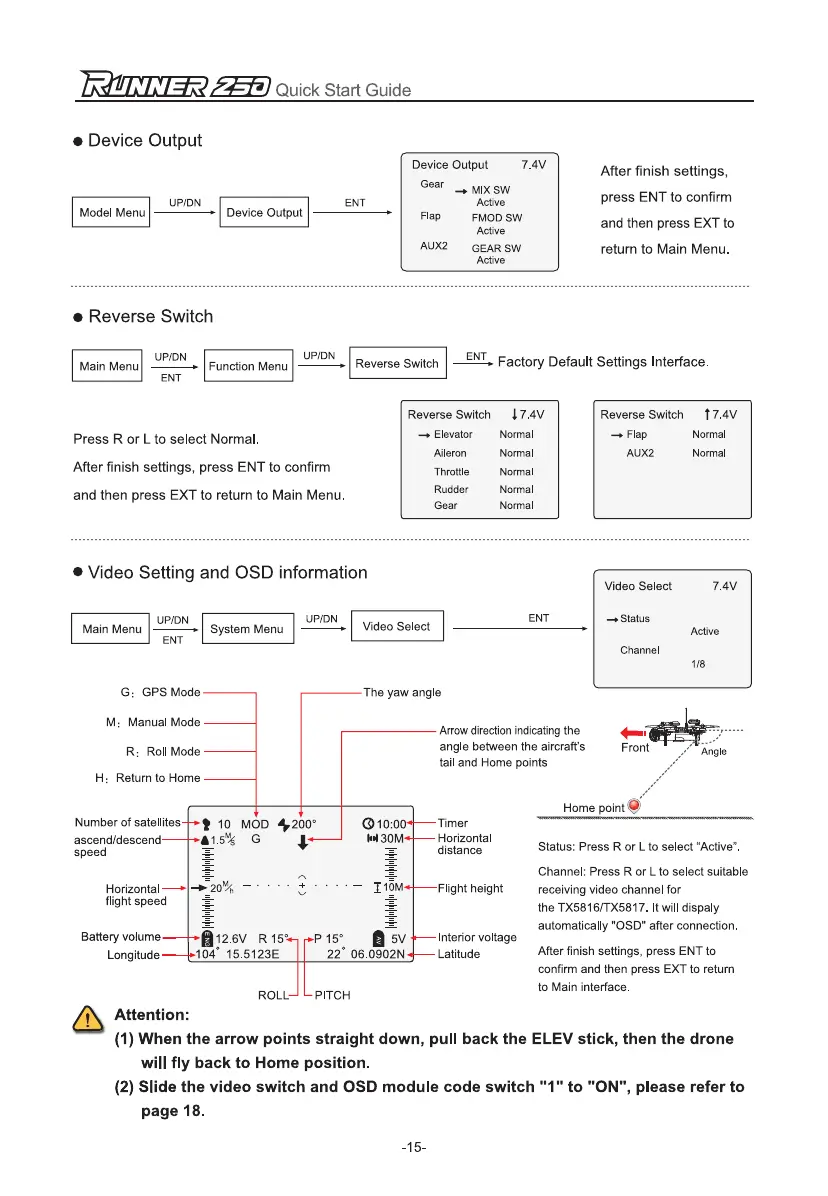
Device Output
7.4V
Gear
MIX SW
Active
Flap
FMOD SW
Active
AUX2 GEAR SW
Active
After finish settings,
press ENT to confirm
and then press EXT to
return to Main Menu.
Model Menu
UPIDN
Device Output
ENT
UP/DN
UP/DN
ENT
Main Menu
Function Menu
Reverse Switch
Ear
Factory Default Settings Interface.
Press R or L to select Normal.
After finish settings, press ENT to confirm
and then press EXT to return to Main Menu.
Reverse Switch
Elevator
Aileron
Throttle
Rudder
Gear
4,
7.4V
Normal
Normal
Normal
Normal
Normal
Reverse Switch
Flap
AUX2
t 7.4V
Normal
Normal
7.4V
Video Select
—.Status
Channel
Active
1/8
UP/DN
System Menu
ENT
Arrow direction indicating the
angle between the aircraft's
tail and Home points
The yaw angle
G
:
GPS Mode
M
:
Manual Mode
R
:
Roll Mode
H
:
Return to Home
•
Video Setting and OSD information
Video Select
UP/DN
ENT
Main Menu
717=LET
Quick Start Guide
•
Device Output
•
Reverse Switch
Number of satellites
2
10 MOD 4200
°
010.0'
Timer
ascend/descend
111.5
m
4
G4
distance
1430m
Horizontal
speed
Status: Press R or L to select "Active".
M
—
,-
Channel: Press R or L to select suitable
Horizontal
—+20
1
% – • • • • .,, • • • • – DOM
Flight height
receiving video channel for
flight speed
w
the TX5816fTX5817. It will dispaly
automatically "OSD" after connection.
Battery volume
a
12.6V R 15
°
15
°
0 5V
Intedor voltage
Longitude
04
*
15.5123E
22
*
06.0902N
Latitude
After finish settings, press ENT to
confirm and then press EXT to return
to Main interface.
Q
t Attention:
(1)
When the arrow points straight down, pull back the ELEV stick, then the drone
will fly back to Home position.
(2)
Slide the video switch and OSD module code switch "1" to "ON", please refer to
page 18.
ROLL PITCH
-15-


 To Next Page