17=45ET
Quick Start Guide
10.6 Introduction for FCS-RUNNER 250(R) Main Controller
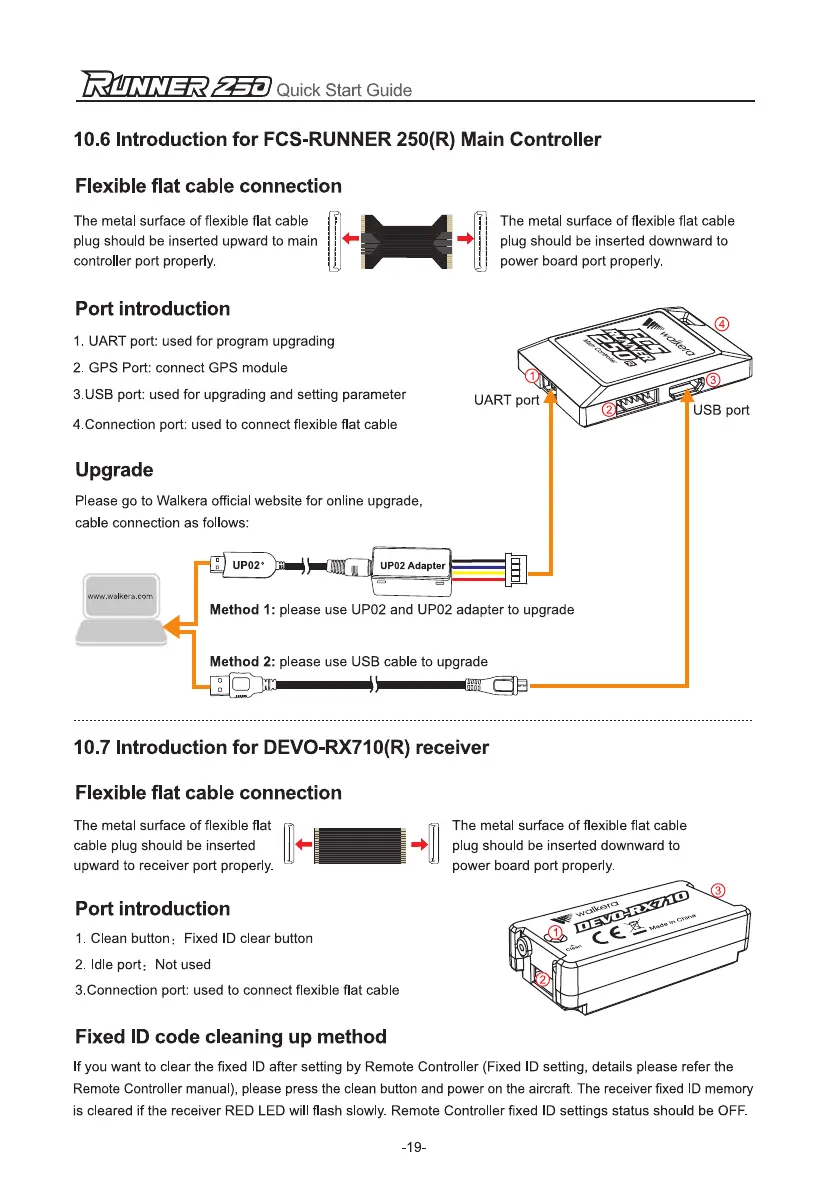
Flexible flat cable connection
The metal surface of flexible flat cable
plug should be inserted upward to main
controller port properly.
The metal surface of flexible flat cable
plug should be inserted downward to
power board port properly.
Port introduction
1.
UART port: used for program upgrading
2.
GPS Port: connect GPS module
3.USB port: used for upgrading and setting parameter
4.Connection port: used to connect flexible flat cable
Upgrade
Please go to Walkera official website for online upgrade,
cable connection as follows:
1:)
UP02° )Imi
11811
UP02 Adapter
°
=,
www.walkera.com
Method 1:
please use UP02 and UP02 adapter to upgrade
Method 2:
please use USB cable to upgrade
10.7 Introduction for DEVO-RX710(R) receiver
Flexible flat cable connection
The metal surface of flexible flat
cable plug should be inserted
upward to receiver port properly.
The metal surface of flexible flat cable
plug should be inserted downward to
power board port properly.
Port introduction
1.
Clean button
:
Fixed ID clear button
2.
Idle port
:
Not used
3.Connection port: used to connect flexible flat cable
Fixed ID code cleaning up method
If you want to clear the fixed ID after setting by Remote Controller (Fixed ID setting, details please refer the
Remote Controller manual), please press the clean button and power on the aircraft. The receiver fixed ID memory
is cleared if the receiver RED LED will flash slowly. Remote Controller fixed ID settings status should be OFF.
-19-


 To Next Page