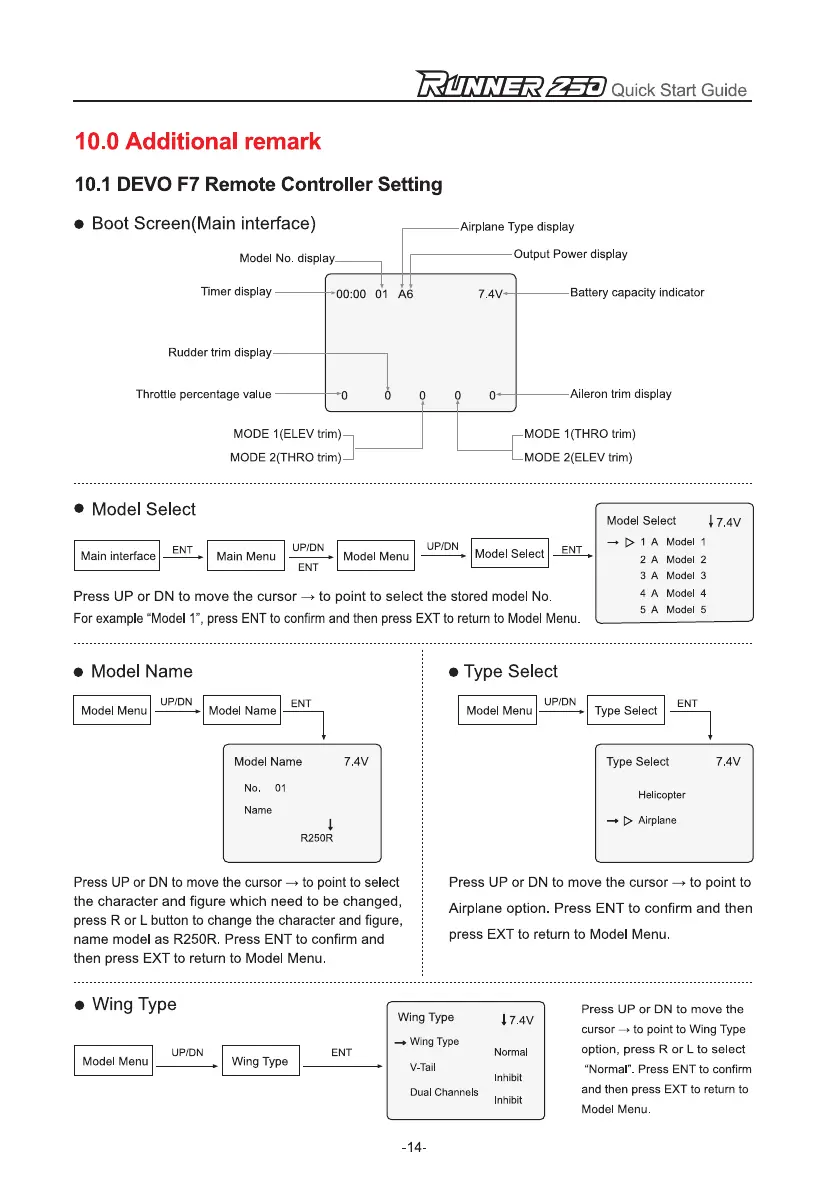
Airplane Type display
10.0 Additional remark
10.1 DEVO F7 Remote Controller Setting
•
Boot Screen(Main interface)
Model Select
Model Menu
Main Menu
UP/DN
UP/DN
ENT
ENT
ENT
Main interface
Output Power display
Model No. display
•
Model Name
•
Type Select
Timer display
00:00 01 A6
7.4V
Battery capacity indicator
Aileron trim display
MODE 1(THRO trim)
MODE 2(ELEV trim)
•
Model Select
Press UP or DN to move the cursor —> to point to select the stored model No.
For example "Model 1", press ENT to confirm and then press EXT to return to Model Menu.
Model Select
j 7.4V
-
D 1 A Model 1
2 A Model 2
3 A Model 3
4 A Model 4
5 A Model 5
Model Menu
UP/DN
Model Name
Model Menu
UP/DN
Type Select
Press UP or DN to move the cursor —> to point to se ect
the character and figure which need to be changed,
press R or L button to change the character and figure,
name model as R250R. Press ENT to confirm and
then press EXT to return to Model Menu.
Press UP or DN to move the cursor to point to
Airplane option. Press ENT to confirm and then
press EXT to return to Model Menu.
Rudder trim display
Throttle percentage value
MODE 1(ELEV tr m)
MODE 2(THRO tr m)
ENT ENT
Model Name
7.4V
No. 01
Name
R250R
Type Select
7.4V
Helicopter
-
> Airplane
r
/=,EET Quick Start Guide
•
Wing Type
ENT
Press UP or DN to move the
cursor
to point to Wing Type
option, press R or L to select
Wing Type
Wing Type
17.4v
Normal
UP/DN
Model Menu
Wing Type
V-Tail
"Normal". Press ENT to confirm
Dual Channels
Inhibit
and then press EXT to return to
Inhibit
Model Menu.
-14-


 To Next Page