ENT
UP/DN
UP/DN
Press R or L to
select "NORM".
Main interface
FUNCTION
REVSW
Press ENT to enter
the "REVSW"
setting interface.
•
OUTPU
DN R/L
DN
R/L
DN
R/L
DN
R/L
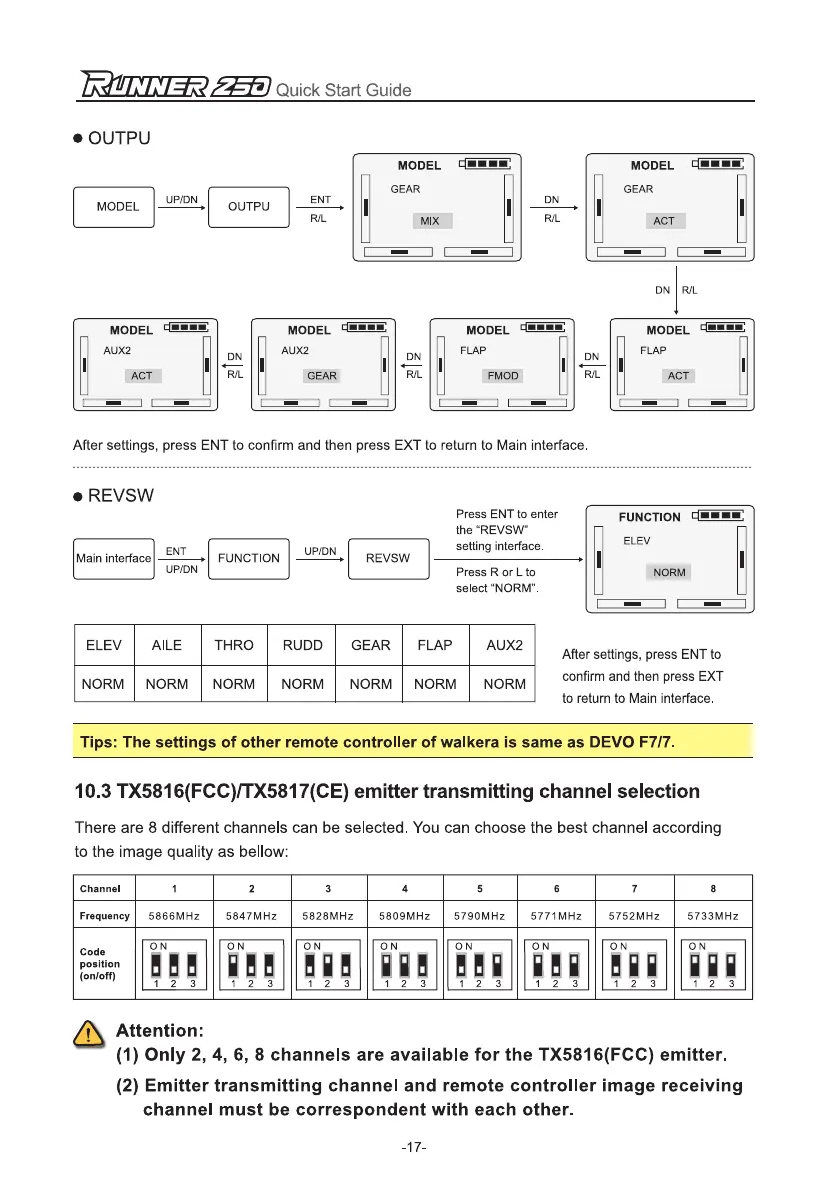
After settings, press ENT to confirm and then press EXT to return to Main interface.
•
REVSW
ENT
R/L
DN
R/L
MODEL
UP/DN
OUTPU
MODEL
cl""
AUG
ACT
I
I
I
MODEL
am.
AUX2
GEAR
I
I
I
MODEL cl""
FLAP
FMOD
I
I
I
MODEL n....
FLAP
ACT
MODEL
O•••-
GEAR
I
MIX
MODEL
El....
GEAR
ACT
`
LET
Quick Start Guide
ELEV
AILE
THRO
RUDD
GEAR
FLAP
AUX2
NORM
NORM
NORM
NORM NORM NORM NORM
After settings, press ENT to
confirm and then press EXT
to return to Main interface.
Tips: The settings of other remote controller of walkera is same as DEVO F7/7.
10.3 TX5816(FCC)/TX5817(CE) emitter transmitting channel selection
There are 8 different channels can be selected. You can choose the best channel according
to the image quality as bellow:
Channel
1
2
3
4
5
6
7
8
Frequency
5866MHz 5847MHz 5828MHz 5809MHz 5790MHz 5771MHz
5752MHz 5733MHz
Code
position
(on/oft)
ON
WWW
1
2
3
ON
11
17
1
2
3
ON
WOM
1
2
3
ON
MWO
1
2
3
ON
WWM
1
2
3
ON
MOW
1
2
3
ON
WOW
1
2
3
ON
MWW
1
2
3
n
e
Attention:
(1)
Only 2, 4, 6, 8 channels are available for the TX5816(FCC) emitter.
(2)
Emitter transmitting channel and remote controller image receiving
channel must be correspondent with each other.
-17-


 To Next Page