11.0 Camera(1920x1080P) Instructions
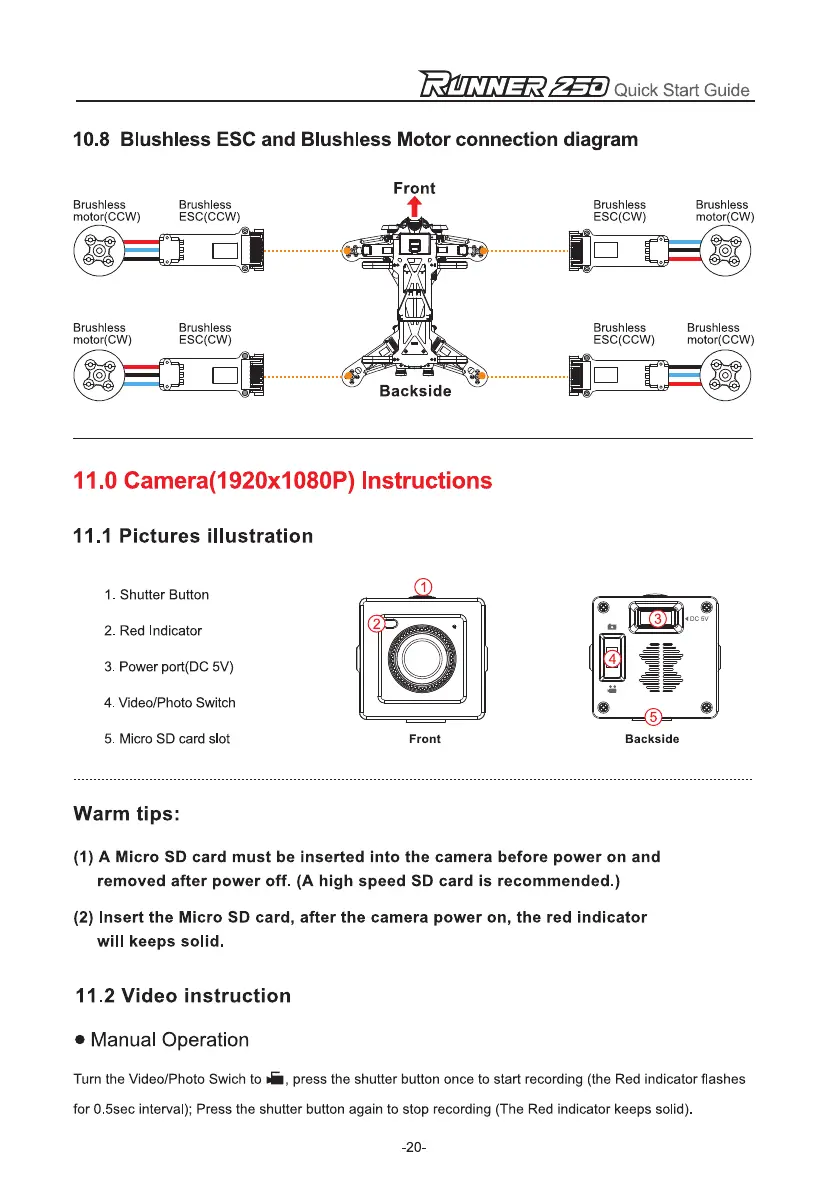
11.1 Pictures illustration
1.
Shutter Button
2.
Red Indicator
3.
Power port(DC 5V)
4.
Video/Photo Switch
5.
Micro SD card slot
Front
Backside
Brushless
motor(CCW)
Brushless
ESC(CCW)
Brushless
ESC(CW)
Brushless
motor(CW)
Brushless
motor(CW)
Brushless
ESC(CW)
ri
---,
Backside
Brushless
ESC(CCW)
Brushless
motor(CCW)
ZE.T
Quick Start Guide
10.8 Blushless ESC and Blushless Motor connection diagram
Front
Warm tips:
(1)
A Micro SD card must be inserted into the camera before power on and
removed after power off. (A high speed SD card is recommended.)
(2)
Insert the Micro SD card, after the camera power on, the red indicator
will keeps solid.
11.2 Video instruction
•
Manual Operation
Turn the Video/Photo Swich to
a,
press the shutter button once to start recording (the Red indicator flashes
for 0.5sec interval); Press the shutter button again to stop recording (The Red indicator keeps solid).
-20-


 To Next Page