r
/=,EET Quick Start Guide
4.0 Attention before flight
•
This product is suitable for people who has flight experience of hobby model and ages 14+.
•
Please do not fly the runner 250 advance in the situation that the windpower is more than level 3,
either in rainy, sowny or foggy etc bad weather.
•
Please choose the open, legal field to fly, and consider your flight skills and mental status.
•
Please keep a certain distance with aircraft and away from the highspeed rotating parts (such as propellers,
brushless motor) during flying.
•
Do not fly it in where there is high-voltage lines, communication base stations or radio towers, in order to
avoid signal interference.
•
Don't fly in no-fly zone according to the local laws and regulations.
5.0 Charge the Battery
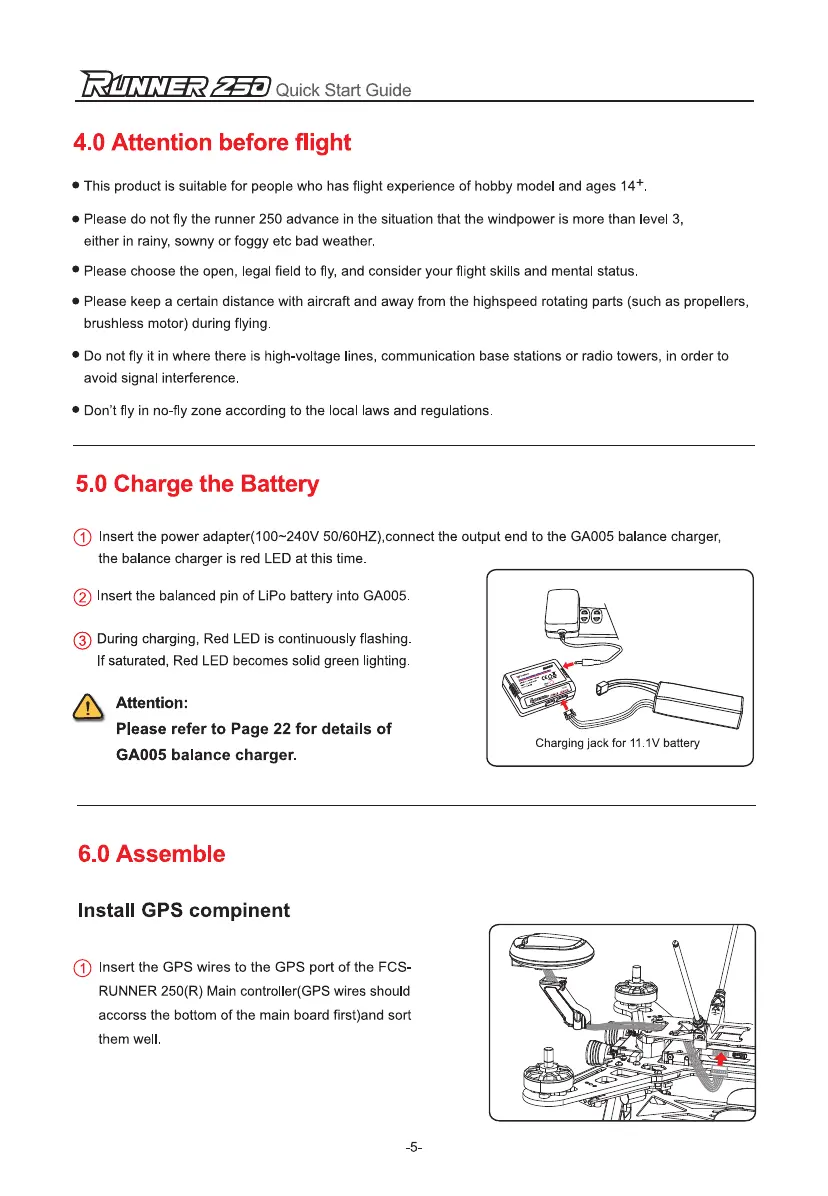
0 Insert the power adapter(100-240V 50/60HZ),connect the output end to the GA005 balance charger,
the balance charger is red LED at this time.
0 Insert the balanced pin of LiPo battery into GA005.
® During charging, Red LED is continuously flashing.
If saturated, Red LED becomes solid green lighting.
,
C
.
S Attention:
Please refer to Page 22 for details of
GA005 balance charger.
Install GPS compinent
Insert the GPS wires to the GPS port of the FCS-
RUNNER 250(R) Main controller(GPS wires should
accorss the bottom of the main board first)and sort
them well.
-5-


 To Next Page