Controls
BXTR6438
Trailer Wood Chipper
28
Fig. 17 – Feed Settings Screen
0:00 HOURS
ROTOR SPEED
FEED POSITION
NEUTRAL
RPM
0000
01245
SETTINGS
FEED SETTINGS
RESET DEFAULTS
DIAGNOSTICS
ENTER PASSWORD
Settings Menu screen
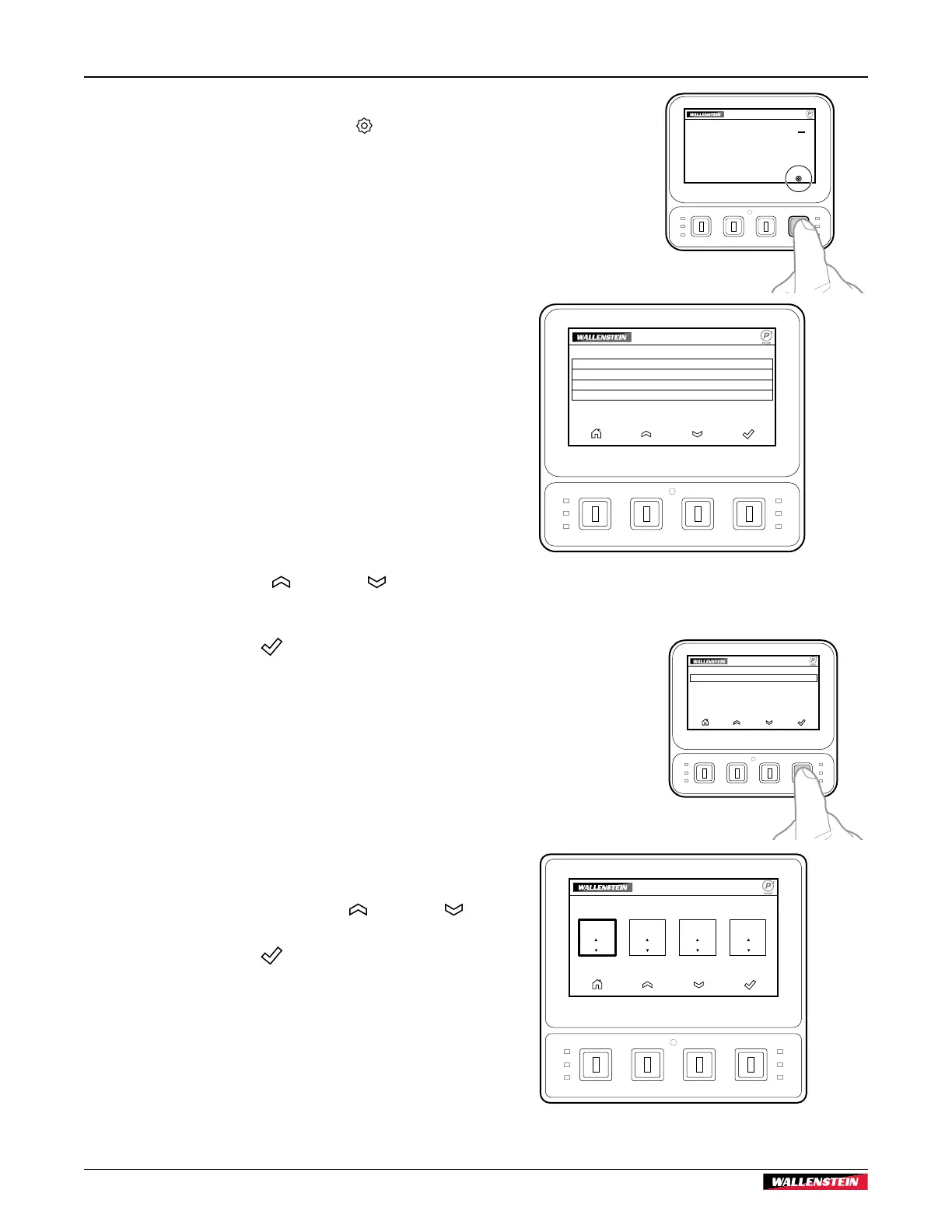
On the Main screen, press the soft key below Settings to
open the Settings Menu screen. Use this screen to select a
settings option. All settings are retained when the machine is
shut down.
The Settings Menu screen includes:
• FEED SETTINGS – Opens the Feed Settings screen
(see page 28) to set the maximum or minimum feed
roller speed, feed roller start speed, or minimum feed
rotor speed.
• RESET DEFAULTS – Opens the Reset Defaults screen
(see page 10) to confirm that you want to return all
settings to the factory default values.
• DIAGNOSTICS – Opens the Diagnostics screen
(see page 10) to see an overview of the machine
operating parameters (for example; feed roller position,
rotor speed, solenoid valve current, or current feed
settings).
• ENTER PASSWORD – This is for use by Wallenstein
technicians and dealers.
Open a screen:
1. Use the soft key below the
Up arrow or Down arrow
to scroll through the menu options. The active selection is
highlighted.
2. Press the soft key below
Select to open the highlighted
screen.
Feed Settings screen
The Feed Settings screen provides access to the four main
P3 PULSE program settings. The active selection is highlighted.
The initial selection is MAX FEED SPEED.
Change settings:
1. If required, press the soft key below the Up arrow or
Down arrow to change the setting number.
2. Press the soft key below
Select to save the displayed
number and select the setting to the right.
3. Repeat Steps 1 and 2 three times to change the settings, as
required, and return to Settings Menu screen.
01250
FEED SETTINGS
MAX FEED
SPEED
MIN FEED
SPEED
FEED START
SPEED
MIN ROTOR
RPM
0% 0% 0000 0000
Fig. 18 – Settings Menu screen
Fig. 19 – Feed Settings screen
01549
SETTINGS
FEED SETTINGS
RESET DEFAULTS
DIAGNOSTICS
ENTER PASSWORD


 To Next Page