BXTR6438
Trailer Wood Chipper
Operating Instructions
41
5.11 Unplugging the Chipper
The wood chipper is designed to handle a wide range of material
sizes without any problem. However, in the event material
gets lodged in the chipper, follow this procedure to clear the
blockage.
1. Before shutting the engine off, reverse the feed rollers to
remove the material from the feed hopper.
2. Place the machine in a Safe Condition before proceeding
further. See page 8.
3. Clear all the material out of the feed hopper. Make sure
nothing is jammed or wedged between the feed rollers
and the rotor. If material is jammed in this area, proceed to
Step 7.
If the chipper is still plugged or the engine has shut down, the
jammed material must be removed by hand.
CAUTION!
Be aware of the risk of injury. Rotor continues to
turn for a few revolutions after engine is stopped.
Wait for all parts to stop moving before opening
any machine access.
W092
CAUTION!
The chipper blades are very sharp. Use caution
when reaching into the rotor compartment to
clear stuck material.
W026
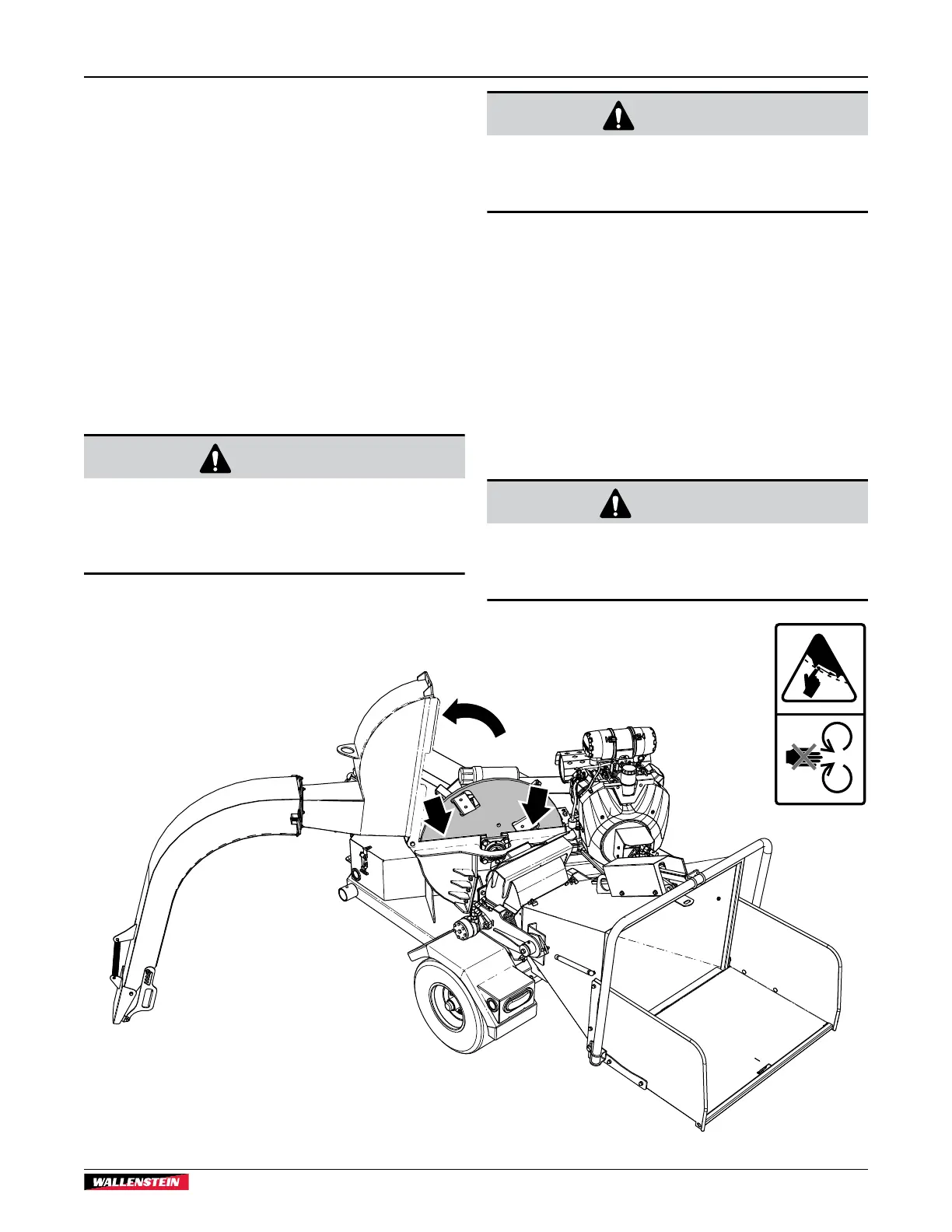
4. Remove the rotor housing flange bolt and open the housing.
Clear out any jammed material inside.
5. Pull any remaining material out of the feed hopper and
discharge hood.
6. Use a stick to poke any material loose jammed into the
discharge hood. Be sure all the material is cleared out, and
nothing is jammed or wedged between the input opening
and the rotor.
7. Check that everyone is clear of machine before restarting
engine.
8. Start the engine and resume working.
WARNING!
Machine shown with shields removed for
illustrative purposes only. Never operate
machine with shields removed.
W001
01578
Fig. 35 – Open Upper rotor Housing to clear Jam


 To Next Page