EasyManua.ls Logo

Wang 5536 - Page 57

Default Icon
112 pages
Print Icon
To Next Page IconTo Next Page
To Previous Page IconTo Previous Page
Loading...
3402
5.2.1.3
Video
Display
Alignment
Procedure
o
Create
a
document
to
display
a
full
screen
(80x24)
filled
with
alter-
nating
characters
"HO"
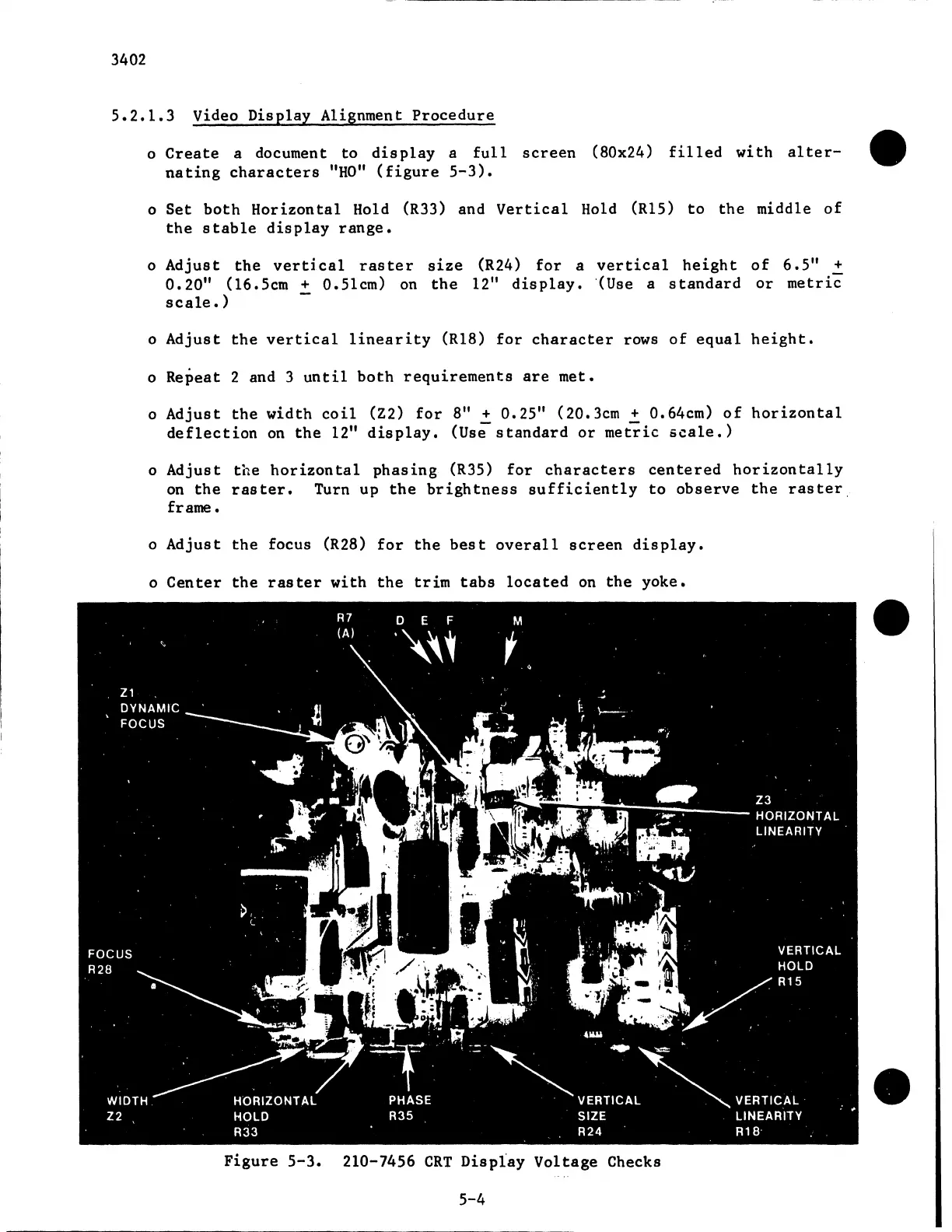
(figure
5-3).
o
Set
both
Horizontal
Hold
(R33)
and
Vertical
Hold
(Rl5)
to
the
middle
of
the
stable
display
range.
o
Adjust
the
vertical
raster
size
(R24)
for
a
vertical
height
of
6.5"
+
0.20"
(16.5cm
+
0.5lcm)
on
the
12"
display.
·(use
a
standard
or
metric
scale.)
o
Adjust
the
vertical
linearity
(Rl8)
for
character
rows
of
equal
height.
o
Repeat
2
and
3
until
both
requirements
are
met.
o
Adjust
the
width
coil
(Z2)
for
8"
+
0.25
11
(20.3cm
+
0.64cm)
of
horizontal
deflection
on
the
12"
display.
(Use
standard
or
metric
scale.)
o
Adjust
the
horizontal
phasing
(R35)
for
characters
centered
horizontally
on
the
raster.
Turn
up
the
brightness
sufficiently
to
observe
the
raster.
frame.
o
Adjust
the
focus
(R28)
for
the
best
overall
screen
display.
o
Center
the
raster
with
the
trim
tabs
located
on
the
yoke.
Figure
5-3.
210-7456
CRT
Display
Voltage
Checks
5-4

Related product manuals