EasyManua.ls Logo

Wang 5536 - Page 65

Default Icon
112 pages
Print Icon
To Next Page IconTo Next Page
To Previous Page IconTo Previous Page
Loading...
3402
5.2.2.5
Motherboard/Rear
Panel
Assembly
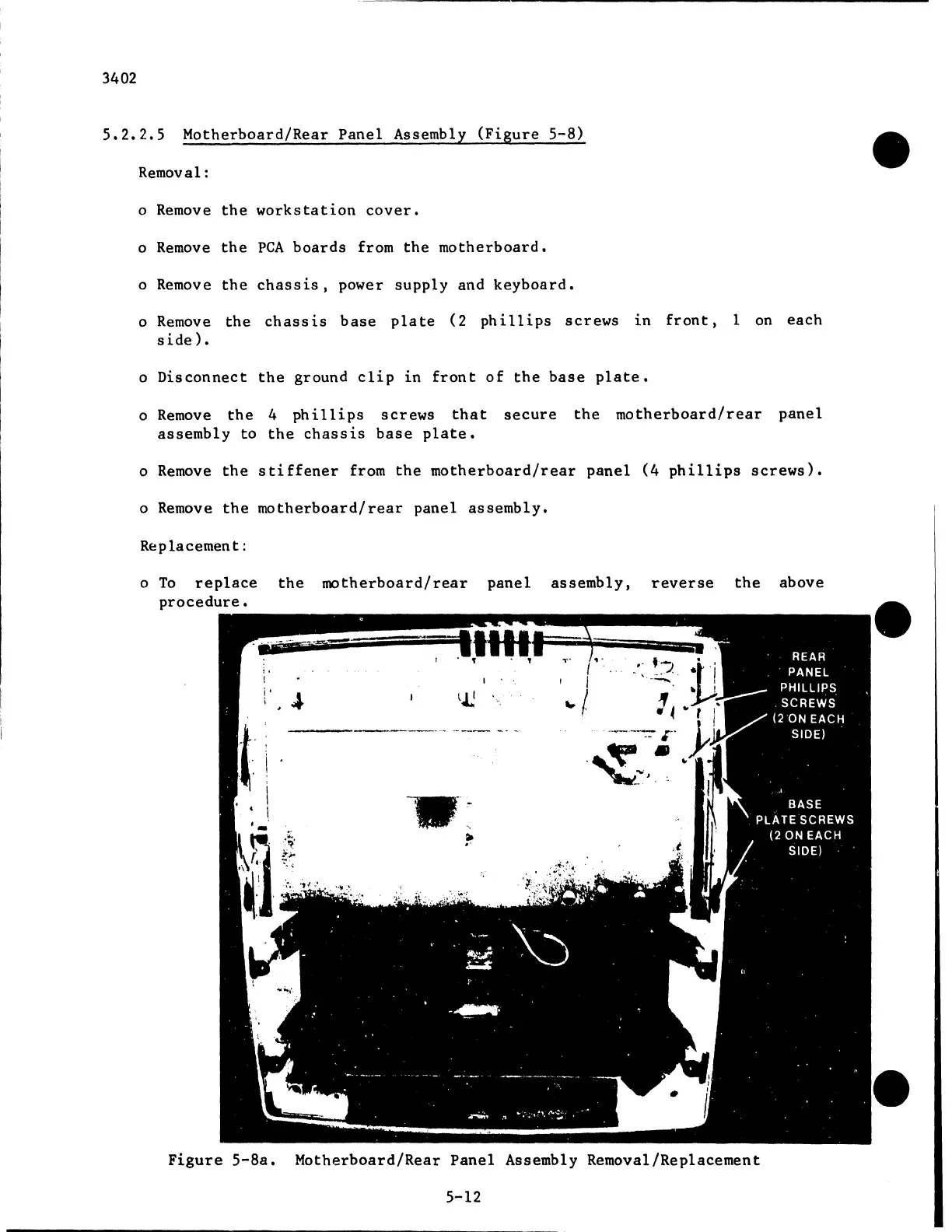
(Figure
5-8)
Removal:
o
Remove
the
workstation
cover.
o
Remove
the
PCA
boards
from
the
motherboard.
o
Remove
the
chassis,
power
supply
and
keyboard.
o
Remove
the
chassis
base
plate
(2
phillips
screws
in
front,
1
on
each
side).
o
Disconnect
the
ground
clip
in
front
of
the
base
plate.
o
Remove
the
4
phillips
screws
that
secure
the
motherboard/rear
panel
assembly
to
the
chassis
base
plate.
o
Remove
the
stiffener
from
the
motherboard/rear
panel
(4
phillips
screws).
o
Remove
the
motherboard/rear
panel
assembly.
Replacement:
o
To
replace
the
motherboard/rear
panel
assembly,
reverse
the
above
procedure.
I
i.
'
i
..
I .
I
I
~1
1.
Figure
5-8a.
Motherboard/Rear
Panel
Assembly Removal/Replacement
5-12

Related product manuals