Wash Thermostat
Part Number
30201
Function
Controls the wash element
Description
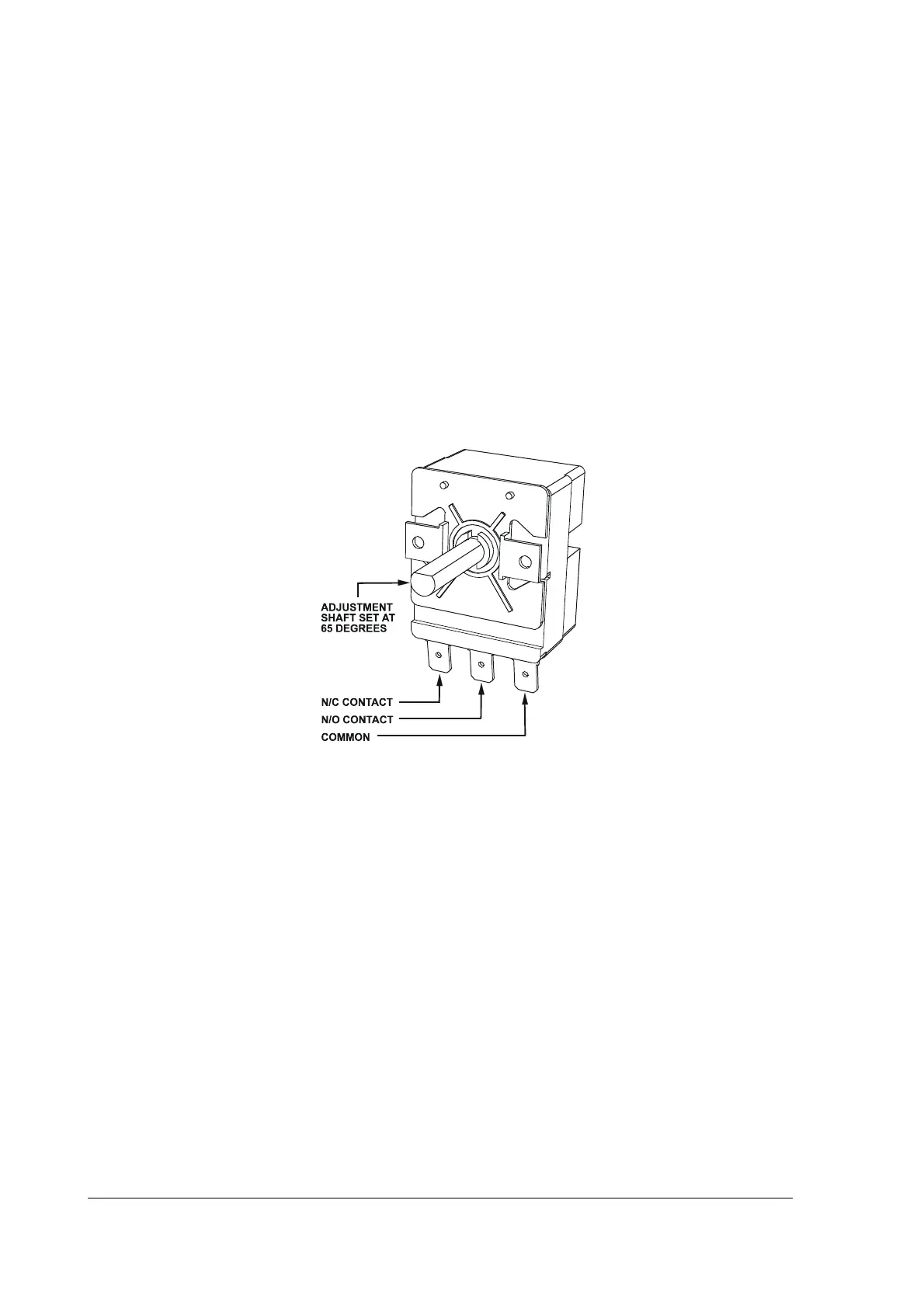
The wash thermostat is a single pole capillary type device. It has a single changeover contact
and a rotating shaft for a manual temperature adjustment.
Factory default setting is 65°C.
Contact switching capacity: 16(4) A 380 V.
Diagram
Replacement
Drain the wash tank. Take note of the connections to the wiring loom before
disconnecting. Release thermostat’s gland nut, move the capillary bulb out of the mounting
bracket inside the tank and remove the bulb from the wash tank (remove the probe from
the pocket in the wash tank on the models supplied with a pocket for the thermostat
probe). Replace in reverse order.
Adjustment
Insert the probe of a digital thermometer into the wash tank. Check the thermostat settings
on a temperature rise. Adjustment is performed by rotating the adjustment shaft of the
thermostat. Clockwise rotation of the shaft increases the setting, anticlockwise– decreases it.
NOTE: the adjustment shaft in a flat horizontal position is a factory default setting
corresponding to 65°C (see the diagram).



 To Next Page