Operating Instructions
Start up
Fit drain upstand, wash pump filters,
scrap trays and shut door.
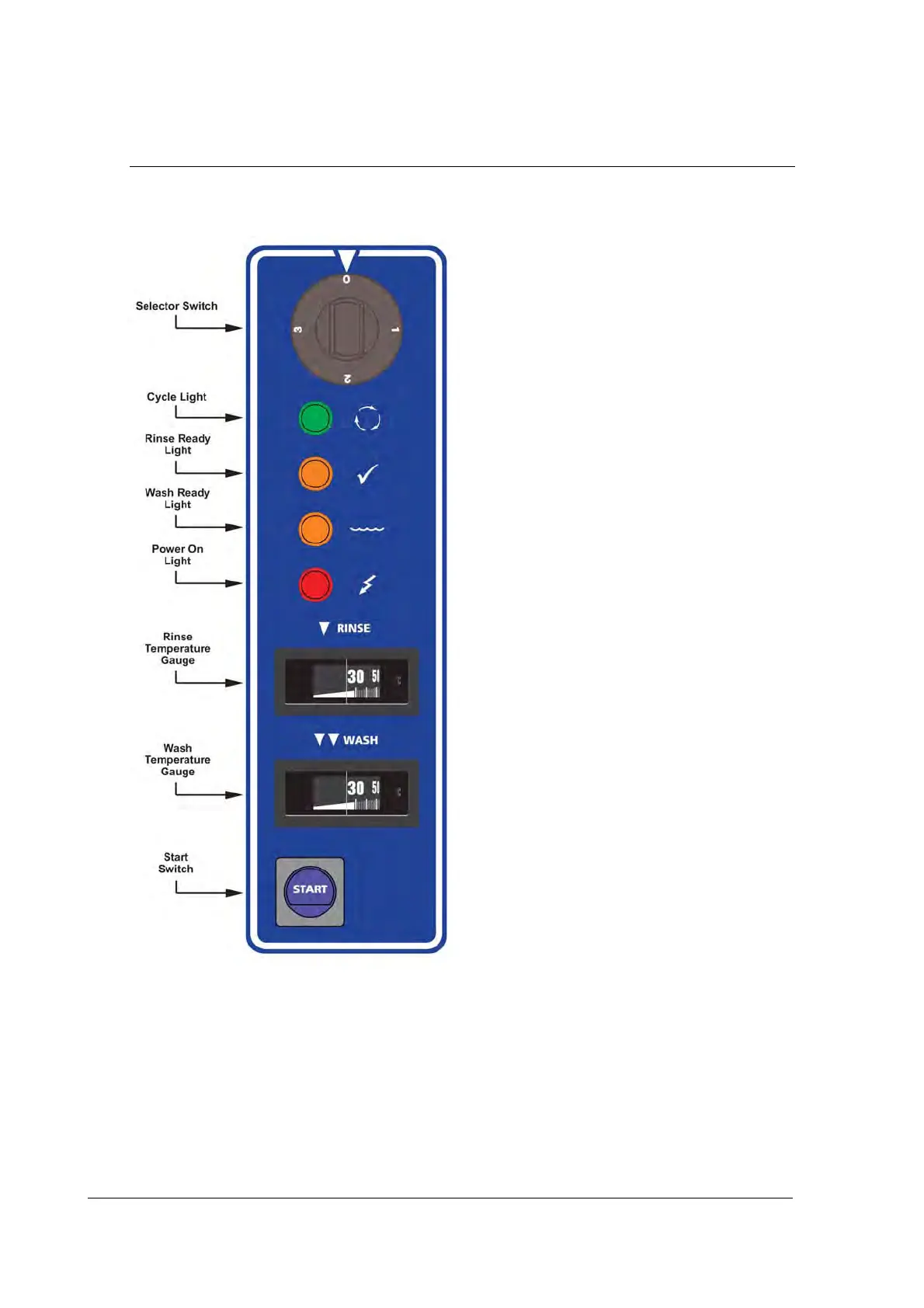
Turn wall power switch on and select
any cycle (1, 2 or 3).
Power light glows red and machine fills
automatically.
Wash Ready light (water symbol) glows
amber when wash tank is ready.
Rinse Ready light (tick symbol) glows
amber when the machine is up to
required temperature and ready to run.
Operation
Select required cycle (1, 2 or 3 for
2, 4 or 6 minutes cycle accordingly).
Try cycle 3 initially and switch to faster
cycles only if necessary.
Load rack into machine and close door.
Press Start button to start the machine.
Cycle light glows green while machine
operates.
When Cycle light goes out, cycle is
complete.
Open door and remove rack.
NOTE: Machine will not operate unless
Ready lights are on.
Shut down every night
Turn machine and wall power switches off.
Remove drain upstand to drain wash tank.
Remove scrap trays and wash pump filters and rinse clean.
Replace drain upstand, filters and scrap trays.



 To Next Page