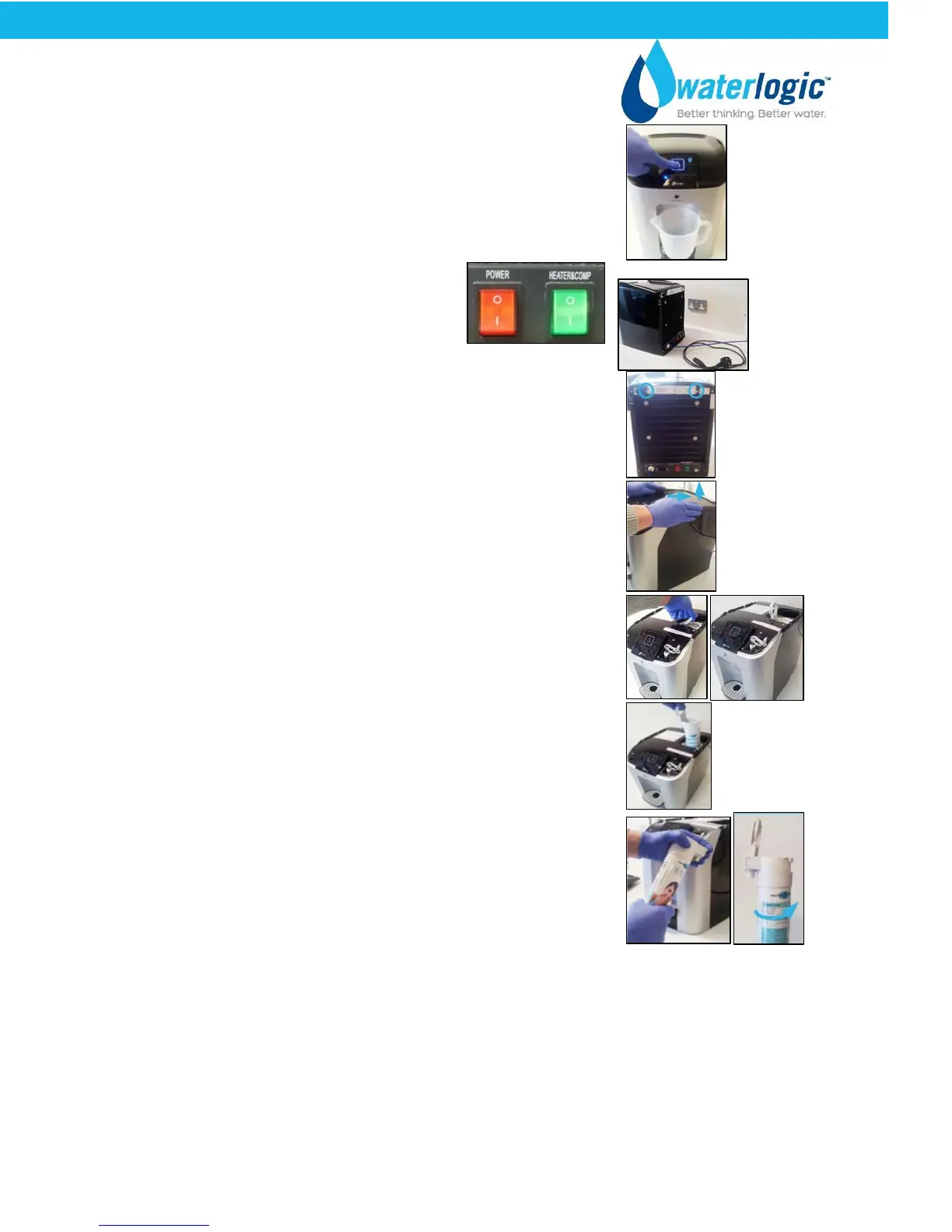
Select the cold water icon and then the dispense button
until no more water is being dispensed.
Switch off the Red Power Switch
O=OFF at the rear of the machine and
remove the power lead from the unit.
Use a Phillips-head screwdriver to remove the two screws
at the rear of the machine that hold the top panel.
Remove the top panel by placing your hands on the top as
shown in the picture and push it backwards and then lift it
up to remove.
Insert your finger into the round hole of the lever, and pull
the lever up to the vertical position.
Pull the lever straight up to remove the filter assembly
(some slight force may be required)
Unscrew the filter body from the filter head by turning the
base in an anti-clockwise direction.
Pour away the excess water.
Remove the UV lamp by removing the screw fixing the UV lamp protective cover in place and
removing the cover. Unplug the UV loom, and pull the lamp upwards to remove.
Examining the UV loom for any discoloration or wear. If there is any visible discoloration or
wear, remove the loom and replace with a new one.
CUBE Operating, Installation, and Service Manual Page 32 - Revision: 6-23-2015


 To Next Page