Wavecom Instruments Fully Integrated Test N Print Unit - User Manual
23
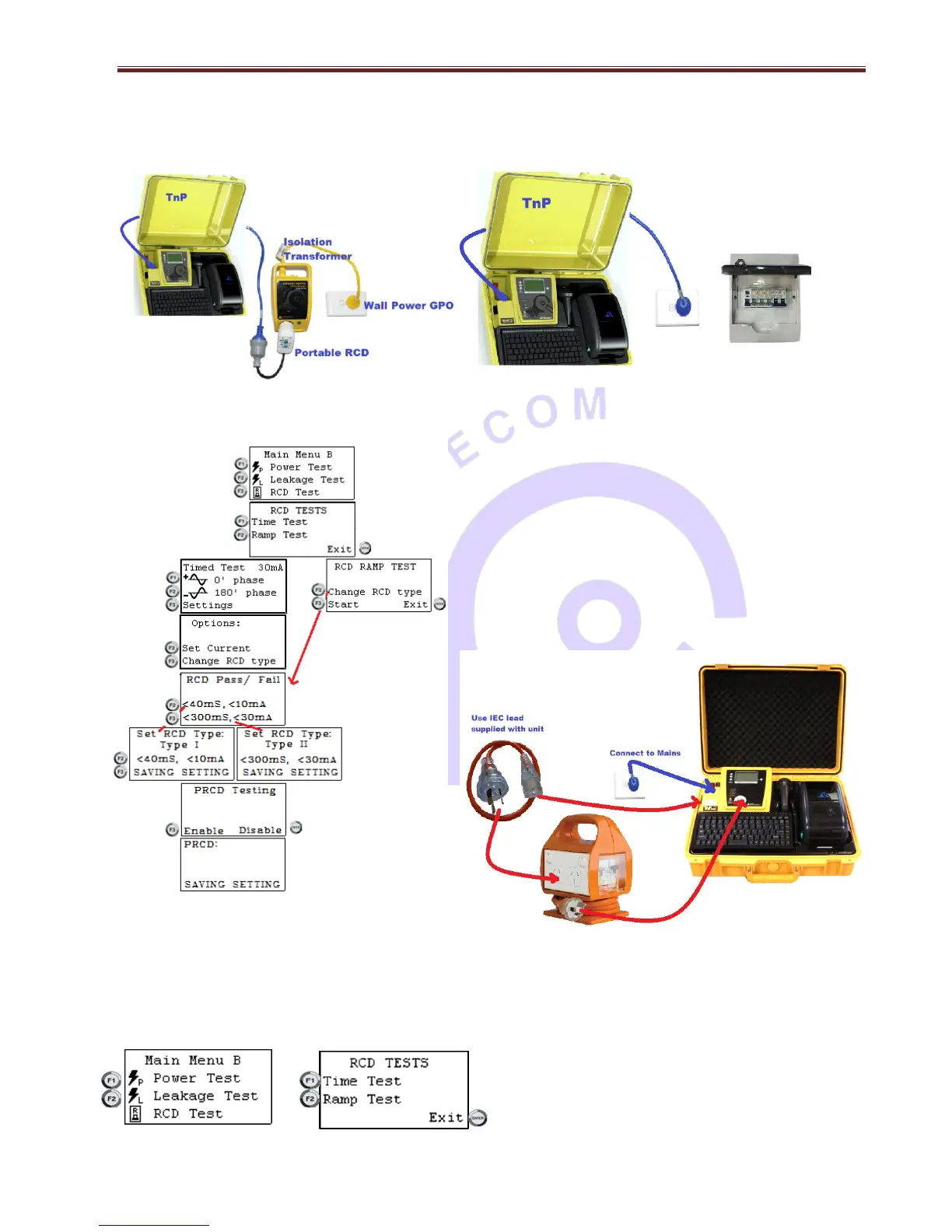
TnP500, TnP500W, TnP500X & TnP500WX – all are required to be connected as per bellow. Use adapter cable that is
provided with X units 20A for 500X and 500WX units.
Diagram 1 For Testing Portable RCD Diagram 2 For Testing Fixed RCD -All models
For testing Portable RCD in TnPB series – with 4.3 Motherboard and Internal Lithium-ion Battery [Separate Isolation
Transformer – not required]
Note* Portable RCD must have hard re-set button (unlike RCDs like
in Diagram1 above where re-set button only works when RCD is
powered. In such cases, please connect TnPB series as per diagram
1)
Connect Portable RCD – with hard re-set switch- as per diagram 3.
Enable Portable RCD from Main Menu B > F3 / RCD Tests > F1 /Time
Test > F3 /Settings > F3 / Change RCD Type > select F2 or F3 > Select
F3 to enable PRCD or Enter to disable PRCD.
Enable Portable RCD from Main Menu B > F3 / RCD Tests > F2 /
Ramp Tests > > F2 / Change RCD Type > select F2 or F3 > Select sF3
to enable PRCD or Enter to disable PRCD.
For testing Fixed / Wall/ Board RCD in TnPB series; Power
the unit from RCD board / GPO, connect as per diagram
2 in previous page. Disable PRCD function as per the flowchart above, to test fixed RCD / wall / Board RCD.
To do RCD test, select F3 in Menu B, press Return/Enter button.
To enter the RCD menu from Main Menu B, press and release the F3 button.


 To Next Page