Please Do Not Return This Product To The Store. Call Us Directly! Our Trained Technicians Will Answer Your Questions and/or Ship Any Parts You May Need
8
Press
Here
T
o
O
p
e
r
a
t
e
D
o
o
r
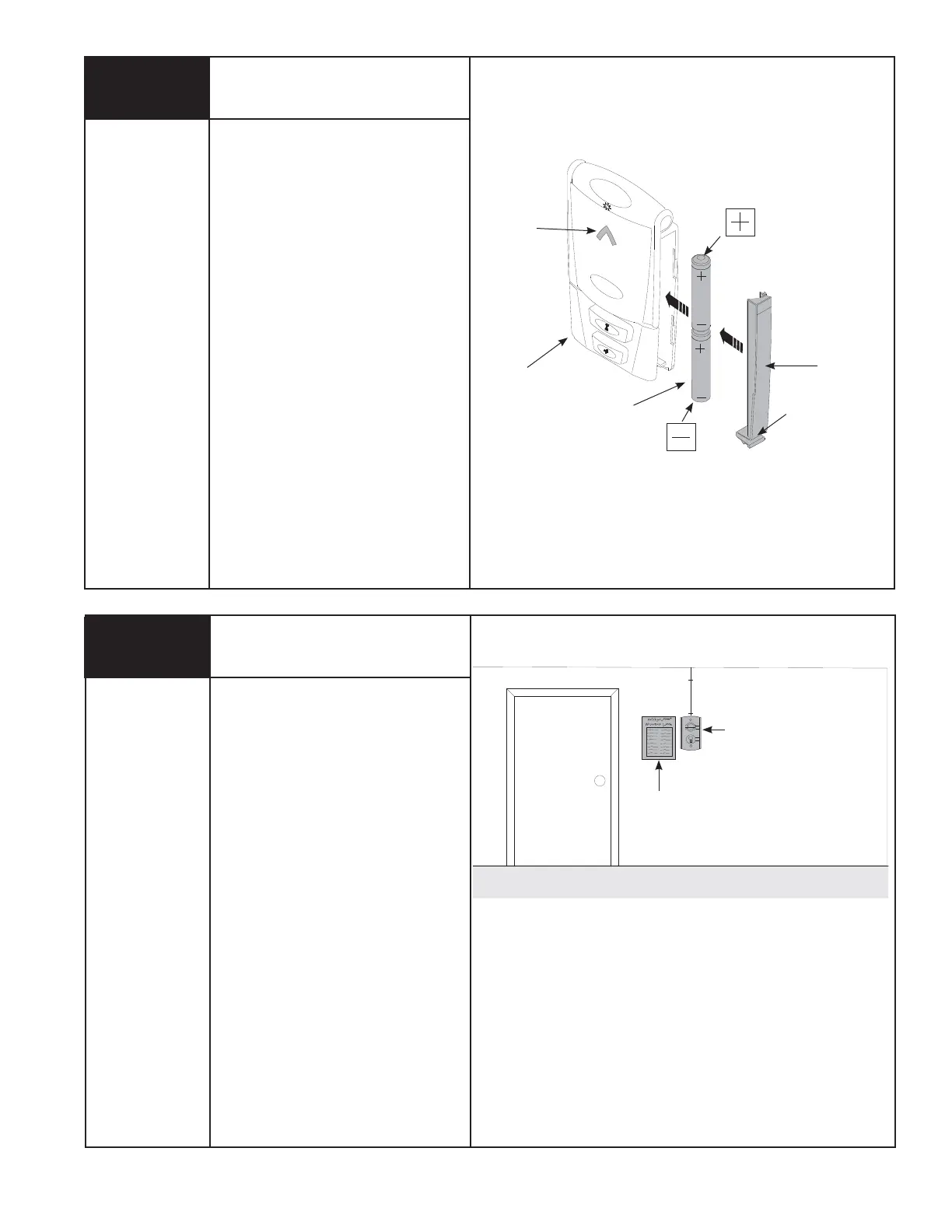
Battery
Cover
Up/Down
LED
Wall
Station
(2) AAA
Batteries
Lower
Clip
10
Entrapment
Warning Label
Tools Needed:
None
Apply entrapment warning label in a
convenient location next to the wall station.
Use mechanical fasteners if adhesive will
not adhere.
Service
Entrance
Door
Entrapment
Warning Label
Wall Station
Deluxe Multi-Function Wireless
Wall Station Installation Continued
(If Included)
Remove the battery cover (right-hand side of
wall station) by disengaging the battery cover’s
lower clip. Install two AAA batteries into the wall
station observing the polarity, (+) and (-), of
both batteries. After about three seconds, the
red LED will begin to blink every three seconds.
Re-install the battery cover by first inserting its
top into the wall station then inserting and
securing its bottom.
NOTE: To slow blink rate or turn off, refer to
wall station operation page 28 “Back Lit LED
Light”.



 To Next Page