152967530000/00/06.2023
Setting up the printer
6.3 Inserting material into the print mecha-
nism
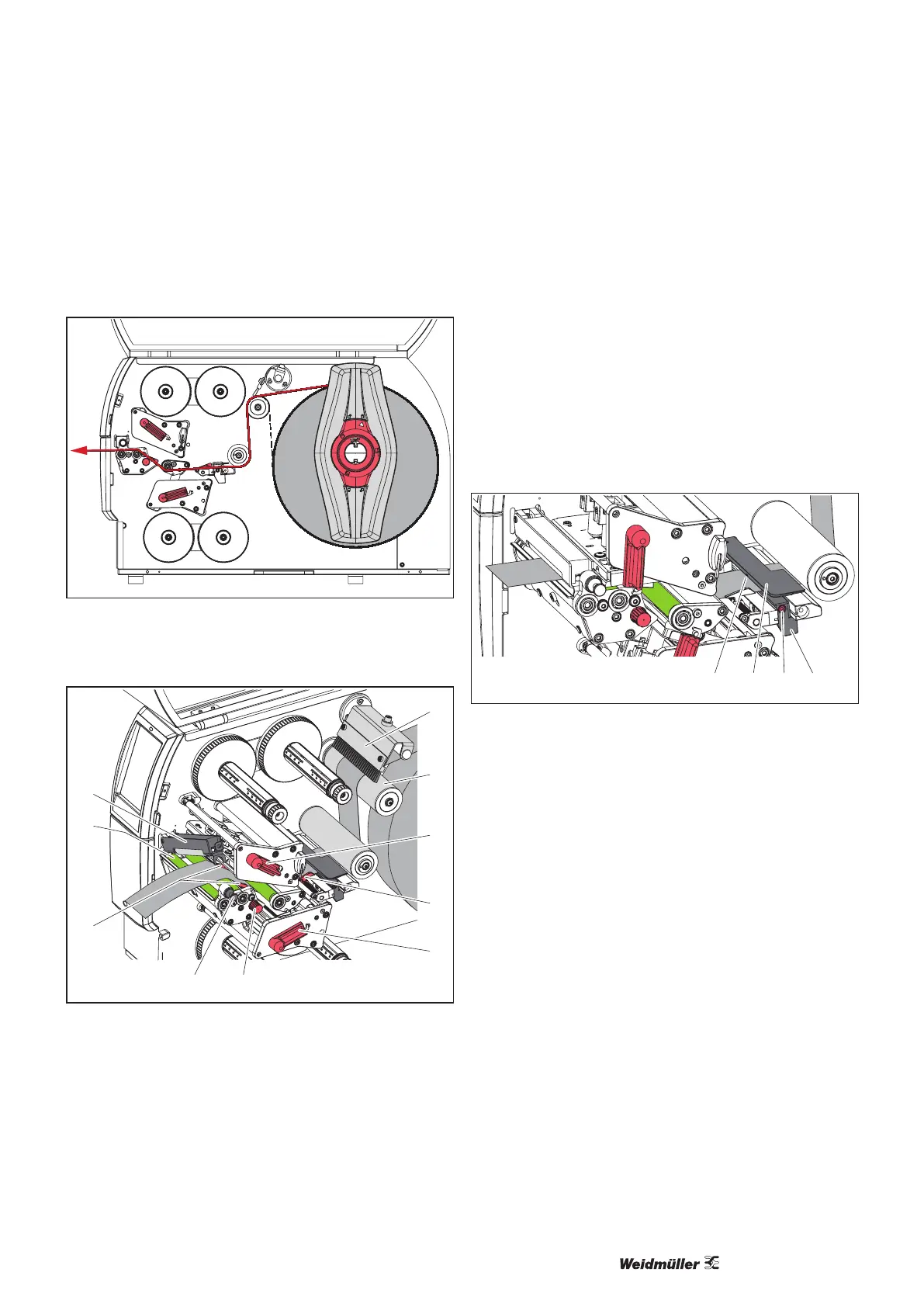
Figure 6.3 Material run in the printer
► Unwind an approx. 50 cm long label strip from the reel to
insert it into the print mechanism.
9
1
5
3
4
6
7
2
8
3
Figure 6.4 Loading material into the print mechanism
► Pull the locking bolt (4).
The locking system (1) swivels upwards.
► Turn the lever (8) counter-clockwise and the lever (9)
clockwise to release and lift both printheads.
► Swivel the brush (6) away from the pulley (7).
► Turn the knob (5) until the two guides (3) are far enough
apart to t the material between them.
► Guide the material through both print units up to the pull
roller (2) and place it between the guides (3).
Only devices with perforation attachment:
► Feed the material between the perforation knives.
► Turn the lever (8) clockwise to lock the top printhead.
► Pull the locking bolt (4), press the locking system (1)
down and lock it with the locking bolt.
► Turn the material reel against the direction of material
transport until the material is taut.
► Turn the lever (9) counter-clockwise to lock the bottom
printhead.
► Swivel the brush (6) back to the pulley (7).
6.4 Adjusting the label light barrier
1 2 3 4
Figure 6.5 Label light barrier
The label light barrier (2) is aligned to the centre of the ma-
terial at the factory. The position of the light barrier can be
shifted transversely to the running direction if, for example,
material with reective marks or punched holes is to be
processed. When the printer is switched on, a yellow LED
lights up at the sensor position (1).
► Unscrew the screw (3).
► Position the label light barrier with the handle (4) so that
the sensor (1) can detect the label gap or a reective
mark or a punched hole.
Alternatively, if the labels deviate from a rectangular shape:
► Align the label light barrier with the handle (4) so that
the foremost edge of the label in the running direction is
detected.
► Re-tighten the screw (4).



 To Next Page