EasyManua.ls Logo

Weinmann ACCUVAC Rescue WM 10600 - User Manual

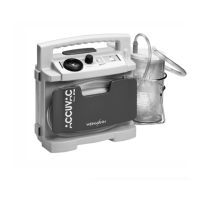
Weinmann ACCUVAC Rescue WM 10600
36 pages
Print Icon
To Next Page IconTo Next Page
Loading...
ACCUVAC
Rescue
Service and
Repair Instructions
Aspirator
WM 10600

Table of Contents

Questions and Answers

  • J
    James WellsAug 17, 2025
    How to troubleshoot a Weinmann ACCUVAC Rescue WM 10600 that does not start?
    • T
      Taylor CampbellAug 17, 2025
      If your Weinmann Medical Equipment isn't starting, try the following: * Ensure all tubes are securely connected and that the filter cover and secretion cover are firmly installed. * Charge the power pack. * Make sure the connection snaps in. * Fit a new pump. * Fit a new fuse.
  • V
    vcardenasNov 2, 2025
    What to do if Weinmann ACCUVAC Rescue WM 10600 Medical Equipment does not reach maximum vacuum?
    • T
      Terry GarciaNov 2, 2025
      If your Weinmann medical equipment doesn't reach the maximum vacuum within 20 seconds, but the capacity indicator shows ready, here are a few things you can check: * If the x- LED lights up, the external power supply is in order. Check the service display. * If the 0.3 bar LED lights up, the power pack temperature is not in the operating range 5°C to 45°C. Check the service display. * If the 0.2 bar LED lights up (power pack overvoltage), fuse F2 may have blown. Check the service display. * If the 0.2 bar LED lights up (power pack overvoltage), the connector to the power pack may be loose. Check the service display. Also, consider these possibilities: * There may be a leak in the suction side of the appliance. * The power pack may not be sufficiently charged – try connecting...

Summary

Introduction

1. Overview

2. Safety Instructions

2.1 Special Symbols on the Appliance

Explanation of warning and information symbols used on the device.

3. Description

3.1 Purpose

Describes the intended uses of the ACCUVAC Rescue aspirator.

3.2 Function

Explains the working principle and internal mechanism of the device.

4. Operation

Power Supply

Details the various sources of power for the ACCUVAC Rescue.

5. Operating and Display Elements

5.1 Operation

Explains the function of the main switch, suction level keys, and membrane keyboard.

5.2 Service

Describes how to access and interpret service-related displays on the device.

6. Maintenance

6.1 Disposal

Instructions for the proper disposal of the ACCUVAC Rescue unit.

7. Function Checks

7.1 Intervals

Outlines the recommended schedule for performing function checks on the device.

7.2 Performing the Function Check

8. Troubleshooting

9. Repairs: Information and Instructions

9.1 General

Provides essential general guidelines and precautions for performing repairs on the device.

9.2 Opening the Device

Detailed instructions on how to safely open the ACCUVAC Rescue for internal access.

9.3 Closing the Device

9.4 Replacing Release Catch

9.5 Replacing Membrane Keyboard

9.6 Changing the Power Pack

9.7 Initializing the Power Pack

9.8 Changing Fuse F1 or F2

9.9 Checking Connector Between Circuit Board and Power Pack

9.10 Fitting New Circuit Board WM 10680

9.11 Fitting New Pump

9.12 Changing Fuse in Vehicle Plug

9.13 Changing the Muffler

9.14 Electrical Circuit Diagram

10. Spare Parts

10.1 Spare Parts List

Comprehensive list of available spare parts with item numbers and order codes.

11. Tools and Test Equipment

12. Technical Changes

13. Technical Data

13.1 Safe Distances

14. Repair and Test Report

Weinmann ACCUVAC Rescue WM 10600 Specifications

General IconGeneral
BrandWeinmann
ModelACCUVAC Rescue WM 10600
CategoryMedical Equipment
LanguageEnglish

Related product manuals