Merrychef eikon
®
e2s service and repair manual
_______________________________________________________________________________________________________________________________
_______________________________________________________________________________________________________________________________
Task B
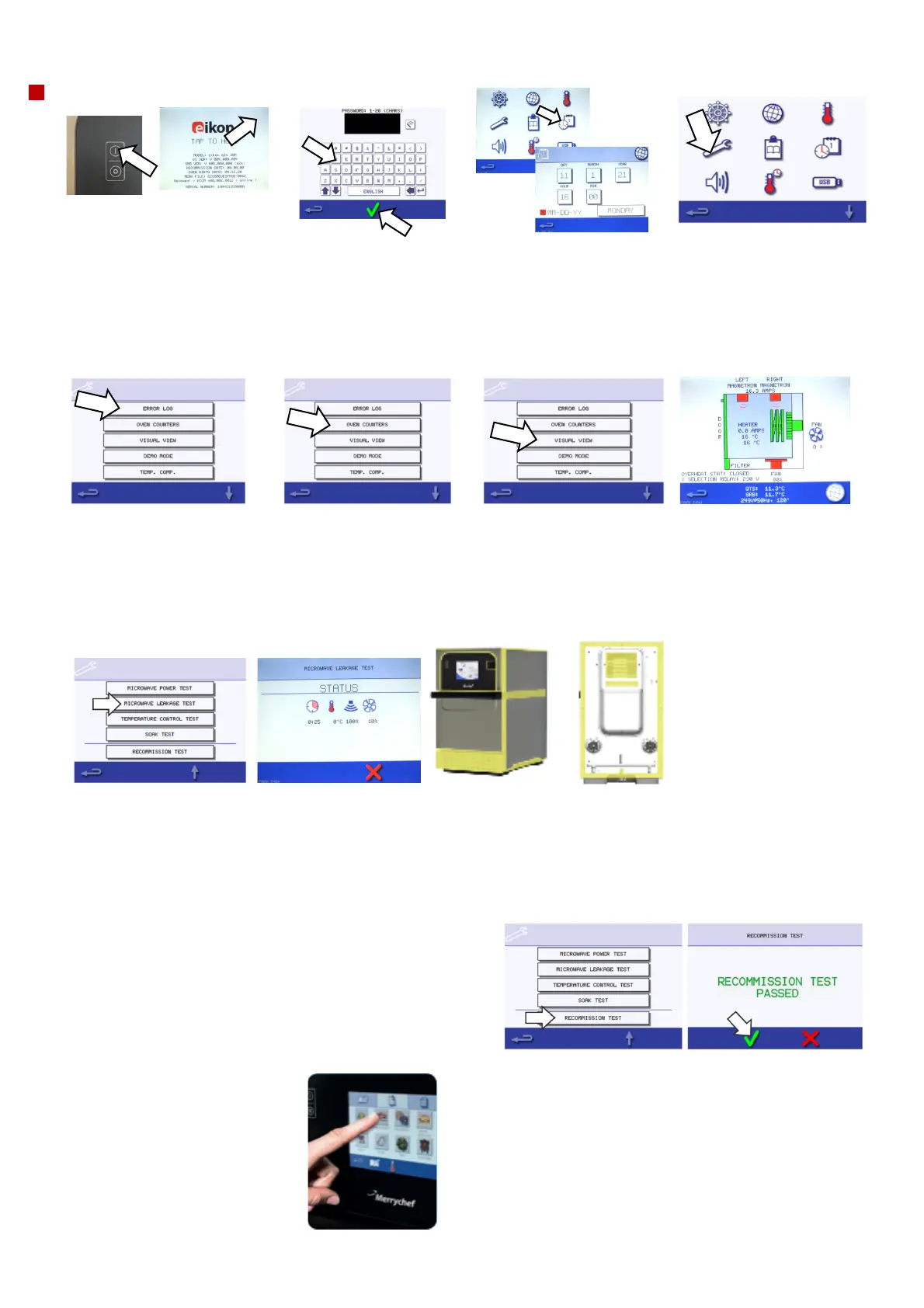
8. Switch the oven on and
record the Serial Number.
Check the firmware is correct,
update if older version is
observed.
Press the top right-hand corner
of the screen to access the key
board screen.
9. Enter the password
MANAGER to access
the settings menu.
Use the displayed
oven serial number
this is invalid.
10. Check the date, day
and time, correct if
necessary. Refer to
Installation and User
manual for details on the
procedure.
11. Press the spanner symbol
and enter the password
SERVICE to access the service
screen. Use the displayed
oven serial number this is
invalid.
12. Check the “Error Log”
for details of any logged
appliance errors. Refer to
the fault finding section 5.3
to reference any errors
logged.
13. Select the oven
counters and reference
the service check sheet
for recommended
replacements, advise the
customer on actions
required.
14. Select the visual view to
perform individual
component checks.
15. In visual view select/operate
each component to check
operation, as detailed in the
visual view section 5.2.
Check all speed ranges of the
fans.
Record microwave (individual &
combined) and heater current
draws.
Record displayed Voltage
Note: ensure a bowl of cold
water is in the cavity for the
microwave current draw checks.
16. Exit out of visual view, place a bowl with 275 ml of cold water in the cavity and select Microwave Leakage test.
While the test is running hold the test probe at right angles to the oven, ensuring the sensor is about 50mm away from the
surface.
Test the following areas marked in yellow, refer to section 5.6 for further details. Level must be 5mW/cm2 or lower &
record.
17. Finally, remove the bowl of water from inside the cavity and
select the recommission test (if the recommission test is greyed
out, it means the oven is above the desired temperature and the
function is disabled).
Follow the onscreen instructions and record result.
18. Come out of the service and
setting modes. Pre-heat the
oven and cook one item of food
from the operators’ menu.



 To Next Page