EasyManua.ls Logo

Welbilt MERRYCHEF eikon e2s - Page 41

Welbilt MERRYCHEF eikon e2s
111 pages
Print Icon
To Next Page IconTo Next Page
To Previous Page IconTo Previous Page
Loading...
Merrychef eikon
®
e2s service and repair manual
_______________________________________________________________________________________________________________________________
_______________________________________________________________________________________________________________________________
4 Accessing the easyTouch
®
screen
Back to contents >
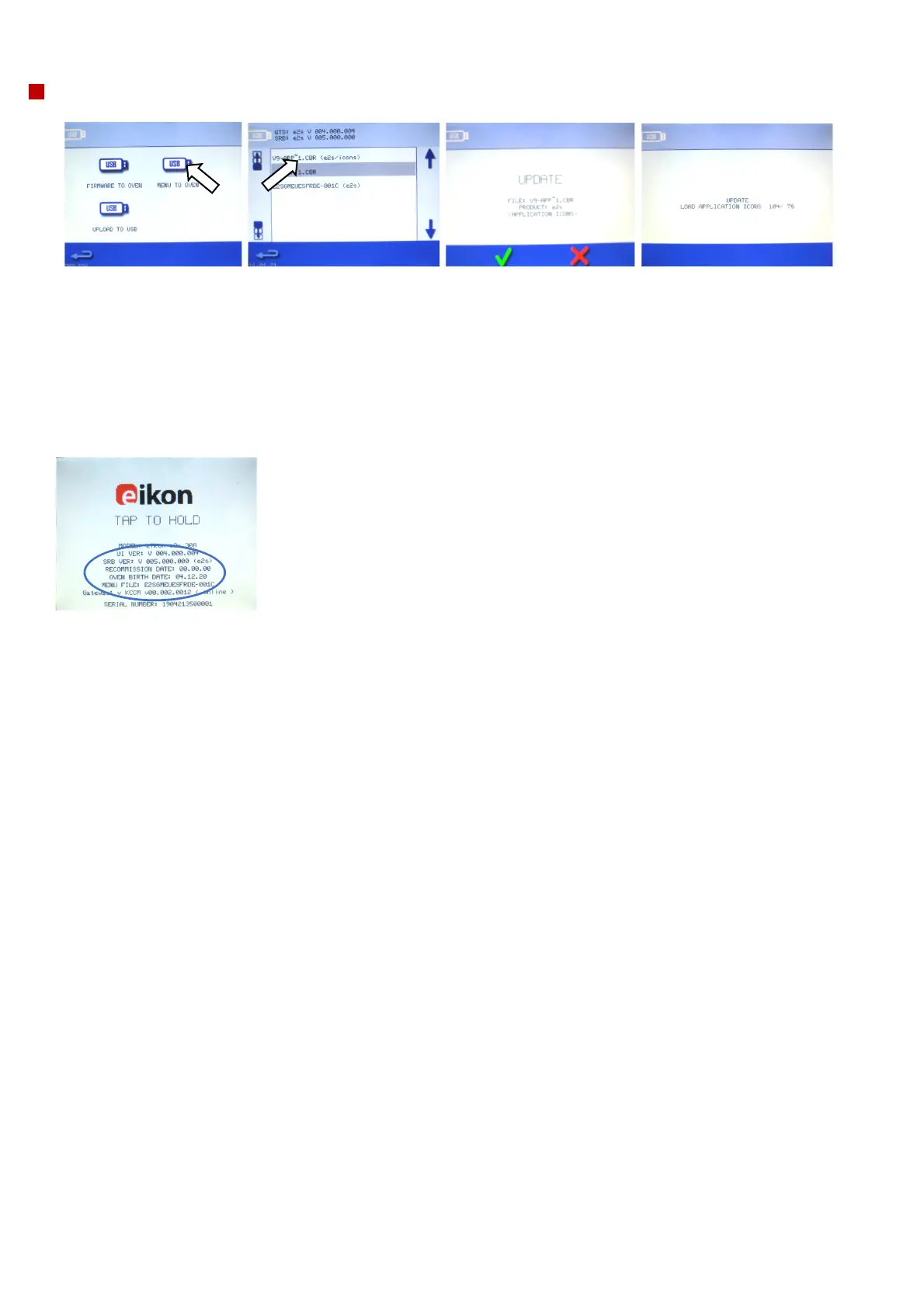
APPS (icons) update
1. Select from the USB
screen ‘’Menu to oven’
2. Select the .CBR
file (e2s/icons)
Note: A tinted
band over a file
name indicates
the file is not valid
for your oven.
3. Check if the file
information shown is
correct before selecting
OK.
If not select ‘X’ and locate
the correct file.
4. The file update progress is
displayed. When the application
icons file download has been
completed, the oven will reboot
and display a flash screen as it
updates (the cooling fan stops
operating during the process).
After 100% various screen
displays appear as the software
reboots.

5. On completion the start
up screen is displayed
showing the firmware
versions and menu file
before moving to the pre
heat temperature screen

Table of Contents

Other manuals for Welbilt MERRYCHEF eikon e2s

Related product manuals