Merrychef eikon
®
e2s service and repair manual
_______________________________________________________________________________________________________________________________
_______________________________________________________________________________________________________________________________
4 Accessing the easyTouch
®
screen
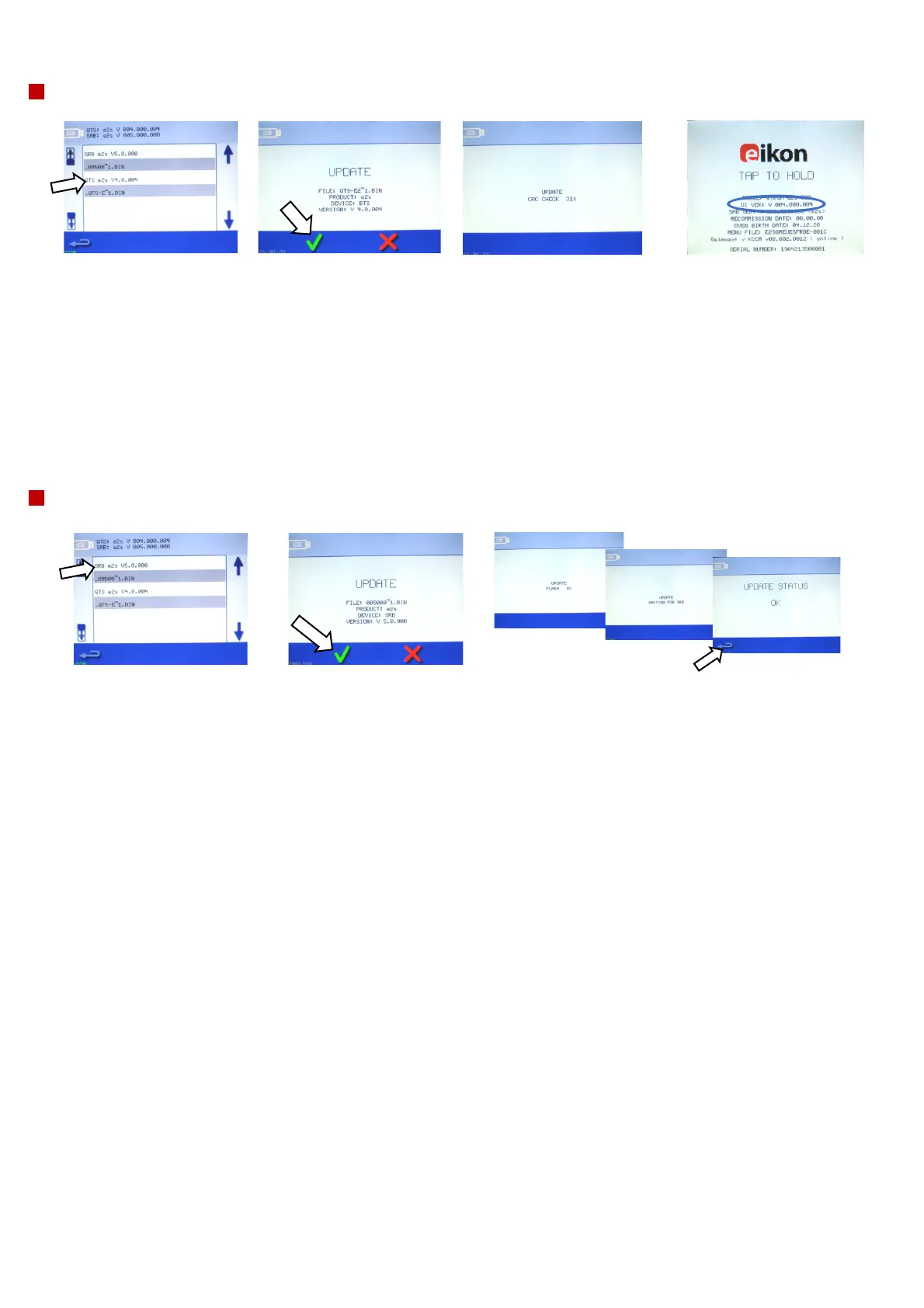
QTS firmware update
SRB firmware update
1. Select the ‘QTS’ file
with the correct file
version number.
Note: A tinted band
over a file name
indicates the file is not
valid for your oven.
2. Check if the file
information shown is
correct before
selecting OK.
If not select ‘X’ and
locate the correct file.
3. The file update progress is
displayed. When the QTS
download has been completed,
the oven will reboot and display
a flash screen as it updates (the
cooling fan stops operating
during the process). After 100%
various screen displays appear as
the software reboots.
4. Once rebooted, check if
the screen shows the
correct QTS version (UI
Ver:).
If not, repeat the process
using the correct file.
5. Remove the USB
memory stick and keep it
in a safe place.
1. When you select firmware, the
current QTS (Quick Touch Screen)
and SRB (Smart Relay Board)
firmware versions are displayed at
the top left of the screen. Select
the ‘SRB’ file with the correct file
version number.
Note: A tinted band over a file
name indicates the file is not
valid for your oven.
2. Check if the file
information shown is
correct before
selecting OK.
If not select ‘X’ and
locate the correct file.
3. The SRB file is checked and the
download progress from the USB is
displayed followed by the update
status and confirmation screens.
Note: Wait until all files have been
loaded. Do not touch the oven until
the end of the downloading process.
4. When the
download
process is
complete press
the return
(backspace)
arrow to now
update QTS file.



 To Next Page