Merrychef eikon
®
e2s service and repair manual
_______________________________________________________________________________________________________________________________
_______________________________________________________________________________________________________________________________
3. Select 250
o
C oven temperature. If there is no preheat temp programmed appropriate for the oven test, a new temperature
must be programmed into a spare location. (250°C)
4. Wait for the oven to reach the preheat temperature of 250
o
C
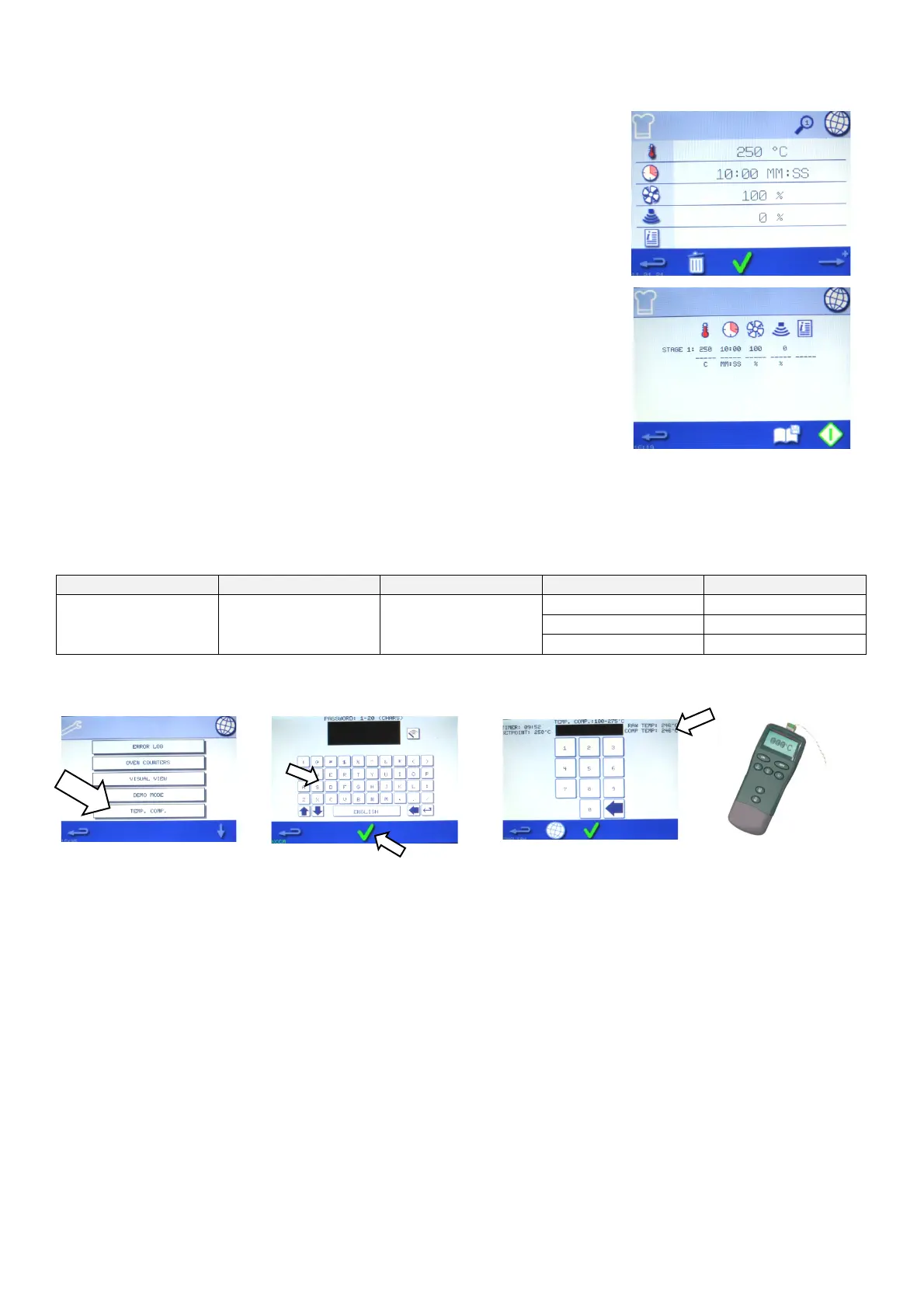
5. When the easy touch screen is displayed press the chef’s hat.
6. Ensure oven temperature is displaying the temperature appropriate for the
calibration test (250
o
C)
7. Press the timer Icon and select 10 minutes
8. Ensure the fan speed is set for 100% and the microwave power is set to 0%, if not
correct by selecting each
9. Press the green tick at the bottom of the screen
10. Press the start icon on the bottom right of the screen and you will then be asked to
confirm that product is in the oven. Select the tick to confirm
11. When the timer has 30 seconds remaining press the temp icon the temperature the oven sensor thinks the cavity has
reached will be displayed prefixed with *
12. Compare the displayed temperature with the actual temperature shown on the digital thermometer. Recalibration will be
required, and should be carried out swiftly, if the readings are outside the following guidelines;
13. To recalibrate, promptly access the temperature calibration selection (Temp Comp) in the service mode
17. Press the backspace in the bottom left-hand corner three times to return to the easy touch screen.
18. Repeat the calibration check, points 5 to 12. Retesting to check that the cavity temperature reading is now within the
recommended guidelines.
If the temperature reading is unstable and not calibrating correctly:
1. Disconnect and isolate the appliance from the electricity supply and Lock off, see section 2.14 ‘Safe working when
testing components’.
14. Press the ‘temp
comp’ icon
15. The next screen will
prompt you for a password
“tcomp” should be entered
here in lower case (if this
does not work the oven serial
number should be entered).
16. In this screen use the actual
temperature observed on the digital
thermometer in step 12, add 5°C and
enter the combined number (i.e. actual
temp =245 + 5 = 250). This “250” should
be entered into this screen then the
green tick pressed to confirm the
setting. Check the entered temperature
is now visible as the “Comp Temp:”.



 To Next Page