10
Merrychef eikon e2s Quick Start Guide
Part Number 32Z3922 CE, GBR Issue 02 06/2018
It is important to set the correct date and time when rst
switching on the oven, as the error log uses these settings and
this will help with maintenance and servicing.
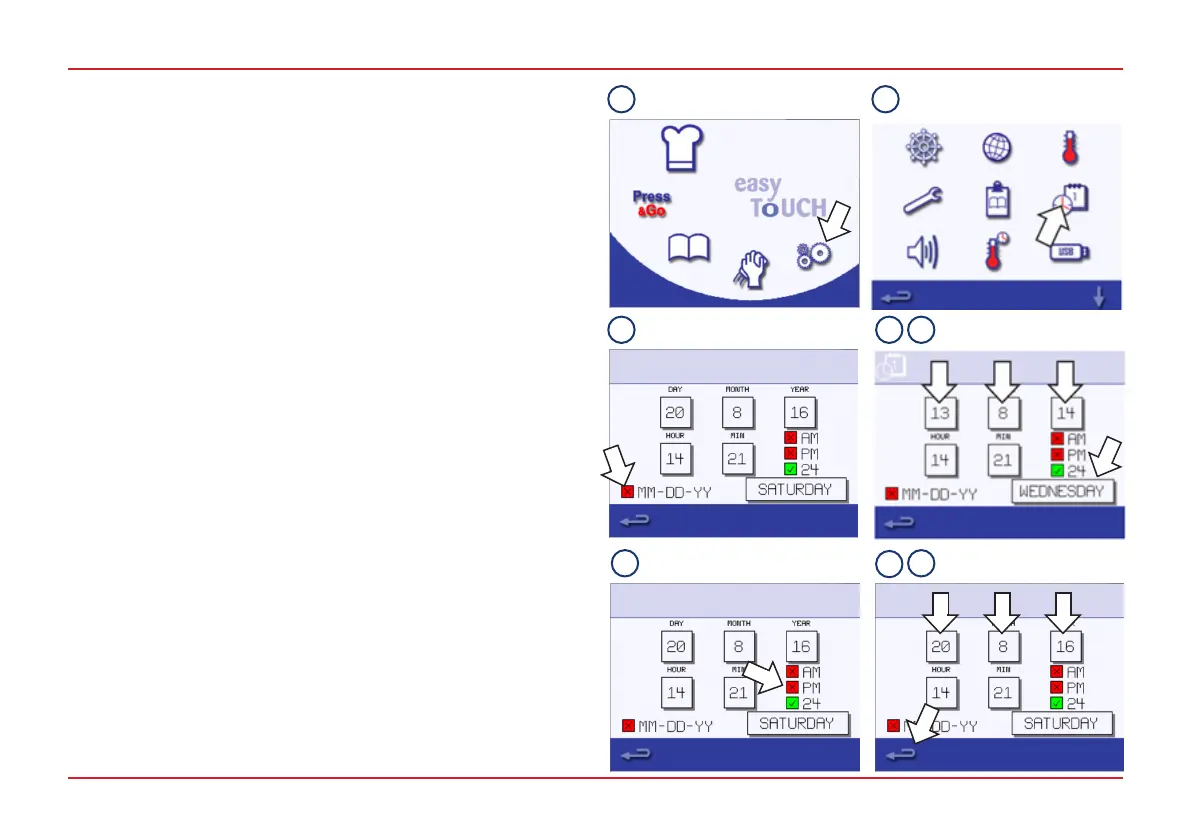
To set the date and time:
1. Select the Settings symbol from the Main Menu.
2. Select the Date and Time symbol.
3. To display the day rst, followed by the month and year,
deselect the MM-DD-YY checkbox.
4. Change the date:
i. Select DAY, enter the correct day on the keypad and
select the green tick.
ii. Select MONTH, enter the correct month on the keypad
and select the green tick.
iii. Select YEAR, enter the correct last two digits of the year
on the keypad and select the green tick.
5. Select the day of the week by cycling through the weekdays.
6. Choose between AM, PM and the 24-hour clock.
7. Change the time:
i. Select HOUR, enter the correct hour on the keypad and
select the green tick.
ii. Select MIN, enter the correct minutes on the keypad and
select the green tick.
8. Press the Backspace button to exit the Settings Menu and
select SAVE.
SETTING THE DATE AND TIME
1 2
3 5
6
4
8
7



 To Next Page